@clawhub-goog-71bd270d77
Display a beautiful time dashboard showing a live summer countdown to the summer solstice, today's sunrise/sunset times in China (Beijing), and current time...
---
name: summer
description: "Display a beautiful time dashboard showing a live summer countdown to the summer solstice, today's sunrise/sunset times in China (Beijing), and current time info. Use this skill whenever the user asks about summer countdown, days until summer, summer solstice 2026, sunrise or sunset in China, Beijing sunrise, time until summer, or wants a time/seasonal clock widget. Also trigger when the user asks how long until summer, when does summer start, what time is sunrise in China, or any combination of summer + time + China topics."
---

# Summer Time Skill — Summer Countdown + China Sunrise

This skill renders a live interactive time dashboard with three main panels:

1. **Summer Countdown** — live ticking countdown to summer Solstice by API
2. **China Sunrise/Sunset** — today's sunrise and sunset times for Beijing, China (fetched via open-meteo / sunrise-sunset API)
3. **Current Time** — today's date and a live clock

## How to build this widget

Create an `.html` file and present it. The file must:

### Summer Countdown Target
- Target datetime: fetch the UTC Solstice time from https://aa.usno.navy.mil/api/seasons?year=2026
- Source: Summer Countdown – Countdown to target datetime
- Display: days, hours, minutes, seconds — all ticking live with `setInterval`

### Beijing Sunrise Data
Fetch from the sunrise-sunset API at runtime using the Beijing coordinates:
- Latitude: 39.9075
- Longitude: 116.3972
- API endpoint: `https://api.sunrise-sunset.org/json?lat=39.9075&lng=116.3972&formatted=0&date=today`
- Note: the API returns UTC times, convert to CST (UTC+8)
- Display: sunrise time, sunset time, solar noon, day length

### Widget Layout
Three cards side by side (or stacked on narrow screens):

```
[ Summer Countdown ]  [ Beijing Sunrise ]  [ Current Time ]
  XX days               Sunrise: HH:MM       Today's date
  XX hours              Sunset: HH:MM        Live clock HH:MM:SS
  XX minutes            Day length: H:MM
  XX seconds
```

### Visual style
- Clean, flat cards using CSS variables
- Sun/summer color accents (amber/orange tones) for the countdown card
- Teal/blue tones for sunrise card
- Gray/neutral for current time
- Live ticking every second via `setInterval(update, 1000)`
- Responsive grid: `repeat(auto-fit, minmax(200px, 1fr))`

### Code structure
```html
<!-- Fetch sunrise on load, then tick every second -->
<script>
const SUMMER = new Date('2026-06-21T01:24:30'); // local time interpretation

async function fetchSunrise() {
  const r = await fetch('https://api.sunrise-sunset.org/json?lat=39.9042&lng=116.4074&formatted=0');
  const d = await r.json();
  // results.sunrise and results.sunset are ISO strings in UTC
  // Add 8 hours for CST
}

function tick() {
  // Update countdown, clock every second
}
setInterval(tick, 1000);
</script>
```

## Important notes
- The summer solstice countdown target is **fetched** from API
- Sunrise data is **fetched live** from the API each page load
- All times display in **24h format** with leading zeros
- Day length = sunset minus sunrise in hours and minutes
- If the API call fails, show a friendly fallback: "Sunrise: ~5:44 · Sunset: ~18:47" (Beijing April averages)
6-step structured research skill. Searches arXiv, reads 5 papers via markitdown, has Claude select the best 2, runs 4 targeted web searches (explanation, Git...
---
name: owl
description: >
6-step structured research skill. Searches arXiv, reads 5 papers via markitdown,
has Claude select the best 2, runs 4 targeted web searches (explanation, GitHub,
survey, citations), then writes a 5-bullet summary. Use when a user asks for a
"research summary", "deep dive", "what is X", "find papers on Y", "owl research",
or any query that benefits from both academic papers and web context combined into
a concise, citation-backed summary.
metadata:
openclaw:
requires:
env:
- OPENROUTER_API_KEY
- SERPER_API_KEY
bins:
- python
---
# 🦉 OWL — 6-Step Research Skill
A precise, structured research pipeline — not a bulk dump, but a curated read-and-select
workflow that mirrors how an expert researcher actually works.
---
## Pipeline
```
Step 1 · Search arXiv for the topic
Step 2 · Open 5 promising papers → PDF → Markdown via markitdown
Step 3 · Read title + abstract + intro of each
Step 4 · Claude selects the best 2 (explains why, drops the rest)
Step 5 · Search web: explanation · GitHub · survey · citations
Step 6 · Write a 5-bullet summary of what was learned
```
---
## Install
```bash
pip install requests markitdown
pip install curl_cffi beautifulsoup4 lxml fake-useragent
chmod +x scripts/owl.py
cp scripts/owl.py /usr/local/bin/owl
```
---
## Usage
```bash
owl "diffusion models"
owl "LoRA fine-tuning" --category cs.LG --output report.md
owl "protein structure prediction" --since year
owl "quantum error correction" --arxiv-n 8
```
For Windows user:
```
python scripts/owl.py "AI agent RAG" --arxiv-n 8 --output report.md
```
---
## CLI Flags
| Flag | Default | Description |
|------|---------|-------------|
| `query` | *(required)* | Research topic |
| `--arxiv-n N` | 5 | arXiv candidates to fetch (top N are used as pool) |
| `--category CAT` | all | arXiv category, e.g. `cs.LG`, `q-bio.BM` |
| `--sort` | relevance | `relevance`, `lastUpdatedDate`, `submittedDate` |
| `--since RANGE` | all time | Google recency: `hour`, `day`, `week`, `month`, `year` |
| `--papers-dir DIR` | `/tmp/owl_papers` | PDF + markdown cache directory |
| `--output FILE` | terminal only | Save Markdown summary to FILE |
| `--no-stream` | off | Wait for full Claude response |
| `--serper-key KEY` | env var | Override `SERPER_API_KEY` |
| `--anthropic-key KEY` | env var | Override `ANTHROPIC_API_KEY` |
---
## Step Details
### Step 1 — arXiv Search
`search_arxiv(query, n, category, sort_by)` → list of paper dicts with
`id, title, authors, abstract, published, categories, url, pdf_url`.
### Step 2 — Open Papers (PDF → Markdown)
Take top 5 candidates. For each: download PDF to `--papers-dir`, convert to
Markdown using `markitdown` (Python lib preferred, CLI fallback). Extract first
8 KB of text = roughly title + abstract + introduction. Falls back to abstract
only if PDF download or conversion fails.
### Step 3 — Read
Display truncated abstract+intro for each candidate. All 5 intro texts are
passed to Claude in Step 4.
### Step 4 — LLM Selects Best 2 papers
Claude returns `{"selected": [i, j], "reason_1": "...", "reason_2": "...",
"dropped": "..."}`. The model used is printed in the step output and checklist.
Selected papers then get their **full** markdown (up to 40 KB) loaded for Step 6.
### Step 5 — 4 Web Searches
Runs 4 targeted Serper queries and fetches page content for the top 2 results
of each:
| Search type | Query pattern |
|-------------|---------------|
| explanation | `{topic} explained` |
| github | `{topic} github implementation` |
| survey | `{topic} survey review paper` |
| citations | `{topic} highly cited papers results` |
### Step 6 — 5-Bullet Summary
Builds a prompt with both full papers + all 4 web search result sets, then
calls LLM api. Output structure:
1. Selected Papers (with links)
2. **5 dense bullets** — each 3–5 sentences, specific facts, inline citations
3. Web Sources list
---
## Output Format
```markdown
# 🦉 OWL Research Summary: {topic}
## Selected Papers
[P1] Title — Authors — URL — PDF
[P2] Title — Authors — URL — PDF
## 5-Bullet Summary
• **What it is**: ...
• **How it works**: ...
• **Key results**: ...
• **Tools & code**: ...
• **Open questions**: ...
## Web Sources
...
```
---
## Steps Checklist Verification
At the end of every run, owl prints a checklist confirming every step completed
successfully. Verify all 6 items are marked `[✓]` before trusting the output.
```
────────────────────────────────────────────────────────────────────────
✅ RESEARCH CHECKLIST
────────────────────────────────────────────────────────────────────────
[✓] Step 1 Search arXiv 5 papers found
[✓] Step 2 Open 5 papers via markitdown 5 PDFs converted
[✓] Step 3 Read title + abstract + intro 5 papers scanned
[✓] Step 4 Keep best 2 2 selected (2 with full text)
→ Paper title one…
→ Paper title two…
[✓] Step 5 Web search (4 queries) 16 results fetched
→ explanation Top result title…
→ github Top result title…
→ survey Top result title…
→ citations Top result title…
[✓] Step 6 5-bullet summary written by Claude
→ /path/to/report.md
────────────────────────────────────────────────────────────────────────
```
### What each line confirms
| Step | What to verify |
|------|---------------|
| Step 1 | At least 1 paper found — if 0, the arXiv query returned nothing; try rephrasing or removing `--category` |
| Step 2 | PDFs converted — a `⚠ using abstract only` warning here means markitdown failed for that paper; the run continues but that paper's selection is abstract-only |
| Step 3 | Count matches Step 2 — should always be 5 (or `--arxiv-n` if overridden) |
| Step 4 | Exactly 2 selected, model name visible — the model shown is whatever `GET /v1/models` returned as the best available; if it shows the fallback `claude-sonnet-4-20250514` the models list API may have failed silently |
| Step 5 | 4 search types listed, each with a top result — a missing type means that Serper query failed silently |
| Step 6 | "written by Claude" confirms the API call completed — if the summary is truncated, raise `max_tokens` in the source |
### Failure modes to watch for
- **Step 2 all `⚠`** — `markitdown` is not installed (`pip install markitdown`) or PDFs are blocked by arXiv rate limiting; wait and retry
- **Step 4 shows 1 paper** — Claude JSON parse failed; re-run or check `OPENROUTER_API_KEY`
- **Step 5 shows 0 results for a type** — Serper key exhausted or network issue; check `SERPER_API_KEY`
- **Step 6 summary is very short** — context window may be near limit with large PDFs; reduce `--arxiv-n` or use `--no-stream`
---
## Notes
- PDFs are cached in `--papers-dir` — re-runs on the same paper are instant
- Step 4 uses a non-streaming JSON call; Steps 2 and 6 stream to terminal
- `--arxiv-n` can be raised to 8–10 for broader candidate pools before selection
- All 4 web search types always run — they cannot be individually disabled (by design)
- The 5-bullet format is enforced in the Claude prompt; free-form reports use the old pipeline
FILE:scripts/owl.py
#!/usr/bin/env python3
"""
owl - Structured research assistant following a precise 6-step protocol:
Step 1 · Search arXiv for the topic
Step 2 · Open 5 promising papers (download PDF → convert via markitdown)
Step 3 · Read title + abstract + intro of each
Step 4 · Claude keeps the best 2 (explains why)
Step 5 · Search web for: explanation · GitHub · survey · citations
Step 6 · Write a 5-bullet summary of what was learned
Usage:
owl "diffusion models"
owl "LoRA fine-tuning" --category cs.LG --output report.md
owl "protein structure prediction" --since year
Install:
pip install requests markitdown
chmod +x owl.py
cp owl.py /usr/local/bin/owl
API keys:
SERPER_API_KEY Serper.dev (Google search)
OPENROUTER_API_KEY OPENROUTER.AI (paper selection + synthesis)
"""
import argparse
import http.client
import requests
import json
import os
import re
import sys
import time
import gzip
import urllib.parse
import urllib.request
import xml.etree.ElementTree as ET
from datetime import datetime
import web_fetcher
# ── ANSI ──────────────────────────────────────────────────────────────────────
_TTY = sys.stdout.isatty()
def _c(code, t): return f"\033[{code}m{t}\033[0m" if _TTY else t
BOLD = lambda t: _c("1", t)
DIM = lambda t: _c("2", t)
CYAN = lambda t: _c("36", t)
GREEN = lambda t: _c("32", t)
YELLOW = lambda t: _c("33", t)
RED = lambda t: _c("31", t)
MAGENTA = lambda t: _c("35", t)
BLUE = lambda t: _c("34", t)
def step(n: int, label: str) -> None:
print(BOLD(f"\n Step {n} · {label}"))
def ok(msg: str) -> None: print(GREEN( f" ✓ {msg}"))
def info(msg: str) -> None: print(DIM( f" {msg}"))
def warn(msg: str) -> None: print(YELLOW( f" ⚠ {msg}"))
def err(msg: str) -> None: print(RED( f" ✗ {msg}"), file=sys.stderr)
# ── arXiv ─────────────────────────────────────────────────────────────────────
NS = {"atom": "http://www.w3.org/2005/Atom"}
ARXIV_API = "https://export.arxiv.org/api/query"
ARXIV_ABS = "https://arxiv.org/abs"
ARXIV_PDF = "https://arxiv.org/pdf"
TIME_ALIASES = {
"hour": "qdr:h", "day": "qdr:d",
"week": "qdr:w", "month": "qdr:m", "year": "qdr:y",
}
def search_arxiv(query: str, n: int = 10,
category: str = "", sort_by: str = "relevance") -> list[dict]:
sq = f"cat:{category} AND ({query})" if category else query
params = {
"search_query": f"all:{sq}",
"start": 0, "max_results": n,
"sortBy": sort_by, "sortOrder": "descending",
}
url = f"{ARXIV_API}?{urllib.parse.urlencode(params)}"
try:
import requests
r = requests.get(url, timeout=30)
r.raise_for_status()
except Exception as e:
err(f"arXiv request failed: {e}")
return []
root = ET.fromstring(r.text)
out = []
for entry in root.findall("atom:entry", NS):
raw_id = entry.findtext("atom:id", "", NS)
arxiv_id = raw_id.split("/abs/")[-1]
title = (entry.findtext("atom:title", "", NS) or "").strip().replace("\n", " ")
abstract = (entry.findtext("atom:summary", "", NS) or "").strip().replace("\n", " ")
published= (entry.findtext("atom:published", "", NS) or "")[:10]
authors = [a.findtext("atom:name", "", NS)
for a in entry.findall("atom:author", NS)]
cats = [t.get("term", "") for t in entry.findall("atom:category", NS)]
out.append(dict(
id=arxiv_id, title=title, authors=authors,
abstract=abstract, published=published, categories=cats,
url=f"{ARXIV_ABS}/{arxiv_id}", pdf_url=f"{ARXIV_PDF}/{arxiv_id}.pdf",
))
return out
# ── PDF → Markdown via markitdown ────────────────────────────────────────────
def pdf_to_markdown(pdf_url: str, arxiv_id: str,
tmp_dir: str = "/tmp/owl_papers",
max_chars: int = 8_000) -> str:
"""
Download PDF and convert to Markdown via markitdown.
max_chars is intentionally modest here — we only need title + abstract + intro
for the selection step (Step 3). Full text is fetched later for the best 2.
"""
import subprocess
os.makedirs(tmp_dir, exist_ok=True)
safe_id = re.sub(r"[^\w.-]", "_", arxiv_id)
pdf_path = os.path.join(tmp_dir, f"{safe_id}.pdf")
md_path = os.path.join(tmp_dir, f"{safe_id}.md")
if not os.path.exists(pdf_path):
try:
req = urllib.request.Request(pdf_url,
headers={"User-Agent": "owl/3.0"})
with urllib.request.urlopen(req, timeout=30) as resp, \
open(pdf_path, "wb") as fout:
fout.write(resp.read())
except Exception as e:
err(f"download failed for {arxiv_id}: {e}")
return ""
if not os.path.exists(md_path):
try:
from markitdown import MarkItDown
result = MarkItDown().convert(pdf_path)
text = result.text_content or ""
with open(md_path, "w", encoding="utf-8") as f:
f.write(text)
except ImportError:
try:
proc = subprocess.run(
["markitdown", pdf_path, "-o", md_path],
capture_output=True, text=True, timeout=60,
)
if proc.returncode != 0:
err(f"markitdown CLI error: {proc.stderr[:100]}")
return ""
except FileNotFoundError:
err("markitdown not installed — run: pip install markitdown")
return ""
except Exception as e:
err(f"markitdown failed: {e}")
return ""
try:
with open(md_path, "r", encoding="utf-8", errors="ignore") as f:
text = f.read()
text = re.sub(r"\n{4,}", "\n\n\n", text)
text = re.sub(r" {3,}", " ", text)
return text[:max_chars]
except Exception as e:
err(f"could not read markdown for {arxiv_id}: {e}")
return ""
def pdf_to_markdown_full(arxiv_id: str,
tmp_dir: str = "/tmp/owl_papers",
max_chars: int = 40_000) -> str:
"""Return as much of the converted markdown as possible for the final 2 papers."""
#md_path = os.path.join(tmp_dir, f"{re.sub(r'[^\\w.-]', '_', arxiv_id)}.md")
safe_id = re.sub(r'[^\w.-]', '_', arxiv_id)
md_path = os.path.join(tmp_dir, f"{safe_id}.md")
if not os.path.exists(md_path):
return ""
try:
with open(md_path, "r", encoding="utf-8", errors="ignore") as f:
text = f.read()
text = re.sub(r"\n{4,}", "\n\n\n", text)
text = re.sub(r" {3,}", " ", text)
return text[:max_chars]
except Exception:
return ""
# ── Google / Serper ───────────────────────────────────────────────────────────
def search_google(query: str, api_key: str, n: int = 5) -> list[dict]:
conn = http.client.HTTPSConnection("google.serper.dev")
headers = {"X-API-KEY": api_key, "Content-Type": "application/json"}
payload = json.dumps({"q": query, "num": n})
try:
conn.request("POST", "/search", payload, headers)
res = conn.getresponse()
body = res.read().decode("utf-8")
except Exception as e:
err(f"Serper request failed: {e}")
return []
finally:
conn.close()
if res.status != 200:
err(f"Serper HTTP {res.status}")
return []
data = json.loads(body)
results = []
if ab := data.get("answerBox"):
snippet = ab.get("answer") or ab.get("snippet") or ""
if snippet:
results.append(dict(title=ab.get("title","Answer"), snippet=snippet,
url="", label="AnswerBox"))
for i, r in enumerate(data.get("organic", [])[:n], 1):
results.append(dict(
label=f"W{i}", title=r.get("title",""),
snippet=r.get("snippet",""), url=r.get("link",""),
))
return results
def fetch_page(url: str, max_chars: int = 5000) -> str:
if not url or not url.startswith("http"):
return ""
try:
req = urllib.request.Request(
url,
headers={
"User-Agent": "Mozilla/5.0"
}
)
with urllib.request.urlopen(req, timeout=12) as resp:
data = resp.read(100_000)
# ✅ 处理 gzip
if resp.headers.get("Content-Encoding") == "gzip":
data = gzip.decompress(data)
# ✅ 自动编码检测(简单版)
try:
raw = data.decode("utf-8")
except UnicodeDecodeError:
raw = data.decode("latin-1", errors="ignore")
# ✅ 去 script/style
raw = re.sub(r"<script[^>]*>.*?</script>", " ", raw, flags=re.S | re.I)
raw = re.sub(r"<style[^>]*>.*?</style>", " ", raw, flags=re.S | re.I)
# ✅ 去 HTML 标签
raw = re.sub(r"<[^>]+>", " ", raw)
# ✅ 清理空白
raw = re.sub(r"\s+", " ", raw).strip()
return raw[:max_chars]
except Exception as e:
print(f"[fetch_page error] {url}: {e}")
return ""
# ── Claude API ────────────────────────────────────────────────────────────────
_FALLBACK_MODEL = "claude-sonnet-4-20250514"
_SELECTION_MODEL = "claude-opus-4-20250514" # preferred for step 4 judgement
_resolved_model: str | None = None # cached after first resolution
def resolve_model(key: str) -> str:
"""
Query the Anthropic models list and return the best available model for
paper selection (prefers Opus > Sonnet by capability tier).
Result is cached for the lifetime of the process.
"""
global _resolved_model
if _resolved_model:
return _resolved_model
try:
conn = http.client.HTTPSConnection("api.anthropic.com")
conn.request("GET", "/v1/models", headers={
"x-api-key": key,
"anthropic-version": "2023-06-01",
})
resp = conn.getresponse()
if resp.status == 200:
data = json.loads(resp.read().decode())
models = [m["id"] for m in data.get("data", [])]
conn.close()
# Prefer opus → sonnet → fallback
for preferred in (_SELECTION_MODEL, _FALLBACK_MODEL):
if any(preferred in m for m in models):
_resolved_model = preferred
return _resolved_model
# Use first available model from the list
if models:
_resolved_model = models[0]
return _resolved_model
conn.close()
except Exception:
pass
_resolved_model = _FALLBACK_MODEL
return _resolved_model
def call_claude(prompt: str, key: str,
max_tokens: int = 2048, stream: bool = False,
model: str | None = None) -> str:
payload = json.dumps({
"model": model,
"max_tokens": max_tokens,
"messages": [{"role": "user", "content": prompt}],
"reasoning": {"enabled": True}
})
api_key = os.environ.get("OPENROUTER_API_KEY")
if not api_key:
raise EnvironmentError("No API key provided and OPENROUTER_API_KEY is not set.")
response = requests.post(
url="https://openrouter.ai/api/v1/chat/completions",
headers={
"Authorization": f"Bearer {api_key}",
"Content-Type": "application/json",
},
data=payload
)
response.raise_for_status()
#print(response.status_code)
data = response.json()
#print(data['choices'][0]['message'])
return data['choices'][0]['message']['content']
def call_claude_json(prompt: str, key: str, model: str | None = None) -> dict:
"""Call Claude and parse the response as JSON (no streaming)."""
raw = call_claude(prompt, key, stream=False, model=model)
try:
clean = re.sub(r"```json|```", "", raw).strip()
return json.loads(clean)
except json.JSONDecodeError:
m = re.search(r"\{.*\}|\[.*\]", raw, re.S)
if m:
return json.loads(m.group())
return {}
# ── Step 4: LLM selects best 2 papers ────────────────────────────────────────
def select_best_papers(query: str, papers: list[dict], key: str) -> tuple[list[dict], str, str]:
"""
Resolve the best available model via the Anthropic API, then ask it to
pick the 2 most relevant papers and explain why.
Returns (selected_papers, explanation_text, model_used).
"""
#model = resolve_model(key)
model = "anthropic/claude-sonnet-4.6"
parts = [
f"Research topic: {query}\n",
"Below are 5 arXiv papers. Based on the title, abstract, and introduction "
"of each, select the 2 most relevant and high-quality papers for this topic.\n",
]
for i, p in enumerate(papers, 1):
authors = ", ".join(p.get("authors", [])[:3])
content = p.get("intro_text") or p.get("abstract", "(no abstract)")
parts.append(f"\n--- Paper {i} ---")
parts.append(f"Title : {p['title']}")
parts.append(f"Authors : {authors}")
parts.append(f"Published: {p.get('published','')}")
parts.append(f"Abstract + Intro:\n{content[:2000]}")
parts.append("""
---
Respond ONLY with valid JSON in this exact format (no markdown, no explanation outside JSON):
{
"selected": [1, 3],
"reason_1": "One sentence why paper 1 was selected.",
"reason_2": "One sentence why paper 3 was selected.",
"dropped": "One sentence on why the other 3 were less relevant."
}
""")
prompt = "\n".join(parts)
result = call_claude_json(prompt, key, model=model)
selected_indices = result.get("selected", [1, 2])
selected = [papers[i - 1] for i in selected_indices if 1 <= i <= len(papers)]
if len(selected) < 2:
selected = papers[:2]
explanation = (
f"Kept paper {selected_indices[0]}: {result.get('reason_1','')}\n"
f"Kept paper {selected_indices[1]}: {result.get('reason_2','')}\n"
f"Dropped others: {result.get('dropped','')}"
)
return selected, explanation, model
def build_summary_prompt(query: str, papers: list[dict], web_results: dict[str, list]) -> str:
parts = [
f"You are OWL, an expert research analyst.\n",
f"Topic: {query}\n",
"=" * 70,
"PAPERS (title + abstract + intro + full text where available)",
"=" * 70,
]
for i, p in enumerate(papers, 1):
authors = ", ".join(p.get("authors", [])[:4])
parts.append(f"\n[P{i}] {p['title']}")
parts.append(f"Authors : {authors} | Published: {p.get('published','')}")
parts.append(f"URL : {p.get('url','')}")
parts.append(f"PDF : {p.get('pdf_url','')}")
full = p.get("full_text", "")
if full:
parts.append(f"\nFull text (from PDF via markitdown):\n{full}")
else:
parts.append(f"\nAbstract:\n{p.get('abstract','')}")
parts.append("-" * 60)
parts += ["\n" + "=" * 70, "WEB SEARCH RESULTS", "=" * 70]
for search_type, results in web_results.items():
parts.append(f"\n── {search_type.upper()} SEARCH ──")
for r in results:
parts.append(f"\n[{r['label']}] {r['title']}")
if r.get("url"): parts.append(f"URL : {r['url']}")
if r.get("snippet"): parts.append(f"Snippet: {r['snippet']}")
if r.get("page_content"): parts.append(f"Content:\n{r['page_content']}")
parts.append("")
parts += [
"\n" + "=" * 70,
"YOUR TASK",
"=" * 70,
f"""
Write a research summary with exactly this structure:
# 🦉 OWL Research Summary: {query}
*{datetime.now().strftime("%Y-%m-%d")} · 2 papers · 4 web searches*
## Selected Papers
**[P1] {papers[0]['title'] if papers else 'Paper 1'}**
Authors: ... | {papers[0].get('published','') if papers else ''}
🔗 {papers[0].get('url','') if papers else ''} | 📄 {papers[0].get('pdf_url','') if papers else ''}
**[P2] {papers[1]['title'] if len(papers) > 1 else 'Paper 2'}**
Authors: ... | {papers[1].get('published','') if len(papers) > 1 else ''}
🔗 {papers[1].get('url','') if len(papers) > 1 else ''} | 📄 {papers[1].get('pdf_url','') if len(papers) > 1 else ''}
## 5-Bullet Summary
Write exactly 5 bullets. Each bullet must:
- Be 3–5 sentences long
- Include at least one specific fact, number, method name, or result from the sources
- Reference sources inline: [P1], [P2], or [W1]-[W4] etc.
- Cover a different aspect: e.g. what it is / how it works / key results / tools/repos / open questions
• **[Bullet title]**: ...
• **[Bullet title]**: ...
• **[Bullet title]**: ...
• **[Bullet title]**: ...
• **[Bullet title]**: ...
## Web Sources
List each web result with title and URL.
---
Rules:
- Only use facts from the provided material — no invention
- Every bullet must cite at least one source
- The 5 bullets are the centrepiece — make them dense, specific, and informative
""",
]
return "\n".join(parts)
# ── CLI ───────────────────────────────────────────────────────────────────────
def build_parser() -> argparse.ArgumentParser:
p = argparse.ArgumentParser(
prog="owl",
description="6-step research: arXiv → read 5 papers → keep best 2 → web search → 5-bullet summary",
formatter_class=argparse.RawDescriptionHelpFormatter,
epilog="""
steps:
1 Search arXiv for the topic
2 Open 5 promising papers (PDF → markitdown)
3 Read title + abstract + intro of each
4 Claude keeps the best 2 (explains reasoning)
5 Search web: explanation · GitHub · survey · citations
6 Write a 5-bullet summary of what was learned
examples:
owl "diffusion models"
owl "LoRA fine-tuning" --category cs.LG --output report.md
owl "protein structure prediction" --since year
owl "quantum error correction" --arxiv-n 8
environment:
SERPER_API_KEY Serper.dev API key
ANTHROPIC_API_KEY Anthropic API key
"""
)
p.add_argument("query", nargs="+", help="research topic")
p.add_argument("--arxiv-n", type=int, default=5, metavar="N",
help="arXiv candidates to fetch before selection (default: 5)")
p.add_argument("--category", default="", metavar="CAT",
help="arXiv category filter, e.g. cs.LG")
p.add_argument("--sort", default="relevance",
choices=["relevance", "lastUpdatedDate", "submittedDate"])
p.add_argument("--since", default="", metavar="RANGE",
help="Google time filter: hour|day|week|month|year")
p.add_argument("--papers-dir", default="/tmp/owl_papers", metavar="DIR",
help="cache directory for PDFs and markdown files")
p.add_argument("--serper-key", default="", metavar="KEY")
p.add_argument("--anthropic-key", default="", metavar="KEY")
p.add_argument("--output", default="", metavar="FILE",
help="save summary to FILE (e.g. report.md)")
p.add_argument("--no-stream", action="store_true",
help="disable streaming for final summary")
return p
# ── Main ──────────────────────────────────────────────────────────────────────
def main() -> None:
#_SERPER_BUNDLED = "7fc2aa"
parser = build_parser()
args = parser.parse_args()
query = " ".join(args.query)
serper_key = args.serper_key or os.environ.get("SERPER_API_KEY", "")
#anthropic_key = args.anthropic_key or os.environ.get("ANTHROPIC_API_KEY", "")
if not serper_key:
err("No Serper API key. Set SERPER_API_KEY."); sys.exit(1)
print(BOLD(f"\n🦉 OWL · \"{query}\""))
print(DIM( f" 6-step research pipeline\n"))
# ══════════════════════════════════════════════════════════════════════════
# Step 1 — Search arXiv
# ══════════════════════════════════════════════════════════════════════════
step(1, "Search arXiv")
candidates = search_arxiv(query, n=args.arxiv_n,
category=args.category, sort_by=args.sort)
if not candidates:
err("No arXiv results found."); sys.exit(1)
ok(f"{len(candidates)} papers found")
for i, p in enumerate(candidates, 1):
info(f"[{i}] {p['title'][:70]}")
# ══════════════════════════════════════════════════════════════════════════
# Step 2 — Open 5 papers (PDF → markitdown)
# ══════════════════════════════════════════════════════════════════════════
step(2, "Open promising papers (PDF → Markdown via markitdown)")
pool = candidates[:5]
for p in pool:
print(DIM(f" · downloading {p['id']}…"), end="", flush=True)
text = pdf_to_markdown(p["pdf_url"], p["id"],
tmp_dir=args.papers_dir, max_chars=8_000)
if text:
p["intro_text"] = text
ok(f"{len(text)//1024} KB — {p['title'][:55]}")
else:
p["intro_text"] = p["abstract"]
warn(f"PDF failed, using abstract — {p['title'][:50]}")
time.sleep(0.5) # be polite to arXiv
# ══════════════════════════════════════════════════════════════════════════
# Step 3 — Read title + abstract + intro
# ══════════════════════════════════════════════════════════════════════════
step(3, "Read title + abstract + intro of each paper")
for i, p in enumerate(pool, 1):
snippet = (p.get("intro_text") or p.get("abstract",""))[:200].replace("\n"," ")
info(f"[{i}] {p['title'][:60]}")
info(f" {snippet}…")
# ══════════════════════════════════════════════════════════════════════════
# Step 4 — LLM selects best 2
# ══════════════════════════════════════════════════════════════════════════
step(4, "LLM selects the best 2 papers")
best, explanation, selection_model = select_best_papers(query, pool, None)
ok(f"Selected {len(best)} papers (model: {selection_model})")
for line in explanation.strip().split("\n"):
info(line)
# Reload full text for the 2 selected papers
for p in best:
full = pdf_to_markdown_full(p["id"], tmp_dir=args.papers_dir, max_chars=40_000)
if full:
p["full_text"] = full
ok(f"Full text loaded for [{p['id']}] ({len(full)//1024} KB)")
# ══════════════════════════════════════════════════════════════════════════
# Step 5 — 4 targeted web searches
# ══════════════════════════════════════════════════════════════════════════
step(5, "Web search: explanation · GitHub · survey · citations")
web_searches = {
"explanation": f"{query} explained",
"github": f"{query} github implementation",
"survey": f"{query} survey review paper",
"citations": f"{query} highly cited papers results",
}
web_results: dict[str, list] = {}
for search_type, search_query in web_searches.items():
info(f"[{search_type}] '{search_query}'")
results = search_google(search_query, serper_key, n=4)
# Fetch page content for top 2 results
for r in results[:2]:
if r.get("url"):
content = web_fetcher.quick_fetch(r["url"])
if content:
r["page_content"] = content[:4000]
web_results[search_type] = results
ok(f"{len(results)} results for '{search_type}'")
for r in results[:3]:
info(f" · [{r['label']}] {r['title'][:65]}")
time.sleep(0.3)
# ══════════════════════════════════════════════════════════════════════════
# Step 6 — 5-bullet summary
# ══════════════════════════════════════════════════════════════════════════
step(6, "Write 5-bullet summary")
print(DIM(" Claude is reading all sources and writing the summary…\n"))
print(BOLD("─" * 72))
prompt = build_summary_prompt(query, best, web_results)
summary = call_claude(prompt, None,
max_tokens=3000)
print()
print(BOLD("─" * 72))
if args.output:
with open(args.output, "w", encoding="utf-8") as f:
f.write(summary)
ok(f"Saved → {os.path.abspath(args.output)}")
# ── Checklist ──────────────────────────────────────────────────────────────
full_count = sum(1 for p in best if p.get("full_text"))
web_count = sum(len(v) for v in web_results.values())
paper_titles = [p["title"][:55] + "…" if len(p["title"]) > 55 else p["title"]
for p in best]
print()
print(BOLD("─" * 72))
print(BOLD(" ✅ RESEARCH CHECKLIST"))
print(BOLD("─" * 72))
print(GREEN(" [✓] Step 1") + f" Search arXiv {len(candidates)} papers found")
print(GREEN(" [✓] Step 2") + f" Open 5 papers via markitdown {len(pool)} PDFs converted")
print(GREEN(" [✓] Step 3") + f" Read title + abstract + intro {len(pool)} papers scanned")
print(GREEN(" [✓] Step 4") + f" Keep best 2 {len(best)} selected via {selection_model}"
+ (f" ({full_count} with full text)" if full_count else ""))
for t in paper_titles:
print(DIM(f" → {t}"))
print(GREEN(" [✓] Step 5") + f" Web search (4 queries) {web_count} results fetched")
for stype, results in web_results.items():
top = results[0]["title"][:50] if results else "—"
print(DIM(f" → {stype:<12} {top}"))
print(GREEN(" [✓] Step 6") + f" 5-bullet summary written by Claude")
if args.output:
print(DIM(f" → {os.path.abspath(args.output)}"))
print(BOLD("─" * 72))
print()
if __name__ == "__main__":
main()
FILE:scripts/web_fetcher.py
"""
WebFetcher - 高级网页抓取工具
===============================
功能特性:
- Token Bucket 限速器 - 防止请求过快被封
- Stealth 请求头 - 伪装成真实浏览器
- curl_cffi 模拟浏览器指纹 - 高级反反爬
- BeautifulSoup + lxml 解析 - 高效 HTML 解析
- 代理支持 - 灵活配置代理
- 自动提取文本和JSON数据
依赖安装:
pip install curl_cffi beautifulsoup4 lxml fake-useragent
Author: AI Assistant
"""
import time
import json
import random
import logging
from dataclasses import dataclass, field, asdict
from typing import Optional, Dict, Any, List, Union
from urllib.parse import urlparse, parse_qs
from threading import Lock
from contextlib import contextmanager
from bs4 import BeautifulSoup
try:
from curl_cffi import requests as curl_requests
CURL_CFFI_AVAILABLE = True
except ImportError:
CURL_CFFI_AVAILABLE = False
curl_requests = None
import requests
try:
from fake_useragent import UserAgent
FAKE_UA_AVAILABLE = True
except ImportError:
FAKE_UA_AVAILABLE = False
# ============================================================================
# 配置与常量
# ============================================================================
DEFAULT_HEADERS = {
"Accept": "text/html,application/xhtml+xml,application/xml;q=0.9,image/avif,image/webp,image/apng,*/*;q=0.8",
"Accept-Language": "en-US,en;q=0.9,zh-CN;q=0.8,zh;q=0.7",
"Accept-Encoding": "gzip, deflate, br",
"DNT": "1",
"Connection": "keep-alive",
"Upgrade-Insecure-Requests": "1",
"Sec-Fetch-Dest": "document",
"Sec-Fetch-Mode": "navigate",
"Sec-Fetch-Site": "none",
"Sec-Fetch-User": "?1",
"Cache-Control": "max-age=0",
}
BROWSER_PROFILES = [
"chrome110", "chrome116", "chrome120", "chrome124",
"chrome126", "edge101", "edge117", "edge120",
"safari15_5", "safari16_5", "safari17_0"
]
logging.basicConfig(level=logging.INFO)
logger = logging.getLogger(__name__)
# ============================================================================
# Token Bucket 限速器
# ============================================================================
class TokenBucket:
"""
Token Bucket 算法实现限速器
原理:
- 桶的容量为 burst_size,代表最大突发请求数
- 以 constant_rate 速率向桶中添加 token
- 每次请求消耗一个 token
- 如果桶中没有足够的 token,则需要等待
"""
def __init__(self, rate: float = 5.0, burst: int = 10):
"""
初始化限速器
Args:
rate: 每秒产生的 token 数量(每秒请求数上限)
burst: 令牌桶容量(最大突发请求数)
"""
self.rate = rate # tokens per second
self.burst = burst # max bucket size
self.tokens = burst
self.last_update = time.time()
self.lock = Lock()
def _refill(self):
"""自动补充 token"""
now = time.time()
elapsed = now - self.last_update
# 根据流逝的时间补充 token
new_tokens = elapsed * self.rate
self.tokens = min(self.burst, self.tokens + new_tokens)
self.last_update = now
def acquire(self, tokens: int = 1, blocking: bool = True, timeout: float = None) -> bool:
"""
获取 token
Args:
tokens: 需要获取的 token 数量
blocking: 是否阻塞等待
timeout: 阻塞超时时间(秒)
Returns:
bool: 是否成功获取 token
"""
start_time = time.time()
while True:
with self.lock:
self._refill()
if self.tokens >= tokens:
self.tokens -= tokens
return True
if not blocking:
return False
# 计算需要等待的时间
wait_time = (tokens - self.tokens) / self.rate
# 检查超时
if timeout is not None:
elapsed = time.time() - start_time
if elapsed + wait_time > timeout:
return False
# 释放锁并等待
time.sleep(min(wait_time, 0.1))
def __enter__(self):
"""上下文管理器入口"""
self.acquire()
return self
def __exit__(self, *args):
pass
# ============================================================================
# 数据类定义
# ============================================================================
@dataclass
class FetchResult:
"""
网页抓取结果封装类
Attributes:
url: 请求的 URL
status_code: HTTP 状态码
headers: 响应头
content: 原始 HTML 内容
text: 提取的文本内容
json_data: 自动检测并解析的 JSON 数据(如果存在)
cookies: 响应的 cookies
error: 错误信息(如果有)
elapsed: 请求耗时(秒)
is_success: 是否成功
"""
url: str
status_code: int = 0
headers: Dict[str, str] = field(default_factory=dict)
content: str = ""
text: str = ""
json_data: Any = None
cookies: Dict[str, str] = field(default_factory=dict)
error: Optional[str] = None
elapsed: float = 0.0
is_success: bool = False
def __post_init__(self):
"""后处理:尝试解析 JSON"""
if self.is_success and self.json_data is None:
self._try_parse_json()
def _try_parse_json(self):
"""尝试从内容中解析 JSON"""
# 检查是否看起来像 JSON
content = self.content.strip()
# 检查是否以 { 或 [ 开头
if content.startswith('{') or content.startswith('['):
try:
self.json_data = json.loads(content)
except json.JSONDecodeError:
pass
@property
def soup(self) -> Optional[BeautifulSoup]:
"""返回 BeautifulSoup 对象"""
if self.content:
return BeautifulSoup(self.content, 'lxml')
return None
def find(self, *args, **kwargs) -> Optional[BeautifulSoup]:
"""使用 BeautifulSoup 查找元素"""
if self.soup:
return self.soup.find(*args, **kwargs)
return None
def find_all(self, *args, **kwargs) -> List[BeautifulSoup]:
"""使用 BeautifulSoup 查找所有匹配元素"""
if self.soup:
return self.soup.find_all(*args, **kwargs)
return []
def select(self, selector: str) -> List[BeautifulSoup]:
"""使用 CSS 选择器"""
if self.soup:
return self.soup.select(selector)
return []
def get_text_content(self, selector: str = None) -> str:
"""
获取文本内容
Args:
selector: CSS 选择器,如果为 None 则返回全部文本
Returns:
str: 提取的文本
"""
if selector:
elements = self.select(selector)
return '\n'.join(elem.get_text(strip=True) for elem in elements)
return self.text
# ============================================================================
# WebFetcher 主类
# ============================================================================
class WebFetcher:
"""
高级网页抓取工具
功能特性:
- Token Bucket 限速 - 可配置请求频率
- Stealth 请求头 - 模拟真实浏览器
- curl_cffi 指纹 - 高级浏览器模拟
- 代理支持 - HTTP/HTTPS/SOCKS 代理
- 自动重试 - 失败自动重试
- 代理池支持 - 自动切换代理
使用示例:
>>> fetcher = WebFetcher(rate=5, burst=10)
>>> result = fetcher.fetch("https://example.com")
>>> if result.is_success:
... print(result.text)
... print(result.json_data)
# 带代理
>>> fetcher = WebFetcher(proxy="http://127.0.0.1:7890")
>>> result = fetcher.fetch("https://example.com")
# 使用代理池
>>> fetcher = WebFetcher(proxies=[
... "http://proxy1:8080",
... "http://proxy2:8080"
... ])
"""
def __init__(
self,
rate: float = 5.0,
burst: int = 10,
proxy: str = None,
proxies: List[str] = None,
timeout: int = 30,
max_retries: int = 3,
browser_profile: str = "chrome120",
follow_redirects: bool = True,
verify_ssl: bool = True,
extra_headers: Dict[str, str] = None,
):
"""
初始化 WebFetcher
Args:
rate: 每秒请求数限制(默认 5)
burst: 令牌桶容量(默认 10)
proxy: 单个代理地址(格式: http://host:port 或 socks5://host:port)
proxies: 代理池列表,会自动随机切换
timeout: 请求超时时间(秒)
max_retries: 最大重试次数
browser_profile: 浏览器指纹配置文件
follow_redirects: 是否跟随重定向
verify_ssl: 是否验证 SSL 证书
extra_headers: 额外的请求头
"""
self.rate = rate
self.burst = burst
self.timeout = timeout
self.max_retries = max_retries
self.browser_profile = browser_profile if browser_profile in BROWSER_PROFILES else "chrome120"
self.follow_redirects = follow_redirects
self.verify_ssl = verify_ssl
# 初始化 Token Bucket
self.token_bucket = TokenBucket(rate=rate, burst=burst)
# 代理配置
self.proxy = proxy
self.proxies = proxies or []
self._proxy_index = 0
# 请求头
self.extra_headers = extra_headers or {}
self._user_agent = None
# 检查 curl_cffi
if not CURL_CFFI_AVAILABLE:
logger.warning(
"curl_cffi 未安装,将使用 requests 库。"
"建议安装: pip install curl_cffi"
)
logger.info(
f"WebFetcher 初始化完成 | "
f"限速: {rate} req/s | "
f"Burst: {burst} | "
f"代理: {self._get_proxy_info()}"
)
def _get_proxy_info(self) -> str:
"""获取代理信息"""
if self.proxy:
return f"单代理 {self.proxy}"
elif self.proxies:
return f"代理池 ({len(self.proxies)} 个)"
return "无代理"
def _get_user_agent(self) -> str:
"""获取 User-Agent"""
if FAKE_UA_AVAILABLE:
if self._user_agent is None:
ua = UserAgent()
self._user_agent = ua.random
return self._user_agent
else:
return (
"Mozilla/5.0 (Windows NT 10.0; Win64; x64) "
"AppleWebKit/537.36 (KHTML, like Gecko) "
"Chrome/120.0.0.0 Safari/537.36"
)
def _get_headers(self, url: str = None) -> Dict[str, str]:
"""
生成请求头
Args:
url: 请求的 URL(用于生成 Referer)
"""
headers = DEFAULT_HEADERS.copy()
# 添加随机 User-Agent
headers["User-Agent"] = self._get_user_agent()
# 添加 Referer(如果提供了 URL)
if url:
parsed = urlparse(url)
headers["Referer"] = f"{parsed.scheme}://{parsed.netloc}/"
# 添加额外的请求头
headers.update(self.extra_headers)
return headers
def _get_current_proxy(self) -> Optional[str]:
"""获取当前代理"""
if self.proxy:
return self.proxy
elif self.proxies:
proxy = self.proxies[self._proxy_index]
return proxy
return None
def _rotate_proxy(self):
"""轮换代理"""
if self.proxies:
self._proxy_index = (self._proxy_index + 1) % len(self.proxies)
def _extract_text(self, html: str) -> str:
"""
从 HTML 中提取文本内容
Args:
html: HTML 字符串
Returns:
str: 提取的文本
"""
soup = BeautifulSoup(html, 'lxml')
# 移除脚本和样式
for script in soup(["script", "style", "noscript"]):
script.decompose()
# 获取文本
text = soup.get_text(separator='\n', strip=True)
# 清理空行
lines = [line.strip() for line in text.split('\n') if line.strip()]
return '\n'.join(lines)
@contextmanager
def _get_session(self):
"""
获取 HTTP Session
使用上下文管理器确保资源正确释放
"""
if CURL_CFFI_AVAILABLE and curl_requests:
session = curl_requests.Session(
impersonate=self.browser_profile,
timeout=self.timeout,
verify=self.verify_ssl,
)
try:
yield session
finally:
session.close()
else:
# 使用标准 requests 库
with requests.Session() as session:
yield session
def fetch(
self,
url: str,
method: str = "GET",
data: Any = None,
headers: Dict[str, str] = None,
proxy: str = None,
timeout: int = None,
retries: int = None,
) -> FetchResult:
"""
抓取网页
Args:
url: 目标 URL
method: 请求方法(GET/POST)
data: 请求数据(POST 请求体或参数)
headers: 额外的请求头
proxy: 覆盖默认代理
timeout: 覆盖默认超时
retries: 当前重试次数
Returns:
FetchResult: 抓取结果
"""
retries = retries if retries is not None else self.max_retries
timeout = timeout or self.timeout
request_headers = self._get_headers(url)
# 合并额外请求头
if headers:
request_headers.update(headers)
# 获取代理
current_proxy = proxy or self._get_current_proxy()
# Token Bucket 限速
self.token_bucket.acquire()
start_time = time.time()
for attempt in range(retries):
try:
with self._get_session() as session:
# 设置请求头
for key, value in request_headers.items():
session.headers[key] = value
# 发送请求
if method.upper() == "POST":
response = session.post(
url,
data=data,
proxies={"http": current_proxy, "https": current_proxy} if current_proxy else None,
timeout=timeout,
allow_redirects=self.follow_redirects,
)
else:
response = session.get(
url,
params=data,
proxies={"http": current_proxy, "https": current_proxy} if current_proxy else None,
timeout=timeout,
allow_redirects=self.follow_redirects,
)
elapsed = time.time() - start_time
# 提取 cookies
cookies = {}
if hasattr(response, 'cookies'):
cookies = {k: v for k, v in response.cookies.items()}
# 获取内容
content = response.text
# 提取文本
text = self._extract_text(content)
# 构建结果
result = FetchResult(
url=url,
status_code=response.status_code,
headers=dict(response.headers),
content=content,
text=text,
cookies=cookies,
elapsed=elapsed,
is_success=response.ok,
)
logger.info(
f"请求成功: {url} | "
f"状态: {response.status_code} | "
f"耗时: {elapsed:.2f}s | "
f"代理: {current_proxy or '无'}"
)
return result
except Exception as e:
elapsed = time.time() - start_time
error_msg = str(e)
logger.warning(
f"请求失败 (尝试 {attempt + 1}/{retries}): {url} | "
f"错误: {error_msg}"
)
# 如果还有重试次数
if attempt < retries - 1:
# 轮换代理
self._rotate_proxy()
current_proxy = self._get_current_proxy()
# 指数退避
wait_time = (2 ** attempt) + random.uniform(0, 1)
time.sleep(wait_time)
continue
# 返回错误结果
return FetchResult(
url=url,
error=error_msg,
elapsed=elapsed,
is_success=False,
)
# 理论上不会到达这里
return FetchResult(
url=url,
error="最大重试次数耗尽",
elapsed=time.time() - start_time,
is_success=False,
)
def fetch_multiple(
self,
urls: List[str],
method: str = "GET",
data: Any = None,
max_concurrent: int = 5,
) -> List[FetchResult]:
"""
批量抓取多个 URL
Args:
urls: URL 列表
method: 请求方法
data: 请求数据
max_concurrent: 最大并发数(注意:这里是串行执行,只是限制同时在桶中的请求数)
Returns:
List[FetchResult]: 结果列表
"""
results = []
for url in urls:
result = self.fetch(url, method, data)
results.append(result)
return results
def head(self, url: str, **kwargs) -> FetchResult:
"""
发送 HEAD 请求(只获取响应头)
"""
return self.fetch(url, method="HEAD", **kwargs)
def post(self, url: str, data: Any = None, **kwargs) -> FetchResult:
"""
发送 POST 请求
"""
return self.fetch(url, method="POST", data=data, **kwargs)
@property
def total_requests(self) -> int:
"""获取 Token Bucket 已发出的请求数(估算)"""
return self.burst - int(self.token_bucket.tokens)
# ============================================================================
# 便捷函数
# ============================================================================
def quick_fetch(url: str, **kwargs) -> str:
"""
快速抓取网页(便捷函数)
Args:
url: 目标 URL
**kwargs: WebFetcher 的其他参数
Returns:
str: 抓取结果
"""
fetcher = WebFetcher(**kwargs)
result = fetcher.fetch(url)
if result.is_success:
print(f"状态码: {result.status_code}")
print(f"内容长度: {len(result.content)} 字符")
return result.text
else:
print("web fetch failed")
return ""
def fetch_and_parse(url: str, selector: str, **kwargs) -> List[str]:
"""
快速抓取并提取指定元素文本
Args:
url: 目标 URL
selector: CSS 选择器
**kwargs: WebFetcher 的其他参数
Returns:
List[str]: 提取的文本列表
"""
result = quick_fetch(url, **kwargs)
if result.is_success:
return result.get_text_content(selector).split('\n')
return []
# ============================================================================
# 使用示例
# ============================================================================
if __name__ == "__main__":
# 示例 1: 基本使用
print("=" * 60)
print("示例 1: 基本抓取")
print("=" * 60)
fetcher = WebFetcher(rate=2, burst=5)
result = fetcher.fetch("https://github.com/goog?tab=repositories")
if result.is_success:
print(f"状态码: {result.status_code}")
print(f"内容长度: {len(result.content)} 字符")
print(f"提取文本前200字:\n{result.text}...")
else:
print(f"抓取失败: {result.error}")
print()
result = quick_fetch("https://github.com/goog?tab=repositories")
print(f"my fetch: {result}")
# 示例 2: 带代理抓取
print("=" * 60)
print("示例 2: 带代理抓取(需要配置有效代理)")
print("=" * 60)
# fetcher = WebFetcher(proxy="http://127.0.0.1:7890")
# result = fetcher.fetch("https://httpbin.org/ip")
# print(f"代理IP响应: {result.json_data}")
# 示例 3: POST 请求
print("=" * 60)
print("示例 3: POST 请求")
print("=" * 60)
result = fetcher.post(
"https://httpbin.org/post",
data={"key": "value", "number": 42}
)
if result.is_success:
print(f"POST 响应: {result.json_data}")
else:
print(f"POST 失败: {result.error}")
print()
# 示例 4: 使用 CSS 选择器提取内容
print("=" * 60)
print("示例 4: CSS 选择器提取")
print("=" * 60)
result = fetcher.fetch("https://httpbin.org/html")
if result.is_success:
# 查找所有标题
titles = result.select("h1, h2, h3")
for title in titles:
print(f"标题: {title.get_text(strip=True)}")
print()
# 示例 5: 批量抓取
print("=" * 60)
print("示例 5: 批量抓取")
print("=" * 60)
urls = [
"https://httpbin.org/headers",
"https://httpbin.org/user-agent",
"https://httpbin.org/get",
]
results = fetcher.fetch_multiple(urls)
for i, res in enumerate(results):
status = "✓" if res.is_success else "✗"
print(f"{status} {urls[i]}: {res.status_code}")
print()
# 示例 6: 快速抓取函数
print("=" * 60)
print("示例 6: 快速抓取")
print("=" * 60)
result = quick_fetch(
"https://httpbin.org/json",
rate=1,
burst=2,
)
if result.is_success:
print(f"JSON 数据: {result.json_data}")
Pick 2-3 random happy moment stories from the HappyDB dataset and retell them as short stand-up comedy bits. Use this skill whenever the user wants to hear f...
---
name: happy
description: Pick 2-3 random happy moment stories from the HappyDB dataset and retell them as short stand-up comedy bits. Use this skill whenever the user wants to hear funny stories, needs a laugh, wants random happy moments from the dataset, or asks for comedy content from the happy moments CSV. Trigger on phrases like "tell me happy stories", "make me laugh", "pick some stories", "random happy moments", "cheer me up", or anything requesting funny/happy content from the data.
---

# Happy Comedy Skill

Your job: pick 2–3 random rows from the HappyDB CSV and retell each one as a punchy stand-up comedy bit.

## Data source

The CSV lives at `./original_hm.csv` (columns: `hmid`, `hm`, `reflection`, `wid`).

## Step-by-step

1. **Sample randomly** — use bash/Python to grab 2–3 random rows from the CSV (use a random seed based on current time so results differ each run):

```bash
python3 -c "
import csv, random, time
random.seed(int(time.time()))
with open('original_hm.csv') as f:
    rows = [r for r in csv.DictReader(f) if len(r.get('hm','').strip()) > 20]
picks = random.sample(rows, 3)
for p in picks:
    print('---')
    print(p['hm'].strip())
"
```

2. **Write the comedy bits** — for each story, write a 3–5 sentence stand-up style retelling. Rules:
   - Keep the core truth of the original moment intact
   - Add comic timing: setup → twist → punchline
   - Use self-aware, observational humour (think everyday absurdity)
   - Keep each bit SHORT — punchy, not padded
   - Never mock the person; punch at the situation, not the human

3. **Format your response** like this:

---
🎤 **Story 1** *(original: "[short quote from the hm]")*

[Comedy bit here — 3-5 sentences]

---
🎤 **Story 2** *(original: "[short quote]")*

[Comedy bit here]

---
🎤 **Story 3** *(optional — include if the third story is gold)*

[Comedy bit here]

---

## Tone guide

- Warm, not mean
- Self-deprecating where possible
- Celebrate the mundane joy — that IS the joke
- Avoid forced puns; prefer observational wit
- End each bit on the laugh, not an explanation

## Example

Original: *"I went to the gym this morning and did yoga."*

> So I went to the gym this morning and did yoga. That's it. That's the whole win. Not a marathon. Not a triathlon. I bent forward, remembered I have knees, and called it personal growth. And honestly? Best day of the month.
Analyse a user's meal or daily food intake and give gentle, friendly suggestions on whether their diet is balanced and within calorie/nutrient limits. Use th...
---
name: food-balance
description: >
Analyse a user's meal or daily food intake and give gentle, friendly suggestions on whether
their diet is balanced and within calorie/nutrient limits. Use this skill whenever a user
describes what they ate — a meal, a snack, a full day of eating — and wants to know if it
is healthy, balanced, or within calorie limits. Trigger on phrases like "I ate...", "I had...
for lunch", "is my diet balanced?", "was that too much?", "what did I eat today?", "my meal
was...", or any description of food consumption followed by a question about health,
calories, balance, or nutritional adequacy. Even casual descriptions like "just had pizza
and coke" should trigger this skill if the user seems to want feedback.
---
# Food Balance Skill
Help users understand whether their meal or daily intake is nutritionally balanced and within
recommended limits. Deliver advice in a warm, encouraging, non-judgmental tone.
## Scope of application
*Asian population or people living in Asia mainly*
## Reference Files
Before analysing, load the relevant reference(s) from `references/`:
- **`nutrition_sv_guide.md`** — Japanese SV (serving) system: standard serving sizes per food
category, calorie limits for snacks/beverages (≤200 kcal/day), and the SV counting rule.
- **`balanced_diet_hk.md`** — Hong Kong Healthy Eating Food Pyramid: recommended daily
intakes by age group (children, teenagers, adults, elderly), food exchange list, and
general balance principles.
Read both files. They are complementary: the SV guide gives per-meal serving benchmarks; the
HK pyramid gives daily totals by age group.
---
## Workflow
### 1. Understand the Input
Identify from the user's message:
- **What** foods were eaten (ingredients, dishes, drinks, snacks)
- **How much** (portions, bowls, glasses, pieces — estimate if vague)
- **Which meal** (breakfast / lunch / dinner / snack) or full day
- **Age group** if mentioned or inferable (default to "Adult" if unknown)
If the user's description is very vague (e.g. "I had some rice"), Politely ask **how much** like
"Could you tell me how much were eaten?".
### 2. Map to Food Categories
Using both reference guides, map each food item to one or more of these categories:
| Category | Examples |
|---|---|
| Grains | Rice, bread, noodles, pasta |
| Vegetables | Leafy greens, potatoes, mushrooms, seaweed |
| Fruits | Apples, oranges, kiwi, fruit juice (limited) |
| Fish & Meat / Protein | Meat, fish, eggs, tofu, beans |
| Milk & Dairy | Milk, yogurt, cheese |
| Fat / Oil / Sugar | Fried foods, butter, sweets, sauces |
| Snacks & Beverages | Chips, cake, alcohol, sugary drinks |
### 3. Assess Balance
Compare the user's intake against:
- **Per-meal SV targets** (from `nutrition_sv_guide.md`): grain ~40g carbs, vegetables ~70g,
protein ~6g per SV
- **Daily totals by age group** (from `balanced_diet_hk.md`): e.g. Adults need 3–8 bowls
grains, ≥3 servings veg, ≥2 fruit, 5–8 taels protein, 1–2 dairy, 6–8 glasses fluid
- **Snack/beverage cap**: ≤200 kcal/day for extras
Flag:
- ✅ Categories that look well covered
- ⚠️ Categories that seem low or missing
- 🔴 Anything that looks excessive (too much oil/fat, heavy snacks, alcohol)
### 4. Estimate Calories (if relevant)
If the user asks about calories or if intake looks excessive, provide a rough estimate using
common food calorie references. Keep estimates clearly approximate ("roughly X kcal").
General adult daily targets: ~1800–2200 kcal for women, ~2000–2600 kcal for men. Adjust for
age/activity if context is given.
### 5. Deliver Suggestions
Write a short, friendly response structured as:
1. **Quick summary** — one sentence on the overall picture ("Your lunch looks fairly balanced!")
2. **What's good** — briefly acknowledge what they did well (1–2 points)
3. **Gentle suggestions** — 2–3 actionable tips for what to add, reduce, or swap
4. **Calorie note** — only if relevant or asked
**Tone rules:**
- Warm and encouraging, never preachy or alarming
- Avoid absolutes ("you must", "never eat") — prefer ("you might try", "consider adding")
- Keep it concise — aim for 150–250 words unless a detailed breakdown is requested
- Use simple language, no medical jargon
---
## Example Response Shape
> **Your dinner looks pretty good overall!** 🍽️
>
> You've got a solid grain base with the rice, and the fish is a great protein source. Nice work
> including some vegetables too.
>
> A couple of gentle suggestions:
> - The portion of vegetables looks a bit light — try doubling it next time (aim for roughly
> 70g or half a bowl of cooked veg per meal).
> - The fried preparation adds quite a bit of oil. Steaming or grilling the fish occasionally
> would keep the fat content lower.
> - A piece of fruit after the meal would round out your vitamins nicely.
>
> Calorie-wise, this meal is likely around 600–700 kcal — reasonable for dinner. 👍
---
## Edge Cases
- **Only snacks described**: Gently note the 200 kcal/day snack guideline and suggest a
proper meal if appropriate.
- **Very restrictive eating**: Do not reinforce restriction. Acknowledge the meal and gently
suggest adding a food group that's missing.
- **Alcohol mentioned**: Note the recommended limits from the SV guide without lecturing.
- **User mentions a health condition**: Acknowledge it briefly and recommend they consult a
dietitian for personalised advice — don't attempt clinical dietary plans.
FILE:references/balanced_diet_hk.md
# The Food Pyramid – A Guide to a Balanced Diet
> Source: [Centre for Health Protection, Hong Kong](https://www.chp.gov.hk/en/static/90017.html)
## The Healthy Eating Food Pyramid
Balanced diet is a key to stay healthy. Follow the "Healthy Eating Food Pyramid" guide as you pick your food. Grains should be taken as the most. Eat more fruit and vegetables. Have a moderate amount of meat, fish, egg, milk and their alternatives. Reduce fat/oil, salt and sugar. Trim fat from meat before cooking. Cook with low-fat methods such as steaming, stewing, simmering, boiling, scalding or cooking with non-stick frying pans. Also reduce the use of frying and deep-frying. These can help us achieve a balanced diet and promote health.
## Eat the Right Food
Since different foods have different nutritional values, it is not possible to obtain all the nutrients we need from a single food. According to the Healthy Eating Food Pyramid, we have to eat a variety of foods among all food groups as well as within each group in order to get different nutrients and meet our daily needs.
## Eat the Right Amount
Neither eating too much nor too little is good for our health. Every day, we need a specific amount of nutrients to maintain optimal health. If we do not eat enough, malnutrition or symptoms of nutrient deficiency are likely to develop. In contrast, excessive intake can result in over-nutrition and obesity. Therefore, we have to eat the right amount of food to stay healthy.
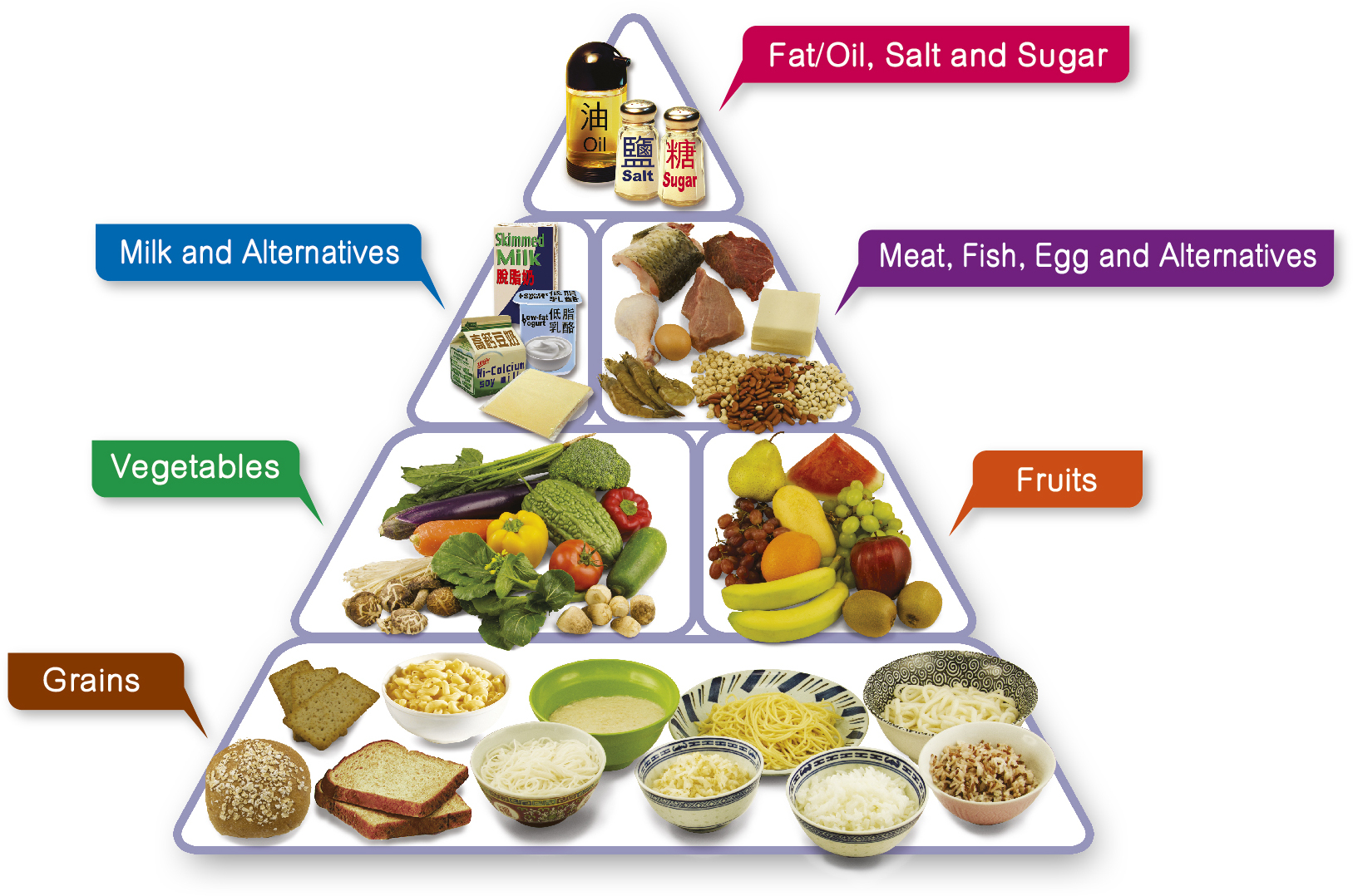
## Healthy Eating Food Pyramid
- **Eat Most** – Grains
- **Eat More** – Vegetables and fruits
- **Eat Moderately** – Meat, fish, egg and alternatives (including dry beans) and milk and alternatives
- **Eat Less** – Fat/oil, salt and sugar
- **Drink** adequate amount of fluid (including water, tea, clear soup, etc.) every day
---
## Recommended Daily Intake by Age Group
### Children (aged 2 to 5)
| Food Group | Amount |
|---|---|
| Grains | 1.5–3 bowls |
| Vegetables | At least 1.5 servings |
| Fruits | At least 1 serving |
| Meat, fish, egg and alternatives | 1.5–3 taels |
| Milk and alternatives | 2 servings |
| Fat/oil, salt and sugar | Eat the least |
| Fluid | 4–5 glasses |
### Children (aged 6 to 11)
| Food Group | Amount |
|---|---|
| Grains | 3–4 bowls |
| Vegetables | At least 2 servings |
| Fruits | At least 2 servings |
| Meat, fish, egg and alternatives | 3–5 taels |
| Milk and alternatives | 2 servings |
| Fat/oil, salt and sugar | Eat the least |
| Fluid | 6–8 glasses |
### Teenagers (aged 12 to 17)
| Food Group | Amount |
|---|---|
| Grains | 4–6 bowls |
| Vegetables | At least 3 servings |
| Fruits | At least 2 servings |
| Meat, fish, egg and alternatives | 4–6 taels |
| Milk and alternatives | 2 servings |
| Fat/oil, salt and sugar | Eat the least |
| Fluid | 6–8 glasses |
### Adults
| Food Group | Amount |
|---|---|
| Grains | 3–8 bowls |
| Vegetables | At least 3 servings |
| Fruits | At least 2 servings |
| Meat, fish, egg and alternatives | 5–8 taels |
| Milk and alternatives | 1–2 servings |
| Fat/oil, salt and sugar | Eat the least |
| Fluid | 6–8 glasses |
### Elderly
| Food Group | Amount |
|---|---|
| Grains | 3–5 bowls |
| Vegetables | At least 3 servings |
| Fruits | At least 2 servings |
| Meat, fish, egg and alternatives | 5–6 taels |
| Milk and alternatives | 1–2 servings |
| Fat/oil, salt and sugar | Eat the least |
| Fluid | 6–8 glasses |
---
## Food Exchange List
**1 bowl of grains** is equivalent to:
- Cooked rice, 1 bowl
- Cooked rice noodles, 1 bowl
- Bread, 2 slices
**1 serving of vegetables** is equivalent to:
- Cooked vegetables, ½ bowl
- Raw vegetables, 1 bowl
**1 serving of fruit** is equivalent to:
- Medium-sized apple, 1 piece
- Kiwifruit, 2 pieces (small-sized)
- Fruit cuts, ½ bowl
**1 tael of meat** is equivalent to:
- Cooked meat, 4–5 slices
- Egg, 1 piece
- Firm tofu, ¼ block
**1 serving of milk and alternatives** is equivalent to:
- Low-fat milk, 1 cup
- Low-fat cheese, 2 slices
- Low-fat plain yogurt, 1 pot (150 g)
---
## Remarks
- 1 tael ≈ 40 grams (raw meat)
- 1 bowl ≈ 250–300 ml
- 1 cup ≈ 240 ml
- The above recommendations are intended for healthy individuals only. Those with chronic diseases and specific nutritional needs should consult their family doctors and dietitians for individualised dietary recommendations.
FILE:references/nutrition_sv_guide.md
# Nutrition Serving (SV) Guide
> In case you want to know how many servings (SV) you should take with the amount of nutrition that is contained in the ingredients
## Food Categories
| Category | Dish Category | Standard Quantity of Nutrition (per serving) | Utilization Guide |
|---|---|---|---|
| **Grain dishes** | Dishes whose main ingredient is rice, bread, or noodles that supply carbohydrates | Carbohydrates contained in the main ingredient is about **40 g** | The Grain dish is indispensable for every meal. Choose a Grain dish, such as rice, bread, or noodles, which matches well with a Vegetable dish (or dishes) and a Fish and Meat dish (or dishes). In case you cannot have a Grain dish for all three meals, make up for shortage with snack between meals. |
| **Vegetable dishes** | Dishes whose main ingredients are vegetables, potatoes, beans (except for soybeans), mushrooms, and seaweed that supply various vitamins, minerals, and dietary fiber | The weight of the main ingredients is about **70 g** | In our daily dietary life, we tend to mainly consume Fish and Meat dishes, resulting in shortage of vegetables. Try to consciously take sufficient Vegetable dishes (almost double amounts of Fish and Meat dishes: one or two SV(s) for every meal). |
| **Fish and Meat dishes** | Dishes whose main ingredients are meats, fish, eggs, soybeans, or soybean products that supply protein | Protein contained in the main ingredient is about **6 g** | Be careful not to take too much. Especially, excessive intake of oily dishes is apt to result in excessive amounts of lipids and energy. |
| **Milk and Milk products** | Milk, yogurt, and cheese that supply calcium | Calcium contained in the main ingredient is about **100 mg** | Take a glass of milk as a standard every day. |
| **Fruits** | Fruits and fruity vegetables that supply vitamin C and potassium | The weight of the main ingredients is about **100 g** | Try to eat the proper quantity every day without fail. |
## Snacks, Confection and Beverages
Up to **200 kcal per day** is the standard.
- 3–4 pieces of rice cracker
- One piece of small shortcake
- A glass of sake (200 ml)
- One and a half cans of beer (500 ml)
- A glass of wine (260 ml)
- A half glass of distilled spirit, straight (100 ml)
> **Note:** Excessive intake of snacks, confection and beverages results in excessive intake of energy that may cause obesity. Do not forget "happily and moderately" and take them with restraint.
---
## SV Counting Rule
> As for the count of "SV", by the above standards, the one that is **more than two thirds and less than 1.5** is counted as **one SV**, while others are rounded off to two or more SVs.
Create, manage, and operate a Zettelkasten slip-box note system using the zk.py CLI script. Use this skill whenever a user wants to build or use a Zettelkast...
---
name: znote
description: Create, manage, and operate a Zettelkasten slip-box note system using the zk.py CLI script. Use this skill whenever a user wants to build or use a Zettelkasten note system, manage atomic notes, create fleeting/literature/permanent notes, link notes together, find orphaned notes, generate Maps of Content, or search/browse a note vault. Trigger on phrases like "zettelkasten", "slip box notes", "atomic notes", "permanent notes", "znote", "zk notes", "note vault", "create a note", "link my notes", "find orphaned notes", "map of content", or "manage my notes with zk".
---

# znote: Zettelkasten CLI Note Manager

A single-file Python CLI tool (`zk.py`) implementing the full Zettelkasten method as described in the Desktop Commander / Obsidian Practical Setup Guide. No dependencies beyond Python 3.8+ stdlib. Creates and manages a local markdown vault compatible with Obsidian.

## Inputs

- Python 3.8+ (no pip installs needed)
- Optional: `ZK_VAULT` environment variable to set vault location (default: `~/Zettelkasten`)
- Optional: `EDITOR` environment variable for note editing (default: `nano`)

## Vault Structure

```
~/Zettelkasten/
  00-Inbox/        ← fleeting notes (quick captures)
  10-Literature/   ← one note per source, in your own words
  20-Permanent/    ← atomic notes, one idea, fully linked
  30-MOC/          ← Maps of Content (navigation layers)
  40-Templates/    ← markdown templates for each type
```

## Workflow

### Step 1: Deliver the script

Copy `zk.py` to `/mnt/user-data/outputs/zk.py` and present it to the user via `present_files`. Also deliver `README.md`.

### Step 2: User installs

```bash
chmod +x zk.py
cp zk.py ~/.local/bin/zk        # optional: make globally available
export ZK_VAULT=~/Zettelkasten  # add to ~/.bashrc or ~/.zshrc
```

### Step 3: Initialise vault

```bash
python3 zk.py init
# Creates all 5 folders + 4 markdown templates
```

### Step 4: Daily workflow

**Capture** (fleeting note, no friction):
```bash
zk new fleeting
```

**Process inbox weekly** (flags notes older than 7 days):
```bash
zk inbox
```

**Write permanent notes** (one atomic idea per note):
```bash
zk new permanent "Claim written as a full sentence"
```

**Link notes** — edit the `## Connections` section and add `[[note-stem]]` links.

**Promote fleeting → permanent**:
```bash
zk promote "fragment of title"
```

**Generate Map of Content** when a topic has 8+ notes:
```bash
zk moc "Topic Name"
```

### Step 5: Maintenance commands

```bash
zk links                    # find orphaned notes (no links in/out)
zk links "note title"       # show forward + backlinks for one note
zk graph                    # ASCII link graph of entire vault
zk stats                    # counts, top tags, orphan count
zk search "query"           # full-text search with highlights
zk list --folder permanent  # list notes in a specific folder
zk list --tag psychology    # filter by tag
```

## Output

- `zk.py` — single-file Python CLI, ~400 lines, no dependencies
- `README.md` — full usage guide with workflow and tips
- A local markdown vault fully compatible with Obsidian

## Note Types & Templates

| Type | Folder | Filename pattern | Template fields |
|---|---|---|---|
| Fleeting | `00-Inbox/` | `{timestamp}.md` | created, status |
| Literature | `10-Literature/` | `{date}-{slug}.md` | created, status, source, author, tags |
| Permanent | `20-Permanent/` | `{date}-{slug}.md` | created, status, tags, source, Connections, Source |
| MOC | `30-MOC/` | `MOC-{slug}.md` | created, status, tags, linked notes |

## Key Method Rules (from the guide)

- **One idea per permanent note** — if a second idea appears, create a new note and link
- **Titles are claims**, not topics: `"Attention is a finite resource"` not `"Attention"`
- **Link from day one** — every permanent note needs at least one `[[link]]`
- **Tags supplement links** — use broad tags (`#psychology`), not fine-grained ones
- **MOCs emerge late** — only create when navigation actually becomes difficult
- **Inbox rule** — fleeting notes must be processed within 7 days

## Notes / Edge Cases

- The script uses `[[double-bracket]]` wiki-link syntax identical to Obsidian — vaults are fully interoperable
- Link targets are matched by filename stem (case-insensitive)
- `zk graph` marks missing link targets with `⇢?` in red
- `--no-edit` flag on `new`, `promote`, `moc` skips opening the editor (useful for scripting)
- `ZK_VAULT` env var overrides `--vault` flag and default path
- The `zk promote` command fuzzy-matches on filename and note body content
- Templates folder is excluded from stats/orphan counts automatically

FILE:scripts/zk.py
#!/usr/bin/env python3
"""
zk.py — Zettelkasten CLI Tool
Based on the Desktop Commander / Obsidian Zettelkasten method:
  - Fleeting notes  → 00-Inbox/
  - Literature notes → 10-Literature/
  - Permanent notes  → 20-Permanent/
  - Maps of Content  → 30-MOC/
  - Templates        → 40-Templates/
"""

import argparse
import datetime
import os
import re
import sys
from pathlib import Path
from collections import defaultdict

# ── Config ──────────────────────────────────────────────────────────────────

DEFAULT_VAULT = Path.home() / "Zettelkasten"

FOLDERS = {
    "inbox":      "00-Inbox",
    "literature": "10-Literature",
    "permanent":  "20-Permanent",
    "moc":        "30-MOC",
    "templates":  "40-Templates",
}

COLORS = {
    "reset":   "\033[0m",
    "bold":    "\033[1m",
    "cyan":    "\033[96m",
    "green":   "\033[92m",
    "yellow":  "\033[93m",
    "red":     "\033[91m",
    "magenta": "\033[95m",
    "blue":    "\033[94m",
    "dim":     "\033[2m",
}

def c(color, text):
    """Colorize text."""
    if not sys.stdout.isatty():
        return text
    return f"{COLORS.get(color,'')}{text}{COLORS['reset']}"

# ── Vault helpers ────────────────────────────────────────────────────────────

def get_vault(args) -> Path:
    vault = Path(getattr(args, "vault", None) or os.environ.get("ZK_VAULT", DEFAULT_VAULT))
    return vault

def init_vault(vault: Path):
    """Create vault folder structure if it doesn't exist."""
    for folder in FOLDERS.values():
        (vault / folder).mkdir(parents=True, exist_ok=True)
    # Write default templates
    _write_templates(vault)

def _write_templates(vault: Path):
    tdir = vault / FOLDERS["templates"]

    fleeting = tdir / "fleeting.md"
    if not fleeting.exists():
        fleeting.write_text(
            "---\n"
            "created: {{date}}\n"
            "status: fleeting\n"
            "---\n\n"
            "[Raw capture — one or two sentences. Don't overthink it.]\n"
        )

    literature = tdir / "literature.md"
    if not literature.exists():
        literature.write_text(
            "---\n"
            "created: {{date}}\n"
            "status: literature\n"
            "source: \n"
            "author: \n"
            "tags: []\n"
            "---\n\n"
            "# [Source title]\n\n"
            "## Key ideas\n\n"
            "[What from this source matters to me, and why?]\n\n"
            "## Quotes worth keeping\n\n"
            "## Raw notes\n"
        )

    permanent = tdir / "permanent.md"
    if not permanent.exists():
        permanent.write_text(
            "---\n"
            "created: {{date}}\n"
            "status: permanent\n"
            "tags: []\n"
            "source: \n"
            "---\n\n"
            "# [Claim written as a full sentence]\n\n"
            "[Main idea — 3 to 5 sentences. Written so that\n"
            "you'd understand it with zero context, years from now.]\n\n"
            "## Connections\n"
            "- [[Related note 1]]\n"
            "- [[Related note 2]]\n\n"
            "## Source\n"
            "[Where this idea came from]\n"
        )

    moc = tdir / "moc.md"
    if not moc.exists():
        moc.write_text(
            "---\n"
            "created: {{date}}\n"
            "status: moc\n"
            "tags: []\n"
            "---\n\n"
            "# MOC: [Topic]\n\n"
            "> A Map of Content for navigating notes on [topic].\n\n"
            "## Core notes\n"
            "- [[Note 1]]\n"
            "- [[Note 2]]\n\n"
            "## Subtopics\n\n"
            "## See also\n"
        )

def _now_str() -> str:
    return datetime.datetime.now().strftime("%Y-%m-%d")

def _timestamp_id() -> str:
    return datetime.datetime.now().strftime("%Y%m%d%H%M%S")

def _fill_template(template_path: Path) -> str:
    text = template_path.read_text()
    return text.replace("{{date}}", _now_str())

def _slugify(title: str) -> str:
    slug = title.lower().strip()
    slug = re.sub(r"[^\w\s-]", "", slug)
    slug = re.sub(r"[\s_]+", "-", slug)
    slug = re.sub(r"-+", "-", slug).strip("-")
    return slug[:80]

def _all_md_files(vault: Path):
    return list(vault.rglob("*.md"))

def _extract_links(text: str):
    """Return set of [[link]] targets found in text."""
    return set(re.findall(r"\[\[([^\[\]|#]+?)(?:\|[^\[\]]+)?\]\]", text))

def _extract_tags(text: str):
    return set(re.findall(r"(?:^|\s)#([\w/-]+)", text))

def _frontmatter_value(text: str, key: str) -> str:
    m = re.search(rf"^{key}:\s*(.+)$", text, re.MULTILINE)
    return m.group(1).strip() if m else ""

def _note_title(path: Path, text: str) -> str:
    m = re.search(r"^#\s+(.+)$", text, re.MULTILINE)
    if m:
        return m.group(1).strip()
    return path.stem

def _open_in_editor(path: Path):
    editor = os.environ.get("EDITOR", "nano")
    os.system(f'{editor} "{path}"')

# ── Commands ─────────────────────────────────────────────────────────────────

def cmd_init(args):
    vault = get_vault(args)
    init_vault(vault)
    print(c("green", f"✓ Vault initialised at {vault}"))
    for key, folder in FOLDERS.items():
        print(f"  {c('dim', '→')} {vault / folder}")


def cmd_new(args):
    vault = get_vault(args)
    init_vault(vault)

    note_type = args.type  # fleeting | literature | permanent | moc
    title = " ".join(args.title) if args.title else None

    folder_key = note_type if note_type != "fleeting" else "inbox"
    folder = vault / FOLDERS[folder_key]
    template_path = vault / FOLDERS["templates"] / f"{note_type}.md"

    if not template_path.exists():
        _write_templates(vault)

    content = _fill_template(template_path)

    if title:
        slug = _slugify(title)
        filename = f"{_now_str()}-{slug}.md"
        # Replace generic title in template
        content = content.replace("[Source title]", title)
        content = content.replace("[Claim written as a full sentence]", title)
        content = content.replace("MOC: [Topic]", f"MOC: {title}")
    else:
        filename = f"{_timestamp_id()}.md"

    note_path = folder / filename

    if note_path.exists():
        print(c("yellow", f"Note already exists: {note_path}"))
    else:
        note_path.write_text(content)
        print(c("green", f"✓ Created [{note_type}] → {note_path.relative_to(vault)}"))

    if not args.no_edit:
        _open_in_editor(note_path)


def cmd_list(args):
    vault = get_vault(args)
    folder_key = args.folder or None

    if folder_key and folder_key not in FOLDERS:
        print(c("red", f"Unknown folder key. Choose from: {', '.join(FOLDERS.keys())}"))
        sys.exit(1)

    folders_to_scan = (
        [vault / FOLDERS[folder_key]] if folder_key
        else [vault / f for f in FOLDERS.values()]
    )

    tag_filter = args.tag.lstrip("#") if args.tag else None
    query = args.query.lower() if args.query else None
    total = 0

    for folder in folders_to_scan:
        files = sorted(folder.glob("*.md")) if folder.exists() else []
        if not files:
            continue
        label = folder.name
        printed_header = False
        for f in files:
            text = f.read_text(errors="replace")
            if tag_filter and tag_filter not in _extract_tags(text):
                continue
            if query and query not in text.lower():
                continue
            if not printed_header:
                print(f"\n{c('cyan', c('bold', label))}")
                printed_header = True
            title = _note_title(f, text)
            status = _frontmatter_value(text, "status")
            tags = " ".join(f"#{t}" for t in sorted(_extract_tags(text)))
            links_count = len(_extract_links(text))
            date_str = _frontmatter_value(text, "created") or ""
            print(
                f"  {c('dim', date_str)}  "
                f"{c('bold', title[:55]):<58} "
                f"{c('blue', f'🔗{links_count}'):>6}  "
                f"{c('magenta', tags[:30])}"
            )
            total += 1

    print(f"\n{c('dim', f'{total} notes found')}")


def cmd_search(args):
    vault = get_vault(args)
    query = " ".join(args.query).lower()
    files = _all_md_files(vault)
    results = []

    for f in files:
        text = f.read_text(errors="replace")
        if query in text.lower():
            # Find matching lines
            lines = [
                (i + 1, l.strip())
                for i, l in enumerate(text.splitlines())
                if query in l.lower()
            ]
            results.append((f, _note_title(f, text), lines))

    if not results:
        print(c("yellow", f"No results for '{query}'"))
        return

    print(f"\n{c('bold', f'Search: \"{query}\"')} — {len(results)} note(s)\n")
    for path, title, lines in results:
        rel = path.relative_to(vault)
        print(f"  {c('cyan', str(rel))}")
        print(f"  {c('bold', title)}")
        for lineno, line in lines[:3]:
            highlighted = re.sub(
                re.escape(query),
                c("yellow", query),
                line,
                flags=re.IGNORECASE,
            )
            print(f"    {c('dim', str(lineno) + ':')} {highlighted}")
        print()


def cmd_links(args):
    vault = get_vault(args)
    files = _all_md_files(vault)

    # Build index: note stem → Path
    note_index = {f.stem: f for f in files}
    # Build forward links
    forward: dict[str, set] = {}
    backward: dict[str, set] = defaultdict(set)

    for f in files:
        text = f.read_text(errors="replace")
        targets = _extract_links(text)
        forward[f.stem] = targets
        for t in targets:
            # Normalize: match by stem
            matched = next(
                (k for k in note_index if k.lower() == t.lower()), t
            )
            backward[matched].add(f.stem)

    target = " ".join(args.note) if args.note else None

    if target:
        # Show links for a specific note
        stem = _slugify(target) if target not in note_index else target
        stem = next((k for k in note_index if k.lower() == target.lower()), target)
        fwd = forward.get(stem, set())
        bck = backward.get(stem, set())
        print(f"\n{c('bold', stem)}")
        print(f"  {c('cyan', 'Outgoing links')} ({len(fwd)}):")
        for l in sorted(fwd):
            exists = "✓" if l in note_index or l.lower() in (k.lower() for k in note_index) else c("red", "✗ missing")
            print(f"    → [[{l}]] {exists}")
        print(f"  {c('green', 'Incoming links')} ({len(bck)}):")
        for l in sorted(bck):
            print(f"    ← [[{l}]]")
    else:
        # Show orphaned notes
        orphans = [
            stem for stem, fwd in forward.items()
            if not fwd and not backward.get(stem)
            and not (vault / FOLDERS["templates"]).name in str(note_index.get(stem, ""))
        ]
        print(f"\n{c('bold', 'Orphaned notes')} (no links in or out): {len(orphans)}\n")
        for stem in sorted(orphans):
            path = note_index.get(stem)
            if path:
                rel = path.relative_to(vault)
                text = path.read_text(errors="replace")
                first_line = next(
                    (l.strip() for l in text.splitlines() if l.strip() and not l.startswith("---") and not l.startswith("#")),
                    ""
                )
                print(f"  {c('yellow', '⚠')} {c('cyan', str(rel))}")
                if first_line:
                    print(f"    {c('dim', first_line[:80])}")


def cmd_graph(args):
    """Print an ASCII link graph of the vault."""
    vault = get_vault(args)
    files = _all_md_files(vault)
    note_index = {f.stem: f for f in files}

    forward: dict[str, set] = {}
    for f in files:
        text = f.read_text(errors="replace")
        forward[f.stem] = _extract_links(text)

    # Filter out templates folder
    tpl_folder = vault / FOLDERS["templates"]
    stems = [
        s for s, p in note_index.items()
        if not str(p).startswith(str(tpl_folder))
    ]

    if not stems:
        print(c("yellow", "No notes found."))
        return

    print(f"\n{c('bold', 'Vault Link Graph')}\n")
    for stem in sorted(stems):
        path = note_index[stem]
        rel = path.relative_to(vault)
        targets = forward.get(stem, set())
        folder_label = c("dim", f"[{rel.parent.name}]")
        print(f"  {folder_label} {c('bold', stem)}")
        for t in sorted(targets):
            exists = t in note_index or any(k.lower() == t.lower() for k in note_index)
            sym = c("green", "→") if exists else c("red", "⇢?")
            print(f"      {sym} {t}")


def cmd_stats(args):
    vault = get_vault(args)
    files = _all_md_files(vault)
    tpl_folder = vault / FOLDERS["templates"]
    notes = [f for f in files if not str(f).startswith(str(tpl_folder))]

    counts_by_folder: dict[str, int] = defaultdict(int)
    all_tags: dict[str, int] = defaultdict(int)
    total_links = 0
    orphans = 0

    forward: dict[str, set] = {}
    backward: dict[str, set] = defaultdict(set)

    for f in notes:
        text = f.read_text(errors="replace")
        folder = f.parent.name
        counts_by_folder[folder] += 1
        targets = _extract_links(text)
        forward[f.stem] = targets
        total_links += len(targets)
        for t in targets:
            backward[t].add(f.stem)
        for tag in _extract_tags(text):
            all_tags[tag] += 1

    for stem, fwd in forward.items():
        if not fwd and not backward.get(stem):
            orphans += 1

    top_tags = sorted(all_tags.items(), key=lambda x: -x[1])[:10]

    print(f"\n{c('bold', 'Vault Statistics')}\n")
    print(f"  {'Total notes':<25} {c('cyan', str(len(notes)))}")
    print(f"  {'Total [[links]]':<25} {c('cyan', str(total_links))}")
    print(f"  {'Orphaned notes':<25} {c('yellow', str(orphans))}")
    print()
    print(c("bold", "  Notes by folder:"))
    for folder, count in sorted(counts_by_folder.items()):
        bar = "█" * min(count, 40)
        print(f"  {folder:<30} {c('blue', bar)} {count}")
    if top_tags:
        print()
        print(c("bold", "  Top tags:"))
        for tag, count in top_tags:
            print(f"  #{tag:<28} {count}")


def cmd_inbox(args):
    """Review inbox: list fleeting notes, optionally promote one."""
    vault = get_vault(args)
    inbox = vault / FOLDERS["inbox"]
    files = sorted(inbox.glob("*.md")) if inbox.exists() else []

    if not files:
        print(c("green", "✓ Inbox is empty — nothing to process."))
        return

    now = datetime.datetime.now()
    print(f"\n{c('bold', 'Inbox Review')} — {len(files)} note(s)\n")

    old_count = 0
    for f in files:
        text = f.read_text(errors="replace")
        title = _note_title(f, text)
        created_str = _frontmatter_value(text, "created")
        age_label = ""
        if created_str:
            try:
                created = datetime.datetime.strptime(created_str, "%Y-%m-%d")
                age_days = (now - created).days
                if age_days > 7:
                    age_label = c("red", f" ⚠ {age_days}d old")
                    old_count += 1
                else:
                    age_label = c("dim", f" ({age_days}d)")
            except ValueError:
                pass
        print(f"  {c('yellow', '→')} {c('bold', title[:60])}{age_label}")
        print(f"    {c('dim', str(f.relative_to(vault)))}")

    if old_count:
        print(f"\n{c('yellow', f'⚠ {old_count} note(s) older than 7 days — consider processing them.')}")
    print(f"\n{c('dim', 'Tip: use `zk new permanent` to promote a fleeting note.')}")


def cmd_promote(args):
    """Promote a fleeting/literature note to permanent."""
    vault = get_vault(args)
    query = " ".join(args.note).lower()

    candidates = []
    for folder_key in ("inbox", "literature"):
        folder = vault / FOLDERS[folder_key]
        if folder.exists():
            for f in folder.glob("*.md"):
                if query in f.name.lower() or query in f.read_text(errors="replace").lower():
                    candidates.append(f)

    if not candidates:
        print(c("yellow", f"No matching notes found for '{query}' in Inbox or Literature."))
        return

    if len(candidates) > 1:
        print(c("yellow", f"Multiple matches found:"))
        for i, f in enumerate(candidates):
            print(f"  [{i}] {f.relative_to(vault)}")
        choice = input("Choose [0]: ").strip() or "0"
        source = candidates[int(choice)]
    else:
        source = candidates[0]

    # Build new permanent note
    template_path = vault / FOLDERS["templates"] / "permanent.md"
    content = _fill_template(template_path)

    # Embed original content as source reference
    orig_title = _note_title(source, source.read_text(errors="replace"))
    perm_folder = vault / FOLDERS["permanent"]
    slug = _slugify(orig_title)
    dest = perm_folder / f"{_now_str()}-{slug}.md"
    content = content.replace("[Claim written as a full sentence]", orig_title)
    content += f"\n\n---\n*Promoted from [[{source.stem}]]*\n"
    dest.write_text(content)
    print(c("green", f"✓ Promoted → {dest.relative_to(vault)}"))
    if not args.no_edit:
        _open_in_editor(dest)


def cmd_moc(args):
    """Generate or update a Map of Content for a topic/tag."""
    vault = get_vault(args)
    topic = " ".join(args.topic)
    tag_filter = _slugify(topic).replace("-", "")  # rough tag match

    files = _all_md_files(vault)
    tpl_folder = vault / FOLDERS["templates"]
    relevant = []

    for f in files:
        if str(f).startswith(str(tpl_folder)):
            continue
        text = f.read_text(errors="replace")
        tags = _extract_tags(text)
        title = _note_title(f, text)
        if (
            topic.lower() in text.lower()
            or any(tag_filter in t.lower() for t in tags)
        ):
            relevant.append((f, title))

    if not relevant:
        print(c("yellow", f"No notes found related to '{topic}'."))
        return

    # Build MOC content
    lines = [
        "---",
        f"created: {_now_str()}",
        "status: moc",
        f"tags: [{_slugify(topic)}]",
        "---",
        "",
        f"# MOC: {topic}",
        "",
        f"> Auto-generated Map of Content for **{topic}**.",
        "",
        "## Notes",
        "",
    ]
    for path, title in sorted(relevant, key=lambda x: x[1].lower()):
        lines.append(f"- [[{path.stem}|{title}]]")

    moc_folder = vault / FOLDERS["moc"]
    slug = _slugify(topic)
    moc_path = moc_folder / f"MOC-{slug}.md"
    moc_path.write_text("\n".join(lines))
    print(c("green", f"✓ MOC created → {moc_path.relative_to(vault)}"))
    print(f"  {len(relevant)} note(s) linked.")
    if not args.no_edit:
        _open_in_editor(moc_path)


# ── CLI wiring ───────────────────────────────────────────────────────────────

BANNER = f"""
{c('cyan', c('bold', '░▒▓ Zettelkasten CLI ▓▒░'))}  {c('dim', 'slip-box for the terminal')}
"""

def build_parser():
    parser = argparse.ArgumentParser(
        prog="zk",
        description="Zettelkasten CLI — manage your slip-box from the terminal.",
        formatter_class=argparse.RawDescriptionHelpFormatter,
        epilog="""
Examples:
  zk init                          # set up vault structure
  zk new fleeting                  # quick capture
  zk new permanent "Ideas compound over time"
  zk new literature "Thinking Fast and Slow"
  zk list                          # list all notes
  zk list --folder permanent       # list permanent notes only
  zk list --tag learning           # filter by tag
  zk search "atomic notes"         # full-text search
  zk inbox                         # review your inbox
  zk promote "conference notes"    # promote fleeting → permanent
  zk links                         # show orphaned notes
  zk links "my note title"         # show links for a specific note
  zk moc "Decision Making"         # generate a Map of Content
  zk stats                         # vault statistics
  zk graph                         # ASCII link graph

Set ZK_VAULT env var to override default vault path.
""",
    )
    parser.add_argument("--vault", "-v", help="Path to vault (overrides ZK_VAULT env)")

    sub = parser.add_subparsers(dest="command", metavar="COMMAND")

    # init
    sub.add_parser("init", help="Initialise vault folder structure and templates")

    # new
    p_new = sub.add_parser("new", help="Create a new note")
    p_new.add_argument(
        "type",
        choices=["fleeting", "literature", "permanent", "moc"],
        help="Note type",
    )
    p_new.add_argument("title", nargs="*", help="Note title (optional)")
    p_new.add_argument("--no-edit", action="store_true", help="Don't open editor")

    # list
    p_list = sub.add_parser("list", help="List notes")
    p_list.add_argument("--folder", "-f", help="Filter by folder key (inbox/literature/permanent/moc)")
    p_list.add_argument("--tag", "-t", help="Filter by tag")
    p_list.add_argument("--query", "-q", help="Filter by text content")

    # search
    p_search = sub.add_parser("search", help="Full-text search across all notes")
    p_search.add_argument("query", nargs="+", help="Search query")

    # inbox
    sub.add_parser("inbox", help="Review inbox (fleeting notes awaiting processing)")

    # promote
    p_promote = sub.add_parser("promote", help="Promote a fleeting/literature note to permanent")
    p_promote.add_argument("note", nargs="+", help="Note title or filename fragment")
    p_promote.add_argument("--no-edit", action="store_true")

    # links
    p_links = sub.add_parser("links", help="Show orphaned notes or links for a specific note")
    p_links.add_argument("note", nargs="*", help="Note title (leave blank for orphan report)")

    # moc
    p_moc = sub.add_parser("moc", help="Generate a Map of Content for a topic")
    p_moc.add_argument("topic", nargs="+", help="Topic name")
    p_moc.add_argument("--no-edit", action="store_true")

    # graph
    sub.add_parser("graph", help="Print ASCII link graph of vault")

    # stats
    sub.add_parser("stats", help="Show vault statistics")

    return parser


def main():
    parser = build_parser()
    args = parser.parse_args()

    print(BANNER)

    dispatch = {
        "init":    cmd_init,
        "new":     cmd_new,
        "list":    cmd_list,
        "search":  cmd_search,
        "inbox":   cmd_inbox,
        "promote": cmd_promote,
        "links":   cmd_links,
        "moc":     cmd_moc,
        "graph":   cmd_graph,
        "stats":   cmd_stats,
    }

    if args.command not in dispatch:
        parser.print_help()
        sys.exit(0)

    dispatch[args.command](args)


if __name__ == "__main__":
    main()
Manage Cornell Method notes as Markdown files using the bundled cornell.py CLI script. Use this skill whenever the user wants to take notes, create a new not...
---
name: notes
description: >
  Manage Cornell Method notes as Markdown files using the bundled cornell.py CLI script.
  Use this skill whenever the user wants to take notes, create a new note, view, list,
  search, edit, or delete Cornell-style notes. Trigger on phrases like "take a note",
  "create a note", "show my notes", "list notes", "search notes", "open my note on X",
  "delete note", "edit my note", or any request involving personal notes or note-taking.
  Also trigger when the user says things like "save this as a note"
  or "what did I write about X". Always prefer this skill over ad-hoc solutions
  for anything note-related.
---

# Notes Skill

Manage Cornell Method notes stored as Markdown files in `~/cornell-notes/`.
One `.md` file per note. Uses the bundled `scripts/cornell.py` CLI tool.

## Script location

```
scripts/cornell.py
```

Always run it with:
```bash
python scripts/cornell.py <command> [args]
```

The script path must be relative to the skill root, or use the absolute path once
you know it. Copy the script to `/tmp/cornell.py` for convenience if needed:
```bash
cp <skill_root>/scripts/cornell.py /tmp/cornell.py
```

## Commands

| Command | What it does |
|---|---|
| `new [title]` | Create a new Cornell note (opens in `$EDITOR` / micro) |
| `list` / `ls` | List all notes with title and date |
| `view [note]` | Pretty-print a note in two-column Cornell layout |
| `search [query]` | Search all notes by keyword, highlights matches |
| `edit [note]` | Open a note in `$EDITOR` for editing |
| `delete [note]` / `rm` | Delete a note (asks for confirmation) |

Notes can be referenced by **number**, **title**, or **slug**. If ambiguous, the script
shows an interactive picker.

## Note structure (auto-generated)

Each note has YAML frontmatter + three Cornell sections:

```markdown
---
title: <Title>
date: <YYYY-MM-DD HH:MM>
tags: []
---

## Notes
<!-- Raw lecture / reading notes -->

## Cues
<!-- Keywords, questions, main ideas — filled in after studying -->

## Summary
<!-- 2-3 sentence synthesis in your own words -->
```

## Workflow

### Creating a note
1. Ask the user for the note title if not provided.
2. Run: `python /tmp/cornell.py new "<title>"`
3. Tell the user the file was created at `~/cornell-notes/<slug>.md` and that it
   opened in their editor (micro by default). Remind them to fill in the three sections.

### Viewing / listing
- For a quick overview: `python /tmp/cornell.py list`
- To read a specific note: `python /tmp/cornell.py view "<title or number>"`
- Render the output in the conversation so the user can read it.

### Searching
- Run: `python /tmp/cornell.py search "<keyword>"`
- Present the matching notes and highlighted lines to the user.

### Editing
- Run: `python /tmp/cornell.py edit "<title or number>"`
- Confirm which note was opened.

### Deleting
- Run: `python /tmp/cornell.py delete "<title or number>"`
- The script will ask for confirmation — relay that to the user if running non-interactively.

## Tips

- Notes are stored in `~/cornell-notes/` — the directory is created automatically.
- The script uses `$EDITOR` or `$VISUAL` env var, falling back to `micro`.
- Slugs are auto-generated from titles (lowercased, spaces → hyphens).
- When the user asks to "take a note now", offer to capture their content directly and
  write it into the appropriate Cornell sections yourself, then save the file.

FILE:scripts/cornell.py
#!/usr/bin/env python3
"""
cornell.py — A CLI tool for managing Cornell Method notes as Markdown files.
Notes are stored in ~/cornell-notes/, one .md file per note.
"""

import os
import re
import sys
import shutil
import subprocess
import argparse
from datetime import datetime
from pathlib import Path

# ── Config ────────────────────────────────────────────────────────────────────
NOTES_DIR = Path.home() / "cornell-notes"
DATE_FMT  = "%Y-%m-%d %H:%M"

# ── ANSI colours (degrade gracefully on Windows) ──────────────────────────────
BOLD   = "\033[1m"
DIM    = "\033[2m"
CYAN   = "\033[36m"
GREEN  = "\033[32m"
YELLOW = "\033[33m"
RED    = "\033[31m"
RESET  = "\033[0m"

def c(text, *codes):
    if not sys.stdout.isatty():
        return text
    return "".join(codes) + str(text) + RESET

# ── Helpers ───────────────────────────────────────────────────────────────────
def ensure_dir():
    NOTES_DIR.mkdir(parents=True, exist_ok=True)

def slug(title: str) -> str:
    """Turn a title into a safe filename stem."""
    s = title.lower().strip()
    s = re.sub(r"[^\w\s-]", "", s)
    s = re.sub(r"[\s_-]+", "-", s)
    return s[:80]

def note_path(title_or_slug: str) -> Path:
    return NOTES_DIR / f"{slug(title_or_slug)}.md"

def all_notes() -> list[Path]:
    return sorted(NOTES_DIR.glob("*.md"))

def template(title: str) -> str:
    now = datetime.now().strftime(DATE_FMT)
    return f"""\
---
title: {title}
date: {now}
tags: []
---

## Notes
<!-- Write your raw lecture / reading notes here -->


## Cues
<!-- After studying: keywords, questions, main ideas that summarise the notes -->
-

## Summary
<!-- In 2-3 sentences, summarise this note in your own words -->

"""

def parse_sections(text: str) -> dict:
    """Return a dict with keys: meta, notes, cues, summary."""
    sections = {"meta": "", "notes": "", "cues": "", "summary": ""}
    current = "meta"
    for line in text.splitlines(keepends=True):
        low = line.strip().lower()
        if low == "## notes":
            current = "notes"
        elif low == "## cues":
            current = "cues"
        elif low == "## summary":
            current = "summary"
        else:
            sections[current] += line
    return sections

def prompt(label: str, default: str = "") -> str:
    hint = f" [{default}]" if default else ""
    try:
        val = input(f"{c(label, CYAN, BOLD)}{hint}: ").strip()
    except (KeyboardInterrupt, EOFError):
        print()
        sys.exit(0)
    return val or default

def confirm(msg: str) -> bool:
    try:
        ans = input(f"{c(msg, YELLOW)} [y/N] ").strip().lower()
    except (KeyboardInterrupt, EOFError):
        print()
        return False
    return ans in ("y", "yes")

def render_note(path: Path):
    """Pretty-print a Cornell note in the terminal."""
    text   = path.read_text()
    secs   = parse_sections(text)
    width  = min(shutil.get_terminal_size().columns, 90)
    ruler  = c("─" * width, DIM)

    # --- header
    title_match = re.search(r"^title:\s*(.+)$", secs["meta"], re.M)
    date_match  = re.search(r"^date:\s*(.+)$",  secs["meta"], re.M)
    title = title_match.group(1).strip() if title_match else path.stem
    date  = date_match.group(1).strip()  if date_match  else ""

    print()
    print(ruler)
    print(c(f"  {title}", BOLD, CYAN))
    if date:
        print(c(f"  {date}", DIM))
    print(ruler)

    # --- two-column layout: cues | notes
    cue_lines  = [l for l in secs["cues"].splitlines()  if l.strip() and not l.strip().startswith("<!--")]
    note_lines = [l for l in secs["notes"].splitlines() if l.strip() and not l.strip().startswith("<!--")]

    col_w   = (width - 4) // 3          # cues  ~1/3
    note_w  = (width - 4) - col_w       # notes ~2/3
    rows    = max(len(cue_lines), len(note_lines), 1)

    print(c(f"{'  CUES':<{col_w+2}}  {'NOTES'}", BOLD))
    print(c("─" * (col_w + 2) + "  " + "─" * note_w, DIM))
    for i in range(rows):
        cue  = cue_lines[i]  if i < len(cue_lines)  else ""
        note = note_lines[i] if i < len(note_lines) else ""
        print(f"  {cue:<{col_w}}  {note}")

    # --- summary
    summary = "\n".join(
        l for l in secs["summary"].splitlines()
        if l.strip() and not l.strip().startswith("<!--")
    ).strip()
    print(ruler)
    print(c("  SUMMARY", BOLD))
    if summary:
        for line in summary.splitlines():
            print(f"  {line}")
    else:
        print(c("  (no summary yet)", DIM))
    print(ruler)
    print()

# ── Commands ──────────────────────────────────────────────────────────────────

def cmd_new(args):
    ensure_dir()
    title = " ".join(args.title) if args.title else prompt("Note title")
    if not title:
        print(c("Title cannot be empty.", RED)); return

    path = note_path(title)
    if path.exists():
        print(c(f"Note already exists: {path.name}", YELLOW))
        if not confirm("Overwrite?"):
            return

    path.write_text(template(title))
    print(c(f"✓ Created: {path}", GREEN))
    _open_in_editor(path)


def cmd_list(args):
    ensure_dir()
    notes = all_notes()
    if not notes:
        print(c("No notes yet. Run:  cornell new", DIM)); return

    print()
    for i, p in enumerate(notes, 1):
        text        = p.read_text()
        title_match = re.search(r"^title:\s*(.+)$", text, re.M)
        date_match  = re.search(r"^date:\s*(.+)$",  text, re.M)
        title = title_match.group(1).strip() if title_match else p.stem
        date  = date_match.group(1).strip()  if date_match  else ""
        print(f"  {c(str(i).rjust(3), DIM)}  {c(title, BOLD)}  {c(date, DIM)}")
    print()


def cmd_view(args):
    ensure_dir()
    notes = all_notes()
    if not notes:
        print(c("No notes found.", DIM)); return

    query = " ".join(args.note) if args.note else ""
    path  = _resolve_note(query, notes)
    if path:
        render_note(path)


def cmd_search(args):
    ensure_dir()
    query = " ".join(args.query)
    if not query:
        query = prompt("Search keyword")
    if not query:
        return

    pattern = re.compile(re.escape(query), re.IGNORECASE)
    hits    = []
    for p in all_notes():
        text = p.read_text()
        if pattern.search(text):
            lines = [l.strip() for l in text.splitlines() if pattern.search(l)]
            hits.append((p, lines))

    if not hits:
        print(c(f'No notes match "{query}".', YELLOW)); return

    print()
    for path, lines in hits:
        title_match = re.search(r"^title:\s*(.+)$", path.read_text(), re.M)
        title = title_match.group(1).strip() if title_match else path.stem
        print(c(f"  ▸ {title}", BOLD, CYAN))
        for l in lines[:3]:
            highlighted = pattern.sub(lambda m: c(m.group(), YELLOW, BOLD), l)
            print(f"    {highlighted}")
        print()


def cmd_edit(args):
    ensure_dir()
    notes = all_notes()
    if not notes:
        print(c("No notes found.", DIM)); return

    query = " ".join(args.note) if args.note else ""
    path  = _resolve_note(query, notes)
    if path:
        _open_in_editor(path)


def cmd_delete(args):
    ensure_dir()
    notes = all_notes()
    if not notes:
        print(c("No notes found.", DIM)); return

    query = " ".join(args.note) if args.note else ""
    path  = _resolve_note(query, notes)
    if not path:
        return

    title_match = re.search(r"^title:\s*(.+)$", path.read_text(), re.M)
    title = title_match.group(1).strip() if title_match else path.stem
    print(c(f'About to delete "{title}"', RED))
    if confirm("Are you sure?"):
        path.unlink()
        print(c(f"✓ Deleted: {path.name}", GREEN))
    else:
        print("Cancelled.")


# ── Internal helpers ──────────────────────────────────────────────────────────

def _resolve_note(query: str, notes: list[Path]) -> Path | None:
    """
    If query matches a title/slug exactly → return it.
    If query is a number → pick by index.
    Otherwise → show fuzzy picker.
    """
    if query:
        # exact slug match
        candidate = note_path(query)
        if candidate.exists():
            return candidate
        # number
        if query.isdigit():
            idx = int(query) - 1
            if 0 <= idx < len(notes):
                return notes[idx]
        # fuzzy: title contains query
        q = query.lower()
        matches = [p for p in notes if q in p.stem or q in p.read_text().lower()[:200]]
        if len(matches) == 1:
            return matches[0]
        if len(matches) > 1:
            notes = matches   # narrow picker

    # interactive picker
    print()
    for i, p in enumerate(notes, 1):
        title_match = re.search(r"^title:\s*(.+)$", p.read_text(), re.M)
        title = title_match.group(1).strip() if title_match else p.stem
        print(f"  {c(str(i), CYAN, BOLD)}  {title}")
    print()
    choice = prompt("Pick a number (or q to cancel)", "")
    if choice.lower() in ("q", ""):
        return None
    if choice.isdigit():
        idx = int(choice) - 1
        if 0 <= idx < len(notes):
            return notes[idx]
    print(c("Invalid choice.", RED))
    return None


def _open_in_editor(path: Path):
    editor = os.environ.get("EDITOR") or os.environ.get("VISUAL") or "micro"
    try:
        subprocess.run([editor, str(path)])
    except FileNotFoundError:
        print(c(f"Editor '{editor}' not found. Set $EDITOR env var.", YELLOW))
        print(f"File saved at: {path}")


# ── CLI wiring ────────────────────────────────────────────────────────────────

def main():
    parser = argparse.ArgumentParser(
        prog="cornell",
        description="Cornell Method note manager — one Markdown file per note.",
        formatter_class=argparse.RawDescriptionHelpFormatter,
        epilog="""
examples:
  cornell new "Lecture 3 – Photosynthesis"
  cornell list
  cornell view 2
  cornell search mitochondria
  cornell edit "lecture-3"
  cornell delete 5
        """,
    )
    sub = parser.add_subparsers(dest="cmd", metavar="command")

    # new
    p_new = sub.add_parser("new",    help="Create a new Cornell note")
    p_new.add_argument("title", nargs="*", help="Note title")

    # list
    sub.add_parser("list",   help="List all notes")
    sub.add_parser("ls",     help="Alias for list")

    # view
    p_view = sub.add_parser("view",  help="View a note (pretty-printed)")
    p_view.add_argument("note", nargs="*", help="Title, slug, or number")

    # search
    p_srch = sub.add_parser("search", help="Search notes by keyword")
    p_srch.add_argument("query", nargs="*", help="Search term")

    # edit
    p_edit = sub.add_parser("edit",  help="Open a note in $EDITOR")
    p_edit.add_argument("note", nargs="*", help="Title, slug, or number")

    # delete
    p_del  = sub.add_parser("delete", help="Delete a note")
    p_del.add_argument("note", nargs="*", help="Title, slug, or number")
    sub.add_parser("rm", help="Alias for delete").add_argument("note", nargs="*")

    args = parser.parse_args()

    dispatch = {
        "new":    cmd_new,
        "list":   cmd_list,
        "ls":     cmd_list,
        "view":   cmd_view,
        "search": cmd_search,
        "edit":   cmd_edit,
        "delete": cmd_delete,
        "rm":     cmd_delete,
    }

    if args.cmd in dispatch:
        dispatch[args.cmd](args)
    else:
        parser.print_help()


if __name__ == "__main__":
    main()
Extract structured Q&A pairs and Selection Preferences from any text source — especially the current chat session or uploaded documents. Use this skill whene...
---
name: text2qa
description: >
  Extract structured Q&A pairs and Selection Preferences from any text source — especially the current chat session or uploaded documents. Use this skill whenever the user asks to "extract Q&A", "generate questions and answers", "pull out questions from the chat", "create a quiz from this conversation", "identify preferences", "find selection criteria", or wants to summarize a session into a reusable knowledge base. Also trigger when users say things like "turn this chat into Q&A", "what did we decide?", "document my preferences from this conversation", or "make flashcards from this". Works on chat sessions, documents, articles, transcripts, or any freeform text.
---

# text2qa Skill

Extract **Q&A pairs** and **Selection Preferences** from the current chat session or any provided text.

---

## Output Format

Produce two clearly separated sections:

### Section 1: Q&A Pairs

Identify every implicit or explicit question-answer exchange. Format as:

```
## Q&A Pairs

**Q1: <question>**
A: <answer>

**Q2: <question>**
A: <answer>
...
```

Rules:
- Extract both **explicit** questions (user directly asked something) and **implicit** questions (Claude provided info that answers an unstated question).
- Rephrase conversational exchanges into clean, standalone Q&A pairs.
- If an answer spans multiple turns, synthesize into one coherent answer.
- Skip small talk or meta-conversation (e.g., "thanks!", "sure!").

---

### Section 2: Selection Preferences

Identify any preferences, constraints, choices, or criteria the user expressed or implied. Format as:

```
## Selection Preferences

| # | Preference / Constraint | Source (direct/inferred) |
|---|------------------------|--------------------------|
| 1 | <preference>           | direct / inferred        |
| 2 | <preference>           | direct / inferred        |
...
```

Preference types to look for:
- **Format preferences** — "I want markdown", "keep it short", "use bullet points"
- **Content preferences** — "focus on X", "skip Y", "I prefer Z style"
- **Tool/approach preferences** — "don't use files", "use Python not JS"
- **Persona/tone preferences** — "be concise", "explain like I'm a beginner"
- **Domain/topic constraints** — "only for production use", "target audience is X"
- **Decisions made** — explicit choices the user made during the session

Mark each as `direct` (user stated it outright) or `inferred` (implied by behavior/choices).

---

## Workflow

1. **Scan** the full conversation (or provided text).
2. **Identify** all Q&A exchanges and stated/implied preferences.
3. **Output** Section 1 (Q&A Pairs) then Section 2 (Selection Preferences).
4. **Optionally** offer to export as a `.md` file if the user might want to save it.

---

## Tips

- For chat sessions: scan from the very first message.
- For documents: treat headings/paragraphs as implicit questions when appropriate.
- If the session is very long, cluster related Q&As under sub-headings by topic.
- If no preferences are found, say so clearly rather than inventing them.
- Always note the total count: "Found X Q&A pairs and Y preferences."
Automatically generate and save a reusable skill after AI agent successfully completes a complex task involving 5 or more tool calls. Use this skill whenever...
---
name: oh-my-skill
description: Automatically generate and save a reusable skill after AI agent successfully completes a complex task involving 5 or more tool calls. Use this skill whenever a multi-step workflow has just been completed successfully — such as document creation pipelines, data transformation flows, research-and-write tasks, multi-file editing workflows, or any agentic sequence that involved planning, tool use, and structured output. Trigger this skill proactively at the end of complex task completions even if the user hasn't asked for it, offering to save the workflow as a reusable skill. Also trigger when users say things like "save this as a skill", "make this repeatable", "turn this into a skill" or "oh-my-skill".
metadata:
  openclaw:
    requires:
      bins:
        - python
---

# oh-my-skill: Auto-Skill Generator

Automatically captures and packages successful complex workflows as reusable skills.
*Warning*: Make sure your session doesn't contain any highly private data. If it's already been sent to Claude, then that's it.
you could modify the Desensitize process to match your scence/case.

## When to Trigger

Trigger **proactively** after completing any task that involved:
- 5 or more distinct tool calls
- A clear sequence of steps (plan → execute → verify)
- A structured or repeatable output (file, report, transformation, research summary)
- Tool combinations that aren't obvious and took iteration

After such a task completes successfully, say something like:
> "That was a fairly involved workflow — want me to save it as a reusable skill so you can repeat it easily next time?"

If the user says yes, or explicitly asks to generate a skill, proceed with the steps below.

---

## Workflow: Capturing a Skill from a Completed Task

### Step 1: Analyze the Session

Review the current conversation and extract:

1. **What was accomplished** — the goal and final output
2. **The tool call sequence** — ordered list of tools used and why
3. **Key decisions made** — branch points, error recovery, formats chosen
4. **Inputs required** — what the user had to provide (files, preferences, constraints)
5. **Output format** — what was produced and where it was saved

Look for patterns: What made this hard? What would be needed to repeat it?

### Step 1b: Desensitize the Session

Before extracting any content, run the session text through the masking script to strip sensitive data:

```bash
python3 ~/.openclaw/workspace/skills/oh-my-skill/scripts/desensitize.py session.txt clean_session.txt
```

Or pipe text directly:
```bash
echo "my text" | python3 ~/.openclaw/workspace/skills/oh-my-skill/scripts/desensitize.py
```

The script applies two layers of masking:

**Literal replacements** (named individuals → generic labels):
- `Bill Gates` → `A man`
- Add more entries in the `LITERAL_REPLACEMENTS` list in `desensitize.py`

**Pattern-based masking** (regex, auto-detected)

Use the **cleaned text** as the source for all subsequent steps.

### Step 2: Draft the Skill

Write a `SKILL.md` with:

```
---
name: <kebab-case-name>
description: <What it does, when to trigger. Be specific and "pushy" — list all the user phrases and contexts that should trigger this skill.>
---

# <Skill Title>

<One-paragraph summary of what this skill does and why it's valuable.>

## Inputs

List what the user must provide:
- File paths / uploads
- Preferences or configuration
- Any required context

## Workflow

Step-by-step instructions Claude should follow, referencing tool calls and decision points extracted from the session.

### Step 1: ...
### Step 2: ...
...

## Output

What gets produced, in what format, saved where.

## Notes / Edge Cases

Anything learned from the original run: gotchas, fallbacks, format quirks.
```

**Naming conventions:**
- Use `kebab-case` for the name
- Keep it specific: `pdf-to-summary-docx` not `document-helper`
- Reflect the *domain + action*: `research-and-cite`, `excel-data-cleaner`, `slide-deck-from-outline`
- **Always append a 4-digit UUID suffix** to the name: e.g. `pdf-to-summary-docx-4f2a`, `excel-data-cleaner-9c31`
- Generate the suffix randomly: `python3 -c "import uuid; print(str(uuid.uuid4())[:4])"`

### Step 3: Save the Skill

Save to `~/.openclaw/workspace/skills/<skill-name>/SKILL.md`.

If the task also used supporting scripts or reference files, save those under:
```
~/.openclaw/workspace/skills/<skill-name>/scripts/
~/.openclaw/workspace/skills/<skill-name>/references/
~/.openclaw/workspace/skills/<skill-name>/assets/
```

### Step 4: Confirm with the User

Show the user:
- The skill name and description
- A brief summary of the workflow it captures

Ask: "Does this look right? Want me to adjust the name, description, or any steps?"

---

## Quality Checklist

Before saving, verify:
- [ ] Description is specific enough to trigger reliably (not vague like "helps with files")
- [ ] Workflow steps are ordered and actionable
- [ ] Inputs section lists everything the user must supply
- [ ] Edge cases from the original run are documented
- [ ] Skill name is unique and descriptive

---

## Example Output

After a session where Claude built a Word report from a PDF + web research:

```markdown
---
name: pdf-research-to-docx-report
description: Build a polished Word document report by combining content from an uploaded PDF with live web research. Use this whenever a user uploads a PDF and wants a written report, briefing, or summary that also pulls in current data from the web. Trigger on phrases like "make a report from this PDF", "write me a briefing", "research and write a doc".
---

# PDF + Research → DOCX Report

Combines PDF extraction, web search, and Word document generation into a single pipeline.

## Inputs
- Uploaded PDF file
- Report topic / framing question
- Desired length and tone (optional)

## Workflow

### Step 1: Read the skill files
Load `docx/SKILL.md` for Word generation instructions.

### Step 2: Extract PDF content
Use `bash_tool` to extract text from the PDF via `pdftotext` or Python `pdfplumber`.

### Step 3: Web research
Run 3–5 `web_search` calls to supplement the PDF with current data.

### Step 4: Outline and draft
Combine findings into a structured outline, then write the full report draft.

### Step 5: Generate DOCX
Follow `docx/SKILL.md` instructions to produce a styled Word document.

### Step 6: Present
Copy to `/mnt/user-data/outputs/` and call `present_files`.

## Output
A `.docx` report file, downloadable by the user.
```

---

## Notes

- This skill is self-referential: it was itself generated using the oh-my-skill pattern.
- Keep captured skills focused — one workflow per skill is better than one mega-skill.
- If the session was messy (lots of retries, dead ends), simplify the skill to the *successful path only*.
- If the user ran the same workflow before and already has a skill for it, offer to *update* the existing skill instead of creating a duplicate.

FILE:scripts/desensitize.py
#!/usr/bin/env python3
"""
desensitize.py — Pattern-based masking for session conversation text.

Usage:
    python3 desensitize.py <input_file> [output_file]
    echo "some text" | python3 desensitize.py

If no output_file is given, prints to stdout.
"""

import re
import sys


# ──────────────────────────────────────────────
# 1. Literal string replacements (case-insensitive)
#    Format: (original, replacement)
# ──────────────────────────────────────────────
LITERAL_REPLACEMENTS = [
    ("Bill Gates",      "A man"),
    ("bill gates",      "a man"),
    ("Elon Musk",       "A man"),
    ("elon musk",       "a man"),
    ("Mark Zuckerberg", "A man"),
    ("mark zuckerberg", "a man"),
    # Add more named individuals here as needed
]


# ──────────────────────────────────────────────
# 2. Regex pattern replacements
#    Format: (compiled_pattern, replacement_string)
# ──────────────────────────────────────────────
PATTERN_REPLACEMENTS = [
    # Email addresses
    (re.compile(r'[\w.+-]+@[\w-]+\.[a-zA-Z]{2,}'), '[EMAIL]'),

    # API keys — common prefixes (sk-, pk-, Bearer tokens, etc.)
    (re.compile(r'\b(sk|pk|rk|Bearer)\-[a-zA-Z0-9\-_]{8,}'), '[API_KEY]'),

    # Generic long hex/alphanumeric secrets (32+ chars)
    (re.compile(r'\b[a-fA-F0-9]{32,}\b'), '[SECRET_HASH]'),

    # JWT tokens (three base64 segments separated by dots)
    (re.compile(r'eyJ[a-zA-Z0-9_-]+\.[a-zA-Z0-9_-]+\.[a-zA-Z0-9_-]+'), '[JWT_TOKEN]'),

    # IPv4 addresses
    (re.compile(r'\b\d{1,3}(\.\d{1,3}){3}\b'), '[IP_ADDRESS]'),

    # Phone numbers (various formats)
    (re.compile(r'\b(\+?\d[\d\s\-().]{7,}\d)\b'), '[PHONE]'),

    # Credit card numbers (basic 13-19 digit pattern with optional separators)
    (re.compile(r'\b(?:\d[ -]?){13,19}\b'), '[CARD_NUMBER]'),

    # Home/user directory paths
    (re.compile(r'/home/[a-zA-Z0-9_.-]+/'), '/home/[USER]/'),
    (re.compile(r'/Users/[a-zA-Z0-9_.-]+/'), '/Users/[USER]/'),
    (re.compile(r'C:\\Users\\[a-zA-Z0-9_. -]+\\', re.IGNORECASE), r'C:\\Users\\[USER]\\'),

    # URLs with embedded credentials (user:pass@host)
    (re.compile(r'(https?://)[\w.-]+:[\w.-]+@'), r'\1[CREDENTIALS]@'),

    # SSH private key blocks
    (re.compile(r'-----BEGIN [A-Z ]*PRIVATE KEY-----.*?-----END [A-Z ]*PRIVATE KEY-----',
                re.DOTALL), '[PRIVATE_KEY]'),

    # AWS-style access key IDs
    (re.compile(r'\b(AKIA|ASIA|AROA|AIDA)[A-Z0-9]{16}\b'), '[AWS_KEY_ID]'),

    # Generic password= / token= / secret= patterns in config/env lines
    (re.compile(r'(?i)(password|passwd|token|secret|api_key|apikey)\s*[:=]\s*\S+'),
     r'\1=[REDACTED]'),
]


def desensitize(text: str) -> str:
    """Apply all literal and pattern replacements to text."""

    # Literal replacements first (exact strings, preserve surrounding chars)
    for original, replacement in LITERAL_REPLACEMENTS:
        text = text.replace(original, replacement)

    # Regex pattern replacements
    for pattern, replacement in PATTERN_REPLACEMENTS:
        text = pattern.sub(replacement, text)

    return text


def main():
    # Read input
    if len(sys.argv) >= 2 and sys.argv[1] != '-':
        input_path = sys.argv[1]
        with open(input_path, 'r', encoding='utf-8') as f:
            text = f.read()
    else:
        text = sys.stdin.read()

    # Desensitize
    result = desensitize(text)

    # Write output
    if len(sys.argv) >= 3:
        output_path = sys.argv[2]
        with open(output_path, 'w', encoding='utf-8') as f:
            f.write(result)
        print(f"✓ Desensitized output written to: {output_path}", file=sys.stderr)
    else:
        print(result)


if __name__ == '__main__':
    main()
Search Google via the ScrapingDog API using the bundled search.py CLI script. Use this skill whenever the user wants to search the web, look something up on...
---
name: dog-search
description: >
  Search Google via the ScrapingDog API using the bundled search.py CLI script.
  Use this skill whenever the user wants to search the web, look something up on Google,
  run a search query, find results for a topic, or do any kind of web/Google search —
  even if they don't explicitly say "use ScrapingDog" or "run search.py".
  Requires SCRAPINGDOG_API_KEY to be set in the environment.
metadata:
  openclaw:
    requires:
      env:
        - SCRAPINGDOG_API_KEY
      bins:
        - python
    primaryEnv: SCRAPINGDOG_API_KEY
---

# dog-search

Run Google searches from the command line using the ScrapingDog API.

## Setup

Requires the `SCRAPINGDOG_API_KEY` environment variable to be set:

```bash
export SCRAPINGDOG_API_KEY=your_key_here
```

Install the dependency if not already present:

```bash
pip install requests
```

## Script location

The search script is bundled at: `scripts/search.py` (relative to this SKILL.md).

When using this skill, resolve the absolute path to `scripts/search.py` from the skill directory and run it with `python`.

## Usage

```bash
python scripts/search.py "your query"

python scripts/search.py "your query" --country uk --lang en
python scripts/search.py "your query" --json
```

## Arguments

| Argument | Default | Description |
|---|---|---|
| `query` | required | The search query string |
| `--country` | us | Country code (us, uk, de, fr, ...) |
| `--lang` | en | Language code (en, fr, de, ...) |
| `--json` | off | Print raw JSON response instead of formatted output |

## Workflow

1. Check that `SCRAPINGDOG_API_KEY` is set in the environment. If not, tell the user to set it and stop.
2. Resolve the path to `scripts/search.py` relative to this skill's directory.
3. Run the script with `python scripts/search.py "<query>"` plus any relevant flags.
4. Parse and present the results clearly to the user.

## Output format (default)

```
  Results for: "your query"

  ────────────────────────────────────────────────────────────

  [1] Result Title
      https://example.com/page
      Snippet describing the result...

  ────────────────────────────────────────────────────────────
  10 result(s)
```

## Error handling

- Missing API key → script exits with a clear message; tell the user to set `SCRAPINGDOG_API_KEY`
- HTTP error → script prints the status code and response body
- No results → script prints "No results found."

FILE:scripts/search.py
#!/usr/bin/env python3
"""
search.py — Google search CLI via ScrapingDog API
Usage:
  python search.py "your query"
  python search.py "your query" --results 5
  python search.py "your query" --country uk --lang en
  python search.py "your query" --json
"""

import argparse
import sys
import json
import os
import requests

API_KEY = os.environ.get("SCRAPINGDOG_API_KEY")
API_URL = "https://api.scrapingdog.com/google"


def search(query, results=10, country="us", language="en"):
    if not API_KEY:
        print("Error: SCRAPINGDOG_API_KEY environment variable is not set.", file=sys.stderr)
        print("  export SCRAPINGDOG_API_KEY=your_key_here", file=sys.stderr)
        sys.exit(1)

    params = {
        "api_key": API_KEY,
        "query": query,
        "results": results,
        "country": country,
        "language": language,
        "advance_search": "false",
        "domain": "google.com",
    }
    try:
        response = requests.get(API_URL, params=params, timeout=30)
        response.raise_for_status()
        return response.json()
    except requests.exceptions.HTTPError:
        print(f"Error: HTTP {response.status_code} — {response.text}", file=sys.stderr)
        sys.exit(1)
    except requests.exceptions.ConnectionError:
        print("Error: Could not connect. Check your internet connection.", file=sys.stderr)
        sys.exit(1)
    except requests.exceptions.Timeout:
        print("Error: Request timed out.", file=sys.stderr)
        sys.exit(1)


def print_results(data, query):
    organic = data.get("organic_results") or data.get("organic_data") or []

    if not organic:
        print("No results found.")
        return

    print(f"\n  Results for: \"{query}\"\n")
    print("  " + "─" * 60)

    for i, result in enumerate(organic, 1):
        title   = result.get("title", "No title")
        url     = result.get("link", result.get("url", ""))
        snippet = result.get("snippet", result.get("description", ""))

        print(f"\n  [{i}] {title}")
        if url:
            print(f"      {url}")
        if snippet:
            words = snippet.split()
            lines, line = [], []
            for word in words:
                line.append(word)
                if len(" ".join(line)) > 70:
                    lines.append("      " + " ".join(line[:-1]))
                    line = [word]
            if line:
                lines.append("      " + " ".join(line))
            print("\n".join(lines))

    print("\n  " + "─" * 60)
    print(f"  {len(organic)} result(s)\n")


def main():
    parser = argparse.ArgumentParser(
        description="Search Google via ScrapingDog API",
        formatter_class=argparse.RawDescriptionHelpFormatter,
        epilog="""
Examples:
  python search.py "python async tutorial"
  python search.py "openai news" --results 5
  python search.py "best laptops" --country uk
  python search.py "AI tools" --json

Environment:
  SCRAPINGDOG_API_KEY    Your ScrapingDog API key (required)
        """
    )
    parser.add_argument("query", help="Search query")
    #parser.add_argument("-n", "--results", type=int, default=9,
    #                    metavar="N", help="Number of results (default: 10)")
    parser.add_argument("--country", default="us",
                        help="Country code, e.g. us, uk, de (default: us)")
    parser.add_argument("--lang", default="en", dest="language",
                        help="Language code, e.g. en, fr, de (default: en)")
    parser.add_argument("--json", action="store_true", dest="raw_json",
                        help="Print raw JSON response")

    args = parser.parse_args()

    data = search(args.query, args.results, args.country, args.language)

    if args.raw_json:
        print(json.dumps(data, indent=2, ensure_ascii=False))
    else:
        print_results(data, args.query)


if __name__ == "__main__":
    main()
Fetch and display international tech news from 8 curated RSS feeds with summaries, titles, links, and timestamps in a markdown table format.
---
name: no-news
description: Fetch and display international tech news from curated RSS feeds (TechCrunch, The Verge, Wired, Ars Technica, Engadget, Hacker News, MIT Technology Review, Gizmodo). Use when the user asks for tech news, latest technology headlines, international tech digest, or says "no-news", "tech news", "科技新闻". NOT for: AI-specific news aggregation (use ai-news or big-ai-news), Chinese tech news (use caixin), Hacker News only (use hn-news).
---

# No-News — 国际科技新闻

Fetch tech news from 8 curated RSS sources and display as a markdown table.

## Quick Start

Run the bundled script:

```
python scripts/tech_news.py --summary
```

This fetches all sources (with 30-min cache) and outputs a markdown table with title, source link, publish time, and summary.

## Options (resolve from user request when specified)

| Flag | Purpose |
|---|---|
| `--summary` | Include 摘要 column (recommended default) |
| `-s <source>` | Single source (techcrunch, theverge, wired, arstechnica, engadget, hackernews, mittech, gizmodo) |
| `-l <N>` | Items per source (default 10) |
| `--no-cache` | Skip cache, force fresh fetch |
| `--sources` | List available sources |

## Workflow

1. Run `scripts/tech_news.py --summary` (add `-s` or `-l` if user specified).
2. Present the markdown output directly to the user.
3. If user wants details on a specific article, provide the link from the table.

## Dependencies

Requires `feedparser`, `requests`, `rich` — install if missing:

```
pip install feedparser requests rich
```

FILE:scripts/tech_news.py
#!/usr/bin/env python3
"""
Tech News CLI - 国际科技新闻命令行工具
从多个国际科技新闻网站获取最新RSS资讯
"""

import argparse
import json
import os
import sys
import webbrowser
from dataclasses import dataclass
from datetime import datetime, timedelta
from typing import Optional
from urllib.parse import urlparse

import feedparser
import requests
from rich.console import Console
from rich.panel import Panel
from rich.table import Table
from rich.text import Text
from rich import print as rprint

# 初始化 Rich Console
console = Console()

# RSS 源配置
RSS_FEEDS = {
    "techcrunch": {
        "name": "TechCrunch",
        "url": "https://techcrunch.com/feed/",
        "description": "创业与科技新闻",
        "category": "startup"
    },
    "theverge": {
        "name": "The Verge",
        "url": "https://www.theverge.com/rss/index.xml",
        "description": "科技、科学、艺术与文化",
        "category": "general"
    },
    "wired": {
        "name": "Wired",
        "url": "https://www.wired.com/feed/rss",
        "description": "科技与文化深度报道",
        "category": "general"
    },
    "arstechnica": {
        "name": "Ars Technica",
        "url": "https://feeds.arstechnica.com/arstechnica/index",
        "description": "深度科技分析与评论",
        "category": "tech"
    },
    "engadget": {
        "name": "Engadget",
        "url": "https://www.engadget.com/rss.xml",
        "description": "消费电子产品评测",
        "category": "gadgets"
    },
    "hackernews": {
        "name": "Hacker News",
        "url": "https://hnrss.org/frontpage",
        "description": "程序员社区热门",
        "category": "developer"
    },
    "mittech": {
        "name": "MIT Technology Review",
        "url": "https://www.technologyreview.com/feed/",
        "description": "麻省理工科技评论",
        "category": "science"
    },
    "gizmodo": {
        "name": "Gizmodo",
        "url": "https://gizmodo.com/rss",
        "description": "科技与生活方式",
        "category": "lifestyle"
    }
}

# 缓存目录
CACHE_DIR = os.path.expanduser("~/.tech_news_cli/cache")
CACHE_EXPIRE_MINUTES = 30


@dataclass
class NewsItem:
    """新闻条目数据类"""
    title: str
    link: str
    source: str
    published: Optional[str] = None
    summary: Optional[str] = None

    def to_dict(self) -> dict:
        return {
            "title": self.title,
            "link": self.link,
            "source": self.source,
            "published": self.published,
            "summary": self.summary
        }


class NewsCache:
    """新闻缓存管理"""

    def __init__(self):
        self.cache_dir = CACHE_DIR
        os.makedirs(self.cache_dir, exist_ok=True)

    def _get_cache_path(self, source_key: str) -> str:
        # 安全检查:防止路径遍历攻击
        # 只允许字母、数字、下划线和连字符
        import re
        safe_key = re.sub(r'[^a-zA-Z0-9_-]', '_', source_key)
        path = os.path.join(self.cache_dir, f"{safe_key}.json")
        # 确保最终路径在缓存目录内
        real_path = os.path.realpath(path)
        real_cache_dir = os.path.realpath(self.cache_dir)
        if not real_path.startswith(real_cache_dir):
            raise ValueError(f"Invalid cache key: {source_key}")
        return path

    def get(self, source_key: str) -> Optional[list]:
        """获取缓存的新闻"""
        cache_path = self._get_cache_path(source_key)

        if not os.path.exists(cache_path):
            return None

        try:
            with open(cache_path, 'r', encoding='utf-8') as f:
                data = json.load(f)

            # 检查缓存是否过期
            cache_time = datetime.fromisoformat(data.get("cached_at", "2000-01-01"))
            if datetime.now() - cache_time > timedelta(minutes=CACHE_EXPIRE_MINUTES):
                return None

            return data.get("news", [])
        except (json.JSONDecodeError, ValueError, KeyError):
            return None

    def set(self, source_key: str, news_list: list):
        """设置缓存"""
        cache_path = self._get_cache_path(source_key)

        data = {
            "cached_at": datetime.now().isoformat(),
            "news": news_list
        }

        with open(cache_path, 'w', encoding='utf-8') as f:
            json.dump(data, f, ensure_ascii=False, indent=2)


class RSSFetcher:
    """RSS 获取器"""

    def __init__(self, use_cache: bool = True):
        self.cache = NewsCache() if use_cache else None
        self.use_cache = use_cache

    def fetch(self, source_key: str, limit: int = 10) -> list[NewsItem]:
        """获取指定源的新闻"""
        if source_key not in RSS_FEEDS:
            console.print(f"[red]错误: 未知的新闻源 '{source_key}'[/red]")
            return []

        # 尝试从缓存获取
        if self.use_cache and self.cache:
            cached = self.cache.get(source_key)
            if cached:
                console.print(f"[dim]从缓存加载 {RSS_FEEDS[source_key]['name']}...[/dim]")
                return [NewsItem(**item) for item in cached[:limit]]

        feed_config = RSS_FEEDS[source_key]

        try:
            console.print(f"[cyan]正在获取 {feed_config['name']}...[/cyan]")

            # 设置请求头和超时
            headers = {
                'User-Agent': 'Mozilla/5.0 (Windows NT 10.0; Win64; x64) AppleWebKit/537.36'
            }

            response = requests.get(
                feed_config['url'],
                headers=headers,
                timeout=15
            )
            response.raise_for_status()

            feed = feedparser.parse(response.content)

            news_list = []
            for entry in feed.entries[:limit]:
                # 解析发布时间
                published = None
                if hasattr(entry, 'published'):
                    published = entry.published
                elif hasattr(entry, 'pubDate'):
                    published = entry.pubDate

                # 解析摘要
                summary = None
                if hasattr(entry, 'summary'):
                    summary = entry.summary[:200] + "..." if len(entry.summary) > 200 else entry.summary

                news_item = NewsItem(
                    title=entry.title,
                    link=entry.link,
                    source=feed_config['name'],
                    published=published,
                    summary=summary
                )
                news_list.append(news_item)

            # 缓存结果
            if self.use_cache and self.cache:
                self.cache.set(source_key, [item.to_dict() for item in news_list])

            return news_list

        except requests.RequestException as e:
            console.print(f"[red]网络错误: {e}[/red]")
            return []
        except Exception as e:
            console.print(f"[red]解析错误: {e}[/red]")
            return []

    def fetch_all(self, limit_per_source: int = 5) -> list[NewsItem]:
        """获取所有源的新闻"""
        all_news = []

        for source_key in RSS_FEEDS:
            news = self.fetch(source_key, limit_per_source)
            all_news.extend(news)

        return all_news


def display_news_list(news_list: list[NewsItem], show_summary: bool = False):
    """显示新闻列表"""
    if not news_list:
        console.print("[yellow]没有获取到新闻[/yellow]")
        return

    table = Table(show_header=True, header_style="bold cyan", expand=True)
    table.add_column("#", style="dim", width=4)
    table.add_column("标题", style="green", ratio=3)
    table.add_column("来源", style="blue", width=15)
    table.add_column("发布时间", style="yellow", width=20)

    if show_summary:
        table.add_column("摘要", style="dim", ratio=2)

    for idx, news in enumerate(news_list, 1):
        row = [str(idx), news.title, news.source, news.published or "N/A"]

        if show_summary:
            # 清理HTML标签
            summary = news.summary.replace("<br/>", " ").replace("<br>", " ") if news.summary else ""
            row.append(summary[:100] + "..." if len(summary) > 100 else summary)

        table.add_row(*row)

    console.print(table)


def display_news_detail(news: NewsItem, index: int):
    """显示新闻详情"""
    panel = Panel(
        f"[bold green]{news.title}[/bold green]\n\n"
        f"[dim]来源:[/dim] [blue]{news.source}[/blue]\n"
        f"[dim]时间:[/dim] [yellow]{news.published or 'N/A'}[/yellow]\n"
        f"[dim]链接:[/dim] [link={news.link}]{news.link}[/link]\n",
        title=f"[bold]新闻 #{index}[/bold]",
        border_style="cyan"
    )
    console.print(panel)


def display_sources():
    """显示所有可用的新闻源"""
    table = Table(title="📰 可用的新闻源", show_header=True, header_style="bold magenta")
    table.add_column("序号", style="dim", width=6)
    table.add_column("Key", style="cyan", width=15)
    table.add_column("名称", style="green", width=20)
    table.add_column("描述", style="white")
    table.add_column("分类", style="yellow", width=12)

    for idx, (key, config) in enumerate(RSS_FEEDS.items(), 1):
        table.add_row(
            str(idx),
            key,
            config['name'],
            config['description'],
            config['category']
        )

    console.print(table)


def open_in_browser(news_list: list[NewsItem], index: int):
    """在浏览器中打开新闻"""
    if 1 <= index <= len(news_list):
        news = news_list[index - 1]
        console.print(f"[cyan]正在打开: {news.title}[/cyan]")
        webbrowser.open(news.link)
    else:
        console.print(f"[red]无效的序号: {index}[/red]")


def interactive_mode(fetcher: RSSFetcher, news_list: list[NewsItem]):
    """交互模式"""
    console.print("\n[bold cyan]交互模式[/bold cyan]")
    console.print("[dim]输入 'h' 查看帮助, 'q' 退出[/dim]\n")

    while True:
        try:
            user_input = console.input("[bold green]>>> [/bold green]").strip().lower()

            if not user_input:
                continue

            if user_input == 'q' or user_input == 'quit' or user_input == 'exit':
                console.print("[yellow]再见![/yellow]")
                break

            elif user_input == 'h' or user_input == 'help':
                help_text = """
[bold]命令帮助:[/bold]
  [cyan]h, help[/cyan]     - 显示帮助信息
  [cyan]q, quit[/cyan]     - 退出程序
  [cyan]l, list[/cyan]     - 重新显示新闻列表
  [cyan]s, sources[/cyan]  - 显示所有新闻源
  [cyan]r, refresh[/cyan]  - 刷新当前源
  [cyan]<数字>[/cyan]       - 查看指定新闻详情
  [cyan]o <数字>[/cyan]     - 在浏览器中打开指定新闻
  [cyan]all[/cyan]          - 获取所有源的新闻
"""
                console.print(Panel(help_text, title="帮助", border_style="blue"))

            elif user_input == 'l' or user_input == 'list':
                display_news_list(news_list)

            elif user_input == 's' or user_input == 'sources':
                display_sources()

            elif user_input == 'r' or user_input == 'refresh':
                console.print("[cyan]刷新中...[/cyan]")
                news_list = fetcher.fetch_all()
                display_news_list(news_list)

            elif user_input == 'all':
                news_list = fetcher.fetch_all()
                display_news_list(news_list)

            elif user_input.startswith('o '):
                try:
                    index = int(user_input[2:])
                    open_in_browser(news_list, index)
                except ValueError:
                    console.print("[red]请输入有效的数字[/red]")

            elif user_input.isdigit():
                index = int(user_input)
                if 1 <= index <= len(news_list):
                    display_news_detail(news_list[index - 1], index)
                else:
                    console.print(f"[red]无效的序号: {index}[/red]")

            else:
                console.print(f"[red]未知命令: {user_input}[/red]")
                console.print("[dim]输入 'h' 查看帮助[/dim]")

        except KeyboardInterrupt:
            console.print("\n[yellow]再见![/yellow]")
            break


def main():
    """主函数"""
    parser = argparse.ArgumentParser(
        description="Tech News CLI - 国际科技新闻命令行工具",
        formatter_class=argparse.RawDescriptionHelpFormatter,
        epilog="""
示例:
  %(prog)s                    # 获取所有新闻源的头条
  %(prog)s -s techcrunch      # 获取 TechCrunch 新闻
  %(prog)s -l 20              # 每个源获取20条新闻
  %(prog)s --sources          # 显示所有新闻源
  %(prog)s -i                 # 进入交互模式
  %(prog)s --no-cache         # 不使用缓存
        """
    )

    parser.add_argument(
        '-s', '--source',
        type=str,
        default=None,
        help='指定新闻源 (如: techcrunch, theverge)'
    )

    parser.add_argument(
        '-l', '--limit',
        type=int,
        default=10,
        help='每个源获取的新闻数量 (默认: 10)'
    )

    parser.add_argument(
        '--sources',
        action='store_true',
        help='显示所有可用的新闻源'
    )

    parser.add_argument(
        '-i', '--interactive',
        action='store_true',
        help='进入交互模式'
    )

    parser.add_argument(
        '--no-cache',
        action='store_true',
        help='不使用缓存'
    )

    parser.add_argument(
        '--summary',
        action='store_true',
        help='显示新闻摘要'
    )

    parser.add_argument(
        '-o', '--open',
        type=int,
        default=None,
        help='在浏览器中打开指定序号的新闻'
    )

    args = parser.parse_args()

    # 显示新闻源
    if args.sources:
        display_sources()
        return

    # 创建获取器
    fetcher = RSSFetcher(use_cache=not args.no_cache)

    # 获取新闻
    if args.source:
        if args.source not in RSS_FEEDS:
            console.print(f"[red]错误: 未知的新闻源 '{args.source}'[/red]")
            console.print("[dim]使用 --sources 查看所有可用的新闻源[/dim]")
            sys.exit(1)
        news_list = fetcher.fetch(args.source, args.limit)
    else:
        news_list = fetcher.fetch_all(args.limit)

    # 打开指定新闻
    if args.open is not None:
        open_in_browser(news_list, args.open)
        return

    # 显示新闻
    md = display_news_list_markdown(news_list, show_summary=args.summary)
    print(md)

def display_news_list_markdown(news_list: list[NewsItem], show_summary: bool = False) -> str:
    """返回 Markdown 格式的新闻列表(source 带链接)"""
    if not news_list:
        return "⚠️ 没有获取到新闻"

    headers = ["#", "标题", "来源", "发布时间"]
    if show_summary:
        headers.append("摘要")

    md = []
    md.append("| " + " | ".join(headers) + " |")
    md.append("| " + " | ".join(["---"] * len(headers)) + " |")

    for idx, news in enumerate(news_list, 1):
        # 👉 source 加链接(假设 news.link 存在)
        source_md = news.source
        if getattr(news, "link", None):
            source_md = f"[{news.source}]({news.link})"

        row = [
            str(idx),
            news.title,
            source_md,
            news.published or "N/A",
        ]

        if show_summary:
            summary = (
                news.summary.replace("<br/>", " ").replace("<br>", " ")
                if news.summary else ""
            )
            summary = summary[:100] + "..." if len(summary) > 100 else summary
            row.append(summary)

        # 转义 Markdown 特殊字符(避免破坏表格)
        row = [str(cell).replace("|", "\\|") for cell in row]

        md.append("| " + " | ".join(row) + " |")

    return "\n".join(md)

if __name__ == "__main__":
    # Fix Windows console encoding
    if sys.platform == "win32":
        import io
        sys.stdout = io.TextIOWrapper(sys.stdout.buffer, encoding="utf-8", errors="replace")
        sys.stderr = io.TextIOWrapper(sys.stderr.buffer, encoding="utf-8", errors="replace")
    main()
Upload local files to filebin.net for quick sharing. Use when the user asks to upload a file, share a file via link, host a file, or says "upload to filebin"...
---
name: file-io
description: >
  Upload local files to filebin.net for quick sharing.
  Use when the user asks to upload a file, share a file via link, host a file,
  or says "upload to filebin" / "put on filebin.net".
  NOT for downloading or general file management.
---

# File Upload via filebin.net

Upload local files to filebin.net so the user gets a shareable link.

## Rules

- Bin ID must be 15–26 characters (shorter → "the bin is too short"; longer → "the bin is too long").
- Filebin bins auto-expire after 7 days.

## Steps

1. **Find the file provided by user** Locate the target file in the ~/.openclaw/workspace/.
2. **Generate bin ID.**
  ```
    import uuid
    u = uuid.uuid4().hex  # hex string (32 chars)
    bin_id = f"my-upload{u[-6:]}"
    print(bin_id)
  ```
3. **Upload via curl (PowerShell):**

   ```
   curl -si -X POST -H "Content-Type: application/octet-stream" -T "<FILEPATH>" "https://filebin.net/$binId/<FILENAME>"
   ```

4. **Extract the URL** from the response JSON. Construct:
   - File direct link: `https://filebin.net/<binId>/<filename>`
   - Bin page: `https://filebin.net/<binId>`

## Notes
- user should not upload a private file because file uploaded will be public.
- If upload returns `400 "the bin is too short/long"`, adjust bin ID length and retry.
- For large files (>100 MB), warn the user that filebin may reject them.
Scrape AI-related articles from Substack search using browser automation. Uses agent-browser to render Substack's JS-dependent search page, extract titles, a...
---
name: substack-news
description: >
  Scrape AI-related articles from Substack search using browser automation.
  Uses agent-browser to render Substack's JS-dependent search page,
  extract titles, authors, and summaries, and format them as a numbered digest.
  Use when: (1) user asks to search Substack for articles or news,
  (2) user wants recent Substack posts on any topic,
  (3) user mentions "Substack" + a search term + "articles/posts/news".
  NOT for: general web search, fetching a single Substack post by URL.
---

# Substack News

Collect and summarize Substack search results via browser automation.

## Workflow

### 1. Open Substack Search

Run the browser automation script:

```bash
python "SKILL_DIR/scripts/scrape_substack.py" "SEARCH QUERY" [--range day|week|month]
```

For environments without Python, fall back to the manual `agent-browser` commands documented in [references/browser-flow.md](references/browser-flow.md).

### 2. Output Format

Return results as a numbered list:

```
N. **Title**
   — Author · Publication · X min read — *one-line summary if available*
```

If fewer than 20 results exist on the page, report exactly what is found. No padding.

### 3. Scroll for More

The script auto-scrolls up to 3 times to capture additional results.
Substack typically returns 10-20 posts per 24-hour window.

## Notes

- Substack search is behind JS rendering; `web_fetch` cannot extract it — browser automation is required.
- Time range filter: `day` (default), `week`, `month`.
- Close the browser session after extraction: `agent-browser close`.

FILE:scripts/scrape_substack.py
#!/usr/bin/env python3
"""Scrape Substack search results via agent-browser CLI."""

import json
import subprocess
import sys
import time
from urllib.parse import quote

QUERY = sys.argv[1]
DATE_RANGE = sys.argv[2] if len(sys.argv) > 2 else "day"

URL = f"https://substack.com/search/{quote(QUERY)}?utm_source=global-search&searching=all_posts&dateRange={DATE_RANGE}"


def run(cmd: str, timeout: int = 20) -> str:
    r = subprocess.run(cmd, capture_output=True, text=True, timeout=timeout, shell=False)
    return r.stdout.strip()


# 1. Open page
print(f"[1/4] Opening Substack search: {QUERY}")
run(f"agent-browser open '{URL}'", timeout=30)
time.sleep(2)

# 2. Wait for network idle
print("[2/4] Waiting for page load...")
run("agent-browser wait --load networkidle", timeout=30)

# 3. Snapshot and scroll to capture more results
print("[3/4] Extracting articles...")
articles = []

for scroll_idx in range(4):
    snap = run("agent-browser snapshot -i", timeout=20)
    # Parse link lines that contain article data
    for line in snap.splitlines():
        line = line.strip()
        if not line.startswith('- link '):
            continue
        # Extract content between quotes
        if '"' not in line:
            continue
        text = line.split('"', 1)[1].rsplit('"', 1)[0]
        # Skip nav/header links (too short or duplicate publication names)
        if len(text) < 40:
            continue
        articles.append(text)

    if scroll_idx < 3:
        run("agent-browser scroll down 800", timeout=10)
        time.sleep(1)

# 4. Close browser
print("[4/4] Closing browser...")
run("agent-browser close", timeout=10)

# Deduplicate while preserving order
seen = set()
unique = []
for a in articles:
    if a not in seen:
        seen.add(a)
        unique.append(a)

# Output as JSON
print(json.dumps(unique, ensure_ascii=False, indent=2))

FILE:references/browser-flow.md
# Browser Automation Flow (Fallback)

When the Python script is unavailable, use `agent-browser` directly.

## Steps

```bash
# 1. Open
agent-browser open 'https://substack.com/search/QUERY?utm_source=global-search&searching=all_posts&dateRange=day'

# 2. Wait
agent-browser wait --load networkidle

# 3. Snapshot
agent-browser snapshot -i

# 4. Optional: scroll for more results
agent-browser scroll down 800
agent-browser snapshot -i

# 5. Close
agent-browser close
```

## Key Snapshot Patterns to Extract

Look for lines matching:
```
- link "PUBLICATION_NAME" [ref=eN]
- button "Copy link" [ref=eM]
```

Article text is embedded within the `link` element that precedes a `Copy link` button.
It typically contains: publication name, date, title, subtitle, author, read time.

## Date Range Values

- `day` — Last 24 hours
- `week` — Past 7 days
- `month` — Past 30 days

Change the URL parameter `dateRange=` accordingly.
Aggregate and rank AI and tech news from multiple user-defined sources in source.md, filtering to the latest 24-hour articles with summaries and source links.
---
name: more-news
description: Fetch, aggregate, and rank AI/tech news from multiple sources listed in `workspace/source.md`. Use when the user asks to get AI news, tech news digest, aggregate news, latest news from sources, fetch news headlines, or compile news from a source list. Triggers on phrases like "get AI news from source.md", "fetch news from my sources", "aggregate tech news", "more-news". NOT for: generic web search queries, single article lookups.
---

# More News

Aggregate AI/tech news from user-defined sources in `source.md`. For broad AI news without a source file, consider using `big-ai-news` or `ai-news` skills instead.

## Workflow

### 1. Load Sources

Read `workspace/skills/more-news/source.md` to extract all source entries. The file uses a markdown table format with columns: #, Source, URL, Type/Focus. Extract all URLs.

### 2. Fetch Articles

For each source URL, use `web_fetch` in parallel batches (5 at a time):
- `maxChars`: 15000
- `extractMode`: "markdown"

**Handle failures gracefully:**
- If fetch returns 403/429/geo-block → skip and note as "blocked"
- If fetch returns navigation-only content with no articles → skip and note
- If fetch succeeds but has no recent articles → skip

### 3. Filter to Last 24 Hours

Only include articles published within 24 hours of the current time. Use article date stamps, relative timestamps ("2 hours ago" / "Apr 3"), or publication sections to determine recency.
For articles that lack full details (no URL, no full headline details), skip it.

### 4. Compile & Rank

Output ranked newest-to-oldest. Each entry must include:
- Numbered ranking (1, 2, 3...)
- Headline
- Brief summary (2-3 sentences)
- Source URL (clickable link — prefer original article URL)
- Approximate date/time

### 5. Report Skipped Sources

At the end, list which sources from `source.md` were skipped and why (blocked, no articles, stale).

## Output Format

```markdown
# 📰 AI News — Last 24 Hours (Ranked by datetime)

## [Date]

**1. Headline**
Brief summary here (2-4 sentences).
🔗 [Source Name](URL)

## Summary

| Metric | Count |
|--------|-------|
| Stories found | X |
| Sources fetched | Y of Z |
| Sources skipped | W |
```

## Tips

- For best results, keep `source.md` updated with reachable URLs
- RSS feeds or API endpoints work better than article listing pages
- If the user wants 50-100+ stories, recommend adding RSS feeds or using Tavily search skill as supplement
- De-duplicate across sources (same story from multiple outlets → list once with multiple links)
- If all sources are blocked, fall back to `web_search` for the news

FILE:source.md
# Tech News Sources (50 Reliable Sites)

## Major Tech News

| # | Source | URL | Type |
|---|--------|-----|------|
| 1 | The Verge | https://www.theverge.com | Tech/Culture |
| 2 | TechCrunch | https://techcrunch.com | Startups/VC |
| 3 | Wired | https://www.wired.com | Science/Tech |
| 4 | Ars Technica | https://arstechnica.com | In-depth Tech |
| 5 | Engadget | https://www.engadget.com | Consumer Tech |
| 6 | Mashable | https://mashable.com/tech | Tech/Culture |
| 7 | The Verge - Tech | https://www.theverge.com/tech | Tech |
| 8 | Mashable | https://mashable.com | Tech/Culture |
| 9 | ZDNet | https://www.zdnet.com | Enterprise Tech |
| 10 | CNET | https://www.cnet.com | Consumer Tech |

## AI-Specific News

| # | Source | URL | Focus |
|---|--------|-----|-------|
| 11 | AI News - Reuters | https://www.reuters.com/technology/artificial-intelligence/ | AI Breaking |
| 12 | TechCrunch AI | https://techcrunch.com/category/artificial-intelligence/ | AI Startups |
| 13 | AI Magazine | https://aimagazine.com | AI Industry |
| 14 | PCMag AI | https://www.pcmag.com/news/categories/ai | AI Reviews |
| 15 | AI News (ainews.ai) | https://ainews.ai | AI/ML/Robotics |
| 16 | All About AI | https://www.allaboutai.com/ai-news/ | AI Trends |
| 17 | Artificial Intelligence News | https://www.artificialintelligence-news.com/ | Enterprise AI |
| 18 | MIT Technology Review | https://www.technologyreview.com/ai | AI Research |
| 19 | VentureBeat AI | https://venturebeat.com/ai | AI Business |
| 20 | Analytics Vidhya | https://www.analyticsvidhya.com/blog/category/artificial-intelligence/ | AI/ML |

## Business/Tech News

| # | Source | URL | Type |
|---|--------|-----|------|
| 21 | Wall Street Journal - AI | https://www.wsj.com/tech/ai | Business AI |
| 22 | Financial Times - Tech | https://www.ft.com/technology | Tech Business |
| 23 | Bloomberg - Tech | https://www.bloomberg.com/technology | Tech Business |
| 24 | Forbes - Tech | https://www.forbes.com/tech/ | Tech Business |
| 25 | Business Insider - Tech | https://www.businessinsider.com/tech | Tech Business |

## Science & Research

| # | Source | URL | Type |
|---|--------|-----|------|
| 26 | ScienceDaily AI | https://www.sciencedaily.com/news/computers_math/artificial_intelligence/ | AI Research |
| 27 | Stanford HAI | https://hai.stanford.edu | AI Research |
| 28 | MIT News - AI | https://news.mit.edu/topic/artificial-intelligence2 | AI Research |
| 29 | Nature AI | https://www.nature.com/ai | AI Research |
| 30 | IEEE Spectrum | https://spectrum.ieee.org/artificial-intelligence | Engineering AI |

## Google/Microsoft/Amazon

| # | Source | URL | Type |
|---|--------|-----|------|
| 31 | Google AI Blog | https://blog.google/technology/ai/ | Google AI |
| 32 | Microsoft AI | https://azure.microsoft.com/en-us/blog/artificial-intelligence/ | MS AI |
| 33 | Anthropic | https://www.anthropic.com/news | Claude AI |
| 34 | Digiday | https://digiday.com | Media Tech |
| 35 | Guardian | https://www.theguardian.com/uk/technology | media |
Fetch and summarize the latest AI-related articles from Nature's RSS feed and the top 7 AI news from New Scientist Technology. Use when the user asks for Nat...
---
name: nature
description: Fetch and summarize the latest AI-related articles from Nature's RSS feed and the top 7 AI news from New Scientist Technology. Use when the user asks for Nature AI news, Nature science news, New Scientist AI news, or wants the latest research headlines from nature.com or newscientist.com. Triggers on phrases like "Nature AI news", "get AI news from Nature RSS", "New Scientist AI news", "latest Nature publications", "merge Nature and New Scientist AI news". Uses direct web_fetch only — never uses web_search.
---

# Nature + New Scientist AI News

Fetches AI news from two sources and merges results. Uses `web_fetch` only — no `web_search`.

## Sources

1. **Nature RSS**: `https://www.nature.com/nature.rss`
2. **New Scientist Tech**: `https://www.newscientist.com/subject/technology/`

## Workflow

### Step 1 — Fetch Nature RSS

```
web_fetch(url="https://www.nature.com/nature.rss", extractMode="text", maxChars=50000)
```

Parse the XML. Each `<item>` has `<title>`, `<link>`, `<dc:date>` (YYYY-MM-DD).

**Filter keywords**: ai, artificial intelligence, machine learning, deep learning, neural network, quantum computing, llm, agi, chip, data centre, data center, algorithm, automation, generative, transformer, gpt, agent, autonomous, cybersecurity, encryption.

**Date rule**: keep only items from the last 3 days (Nature posts infrequently — 24h yields too little).

### Step 2 — Fetch New Scientist Technology

```
web_fetch(url="https://www.newscientist.com/subject/technology/", extractMode="markdown", maxChars=50000)
```

Extract article links and headlines from the markdown output. For the top items, also fetch the individual article pages to get summaries:

```
web_fetch(url="<article-link>", extractMode="markdown", maxChars=5000)
```

**Filter**: Keep only AI-related articles (same keyword list as Nature). Return **top 7** by recency.

### Step 3 — Merge & Present

Combine results from both sources into a single digest, grouped by source:

```
## 🟢 New Scientist — AI News

**Headline** (date if available)
One-sentence summary.
→ URL

## 🔵 Nature — AI News

**Headline** (date)
One-sentence summary.
→ URL
```

**Rules**:
- Max 7 items per source
- If one source has zero AI items, say so honestly — don't pad
- Always indicate which source each item came from
Search and browse 100 curated Japanese udon noodle recipes from Cookpad. Use when the user asks about udon recipes, wants udon dish ideas, searches for udon...
---
name: udon
description: >
  Search and browse 100 curated Japanese udon noodle recipes from Cookpad.
  Use when the user asks about udon recipes, wants udon dish ideas, searches for
  udon by ingredient (e.g. curry, miso, egg, kimchi, salmon), or mentions udon cooking.
  Covers grilled udon (yaki-udon), cold udon, nabeyaki, curry udon, miso udon, and more.
---

# Udon Recipe Search

Search 100 Japanese udon recipes by keyword, ingredient, category, or recipe number.

## Quick Start

Run the search script:

```bash
python <skill_dir>/scripts/search_udon.py [keyword]
```

### Examples
- List all 100 recipes: `python search_udon.py`
- Search by ingredient: `python search_udon.py curry`
- Search by style: `python search_udon.py cold`
- Search by protein: `python search_udon.py salmon`
- Get a specific recipe: `python search_udon.py 42`

Common categories: `grilled`, `cold`, `simmered`, `curry`, `miso`, `egg`, `meat`, `seafood`, `natto`, `kimchi`, `vegetable`, `quick`.

## Workflow

1. Run `search_udon.py` with the user's keyword(s).
2. If no matches, suggest browsing all recipes or trying a broader keyword.
3. If multiple matches, show the top results and offer to narrow down.
4. If user picks a number, show that specific recipe with ingredients and link.

## Resources

### references/recipes.md
Full recipe list with ingredients and Cookpad links. Loaded only when browsing all recipes or when deep context is needed.

### scripts/search_udon.py
Search script — parse recipes, filter by keyword, format output. No dependencies beyond Python 3 stdlib.

FILE:scripts/search_udon.py
#!/usr/bin/env python3
"""Search 100 udon recipes by keyword, ingredient, category, or number."""

import codecs
import re
import sys
from pathlib import Path

# Ensure UTF-8 output on Windows

RECIPES_FILE = Path(__file__).parent.parent / "references" / "recipes.md"

CATEGORY_KEYWORDS = {
    "grilled": ["grilled", "yaki"],
    "cold": ["cold", "hiyashi", "zaru"],
    "simmered": ["simmered", "nabeyaki", "nabe"],
    "curry": ["curry"],
    "miso": ["miso"],
    "egg": ["egg", "tamago"],
    "meat": ["meat", "pork", "beef", "chicken", "bacon", "ham"],
    "seafood": ["salmon", "tuna", "saba", "mentaiko", "tarako", "shrimp", "seafood"],
    "natto": ["natto"],
    "kimchi": ["kimchi"],
    "vegetable": ["vegetable", "cabbage", "spinach", "mushroom", "tomato"],
    "quick": ["easy", "quick", "minute", "no measuring"],
}


def parse_recipes(text: str) -> list[dict]:
    """Parse recipes.md into a list of recipe dicts."""
    results = []
    # Split by ## heading
    blocks = re.split(r"(?=^## \d+\.)", text, flags=re.MULTILINE)
    for block in blocks:
        m = re.match(r"^## (\d+)\.\s*(.+)$", block, re.MULTILINE)
        if not m:
            continue
        num = int(m.group(1))
        title = m.group(2).strip()
        # Extract ingredients from bullet points
        ingredients = re.findall(r"^\*\s*(.+)$", block, re.MULTILINE)
        # Extract link
        links = re.findall(r"\[View Recipe\]\(([^)]+)\)", block)
        results.append({
            "num": num,
            "title": title,
            "ingredients": ingredients,
            "link": links[0] if links else "",
        })
    return results


def search(query: str, recipes: list[dict]) -> list[dict]:
    """Filter recipes by keyword/ingredient."""
    q = query.lower()
    matches = []
    for r in recipes:
        score = 0
        searchable = (r["title"] + " " + " ".join(r["ingredients"])).lower()
        # Check each token in query
        for token in q.split():
            if token in searchable:
                score += 1
        if score > 0:
            matches.append((score, r))
    # Sort by match score descending
    matches.sort(key=lambda x: -x[0])
    return [r for _, r in matches]


def format_recipe(r: dict) -> str:
    """Format a single recipe for display."""
    lines = [f"## {r['num']}. {r['title']}"]
    if r["link"]:
        lines.append(f"  Link: {r['link']}")
    if r["ingredients"]:
        lines.append(f"  Ingredients: {', '.join(r['ingredients'])}")
    return "\n".join(lines)


def main():
    if not RECIPES_FILE.exists():
        print(f"Error: recipes file not found at {RECIPES_FILE}", file=sys.stderr)
        sys.exit(1)

    text = RECIPES_FILE.read_text(encoding="utf-8")
    recipes = parse_recipes(text)

    # No args: show all recipe numbers and titles
    if len(sys.argv) < 2:
        print(f"100 Udon Recipes — quick index:\n")
        for r in recipes:
            print(f"  {r['num']:>3}. {r['title']}")
        print(f"\nUsage: search_udon.py <keyword>")
        print("  e.g.: search_udon.py curry")
        print("        search_udon.py egg")
        print("        search_udon.py cold")
        print("        search_udon.py 42")
        return

    query = " ".join(sys.argv[1:])

    # If query is just a number, show that single recipe
    if query.isdigit():
        num = int(query)
        for r in recipes:
            if r["num"] == num:
                print(format_recipe(r))
                return
        print(f"Recipe #{num} not found.")
        return

    matches = search(query, recipes)
    if not matches:
        print(f"No recipes found matching '{query}'.")
        return

    print(f"Found {len(matches)} recipe(s) matching '{query}':\n")
    for r in matches:
        print(format_recipe(r))
        print()


if __name__ == "__main__":
    main()

FILE:references/recipes.md
# 100 Udon Noodle Recipes (Japanese → English)

Source: [Cookpad - うどん (Udon)](https://cookpad.com/jp/categories/70)

---

## 1. ★Natto Kimchi Udon★ Slightly Luxurious Version
[View Recipe](https://cookpad.com/jp/recipes/19459109)

*Boiled udon • Natto • Kimchi • Onion slices • Green onions • Soft-boiled or onsen egg • Mentsuyu or soy sauce*

---

## 2. Leftovers♪ Milky Simmered Cheese Curry Udon
[View Recipe](https://cookpad.com/jp/recipes/19045122)

*Udon • Curry • Milk • Mentsuyu • Melted cheese*

---

## 3. Salmon with Double Miso Sauce Grilled Udon
[View Recipe](https://cookpad.com/jp/recipes/18961098)

*Boiled udon • Fresh salmon • Cabbage • Carrot • Bell pepper • Shimeji mushroom • White leek • Miso • Sake • Water • Soy sauce • Shichimi or ichimi chili pepper*

---

## 4. Fluffy Egg Drop Udon
[View Recipe](https://cookpad.com/jp/recipes/20373619)

*Udon • Egg • Green onion • Katsuobushi • Mentsuyu • Katakuri starch • Water • Salt*

---

## 5. One-Pot Spicy Chili Style Simmered Udon
[View Recipe](https://cookpad.com/jp/recipes/18974150)

*Boiled udon • Kimchi • Thinly sliced pork • Chives • Egg • Water • Chicken soup base • Miso • Mirin • Gochujang • Sesame oil • Garlic*

---

## 6. Oil-Free Salmon and Cabbage Grilled Udon
[View Recipe](https://cookpad.com/jp/recipes/18965154)

*Boiled udon • Salmon flakes • Cabbage • Carrot • Shimeji mushroom • Soy sauce • Water*

---

## 7. Iron Pan Potato & Wakame Rich Grilled Udon
[View Recipe](https://cookpad.com/jp/recipes/18966937)

*Udon • Hokkai karappo • Wakame • Kombu ponzu • Extra virgin olive oil • Coarse ground red pepper • Grated garlic • Salt • Egg*

---

## 8. 6 Dashi Blend Technique - Simple Sanuki Udon Broth
[View Recipe](https://cookpad.com/jp/recipes/18924967)

*Water • Kombu for dashi • Dried sardines • Flower katsuobushi shaved • Shimayaagochi dashi • Sake • Mirin • Light soy sauce • Sugar • Dried bonito flakes • Yamaki white dashi • Moss salt etc.*

---

## 9. No Measuring! Easy! Grilled Udon (Soy Sauce Flavor)
[View Recipe](https://cookpad.com/jp/recipes/19036123)

*Boiled or frozen udon • Vegetables, meat, fish cakes • Worcestershire sauce or thick sauce • Katsuobushi • Salt and pepper • Topping with nori flakes, katsuobushi, red pickled ginger*

---

## 10. ♪ Grilled Kitsune Udon ♪
[View Recipe](https://cookpad.com/jp/recipes/18896739)

*Deep-fried tofu • Soy sauce • Ginger • Udon • Udon soup • Green onion with shichimi*

---

## 11. Udon with Plenty of Chicken Breast & Wakame
[View Recipe](https://cookpad.com/jp/recipes/18898661)

*Chicken breast • Wakame • Onion • Marinade • Soy sauce koji • Cooking sake • Grated garlic • Salad oil • Extra virgin olive oil • Coarse ground red pepper • Salt • Udon*

---

## 12. My Home's Easy♪ Soy Sauce Grilled Udon☆
[View Recipe](https://cookpad.com/jp/recipes/18196230)

*Udon • Dashi soup • Soy sauce • Sesame oil • Wiener sausage • Chikuwa • Cabbage • Onion*

---

## 13. Fluffy Egg Sweet & Savory Meat Udon
[View Recipe](https://cookpad.com/jp/recipes/18797840)

*Ground beef • Green onion • Sake • Mirin • Thick soy sauce • Sugar • Grated ginger • Udon • White dashi • Sake • Mirin • Egg*

---

## 14. Napa Cabbage with Plenty of Meat Miso Soy Milk Udon
[View Recipe](https://cookpad.com/jp/recipes/19789095)

*Udon • Napa cabbage • Garlic • Ginger • Ground chicken • Sake • Chicken soup base • Water • Sake • Miso • Dashi base*

---

## 15. ♪ With Napa Cabbage... Japanese Style Grilled Udon ♪
[View Recipe](https://cookpad.com/jp/recipes/18764332)

*Udon • Napa cabbage • Pork • Green onion • Shiitake • Mentsuyu • Soy sauce • Frying oil • Katsuobushi ao-nori etc.*

---

## 16. Microwave Easy! Flavor-Infused Grated Kitsune Udon
[View Recipe](https://cookpad.com/jp/recipes/18785149)

*Udon • Daikon • Komatsuna • Deep-fried tofu • Mentsuyu • Sugar • Water • Water • Mentsuyu • Favorite toppings shichimi etc.*

---

## 17. Western Tomato Cheese Simmered Udon
[View Recipe](https://cookpad.com/jp/recipes/18719704)

*Frozen udon noodles • Half bacon • Green onion • Tomato juice • Consome granules • Salt and pepper • Slice cheese • Cabbage, carrot, onion • Ichimi for spicy*

---

## 18. Body and Heart Warming! Fluffy Egg Drop Udon♪
[View Recipe](https://cookpad.com/jp/recipes/18724769)

*Udon • White dashi • Water • Katakuri starch • Water • Egg • Small green onion • Grated ginger • Kamaboko*

---

## 19. ☆Kaki Tamago Udon☆ (Egg Drop Udon)
[View Recipe](https://cookpad.com/jp/recipes/18570635)

*Udon • Egg • Dashi • Soy sauce • Mirin • Salt • Katakuri starch • Water • Mitsuba or enoki, grated ginger*

---

## 20. Meat Miso Udon♪ Easy • Freezes Well
[View Recipe](https://cookpad.com/jp/recipes/18729910)

*Ground meat • Ginger • Miso • Sugar • Sake • Onion • Mitsuba • Dashi soup • Mirin • Salt • Soy sauce • Udon*

---

## 21. Mochi with Fried Tofu and Green Onion Curry Udon
[View Recipe](https://cookpad.com/jp/recipes/18328525)

*Frozen Sanuki udon • Green onion • Deep-fried tofu • Mochi • Butter • Oil • SB Golden Curry medium spiciness • Water • Cooking sake • Black pepper • Flour • Curry powder*

---

## 22. Exam Student Support! Passing Bonala Udon
[View Recipe](https://cookpad.com/jp/recipes/18663652)

*Boiled udon • Bacon • Onion • Asparagus • Fresh cream • Milk • Powdered cheese • Salt, pepper • Egg yolk*

---

## 23. Ishiスキ with Plenty of Chicken Curry Udon
[View Recipe](https://cookpad.com/jp/recipes/18705139)

*Chicken skin • Onion • Hokkai karappo • Udon • Spinach • Vermont curry • Water • Grated garlic • Coarse ground red pepper • Salt and pepper*

---

## 24. Mentsuyu Easy♡ Nabe Grilled Udon♡
[View Recipe](https://cookpad.com/jp/recipes/18530778)

*Udon • Deep-fried tofu • Shiitake • Egg • Tempura shrimp • Kamaboko • Cut green onion • Water • Katsuobushi dashi • Mentsuyu • Mirin • Shichimi*

---

## 25. Super Easy! Backup Soup Base for Moon View Udon
[View Recipe](https://cookpad.com/jp/recipes/18755143)

*Green onion • Small green onion • Egg • Frozen udon • Dashi stock, ago dashi • White dashi • Mentsuyu • Ajinomoto hotate贝柱 soup granules • Water • Ichimi*

---

## 26. Menmentai♪ Tarako Udon♪ Simple Lunch
[View Recipe](https://cookpad.com/jp/recipes/18631620)

*Kishimen • Spicy cod roe • Butter • Olive oil • Lemon juice • Soy sauce • Mitsuba*

---

## 27. Easy 5 Minutes♡ Delicious! Lazy Beef Udon★
[View Recipe](https://cookpad.com/jp/recipes/18597320)

*Frozen Sanuki udon • Beef bowl topping • Egg yolk • Pickled red ginger, green onion, ichimi*

---

## 28. Calcium Rich! Ginger Wakame Udon
[View Recipe](https://cookpad.com/jp/recipes/18648103)

*Udon • Wakame • Green onion • Ginger • Mentsuyu • Water*

---

## 29. Papa's Quick! Nabe Grilled Udon
[View Recipe](https://cookpad.com/jp/recipes/18566467)

*Udon • Udon dashi base • Meat balls • Napa cabbage • Maitake • Enoki • Chikuwa • Kamaboko • Egg • Bean sprouts*

---

## 30. Easy☆ Simple Miso Simmered Udon
[View Recipe](https://cookpad.com/jp/recipes/20069170)

*Boiled udon • Pork • Fried tofu • Carrot • Onion • Shiitake • Egg • Water • White dashi • Red miso • Mirin • Soy sauce*

---

## 31. Miso Simmered Udon
[View Recipe](https://cookpad.com/jp/recipes/19645802)

*Frozen udon • Egg • Pork belly • Fried tofu • Mushroom • Green onion • Red miso • Dashi base • Sugar*

---

## 32. One-Pot Miso Simmered Udon
[View Recipe](https://cookpad.com/jp/recipes/19258636)

*Chicken thigh • Enoki • Chikuwa • Kamaboko • Udon • Egg • Mitsuba • Water • Granulated dashi • Sake • Miso • Sugar*

---

## 33. ⭐︎Chicken and Egg Parent-Child Udon
[View Recipe](https://cookpad.com/jp/recipes/19539591)

*Udon • Favorite udon soup • Egg M size • Chicken breast • Water-dissolved katakuri starch • Green onion, katsuobushi, yuzu slice etc.*

---

## 34. Grilled Udon
[View Recipe](https://cookpad.com/jp/recipes/19520364)

*Udon • Pork belly • Cabbage • Onion • Carrot • Olive oil • Salt • Pepper • Red wine • Tonkatsu sauce • Worcestershire sauce • Soy sauce*

---

## 35. Ishiスキ Salmon Kasu Soup Udon
[View Recipe](https://cookpad.com/jp/recipes/19601423)

*Last night's kasu pot kasu soup • Atlantic salmon collar • Hot oil • Coarse ground red pepper • Salt • Udon*

---

## 36. 10 Minutes! Ultra Smooth♪ Mushroom & Tofu Udon
[View Recipe](https://cookpad.com/jp/recipes/19268801)

*Tofu • Mushroom • Pork • Boiled udon • Katakuri starch water • Green onion • Yuzu peel • Shichimi chili pepper • Mentsuyu • Water • Granulated dashi*

---

## 37. Microwave Easy! No Sauce No Ingredients★ Curry Udon
[View Recipe](https://cookpad.com/jp/recipes/19823928)

*Frozen udon • Water • Green onion • Mentsuyu • Curry powder*

---

## 38. Cabbage Bacon Mentsuyu Butter Udon
[View Recipe](https://cookpad.com/jp/recipes/19561477)

*Cabbage • Bacon • Shiitake • Egg • Udon • Mentsuyu • Butter • Salt and pepper black pepper • Salad oil • Water*

---

## 39. Easy♡ Natto & Nameko Butter Cold Udon♡
[View Recipe](https://cookpad.com/jp/recipes/19082838)

*Udon • Nameko • Natto • Butter • Mentsuyu • Water • Cut green onion • Shredded nori*

---

## 40. 10 Minutes! Frying Pan Easy♪ Curry Udon
[View Recipe](https://cookpad.com/jp/recipes/19417665)

*Pork belly • Onion • Green onion • Boiled udon • Curry powder • Salt • Salad oil • Shichimi • Water • Mentsuyu • Mirin • Granulated dashi*

---

## 41. Easy! Pork Cutlet for Filling Meat Udon♪
[View Recipe](https://cookpad.com/jp/recipes/19422678)

*Boiled or frozen udon or dry noodles • Pork cutlet • Green onion • White dashi • Sake • Salt • Hot water • Hot water • Hot water*

---

## 42. Pork Soup Style! Miso Warm Nabe Grilled Udon♪
[View Recipe](https://cookpad.com/jp/recipes/19253152)

*Frozen udon • Pork • Sake, soy sauce • Thick fried tofu • Gobo • Enoki, shiitake, shimeji etc. • Wakame • Kamaboko, chikuwa, maruten etc. • Miso • Water • Hon dashi granules • Garnish*

---

## 43. Warm Up♪【Tanuki Miso Nabe Grilled Udon】(Fried tofu)
[View Recipe](https://cookpad.com/jp/recipes/19518198)

*Boiled udon • Fried tofu bits • Egg • Narutomaki • Spinach • Small green onion • Water • Granulated Japanese dashi • Miso • Mirin • Sake • Grated ginger*

---

## 44. Season★ Full Flavor【Oyster Miso Nabe Grilled Udon】♪
[View Recipe](https://cookpad.com/jp/recipes/19254429)

*Boiled udon • Oyster • Egg • Narutomaki • Spinach • Small green onion • Water • Granulated Japanese dashi • Miso • Mirin • Sake • Grated ginger*

---

## 45. Cold Prevention! Hot Lemon Udon☆with Saba Tempura
[View Recipe](https://cookpad.com/jp/recipes/19256225)

*Lemon • Udon • Mentsuyu • Green onion • Saba tempura*

---

## 46. Dashi Da for Meat Soup Style Udon
[View Recipe](https://cookpad.com/jp/recipes/19188156)

*Water • Dashi Da • White dashi • Sugar • Small beef • Frozen udon • Green onion*

---

## 47. Curry Udon Made with Spices
[View Recipe](https://cookpad.com/jp/recipes/19137037)

*Udon • Water • Mentsuyu • Udon soup base • Onion • Beef • Water-dissolved katakuri starch • Coriander • Cumin • Turmeric • Cardamom • Cayenne pepper*

---

## 48. Garlic Triple♪ Half-Savory Egg Meat Miso★ Warm Udon
[View Recipe](https://cookpad.com/jp/recipes/19572846)

*Udon • Ground pork • Cucumber • Grated garlic • Garlic meat miso medium spiciness • Mirin • Doubanjiang*

---

## 49. Milk Fragrance☆ Easy Stew on Udon
[View Recipe](https://cookpad.com/jp/recipes/19154440)

*House stew mix • Water • Milk • Ground meat • Vegetable mix • Boiled udon*

---

## 50. Plenty of Chicken Skin + Onion Spicy Grilled Udon
[View Recipe](https://cookpad.com/jp/recipes/18956030)

*Thin udon • Young chicken skin • Onion • Gochujang • Ultra spicy hot oil • Akamoku soy sauce • Salt and pepper*

---

## 51. Easy with Dashi Granules! Western Style Udon
[View Recipe](https://cookpad.com/jp/recipes/19058519)

*Udon • Egg • Wiener sausage • Granulated dashi • Water • Sudachi • Salt and pepper*

---

## 52. Ishiスキ Spicy Grilled Udon
[View Recipe](https://cookpad.com/jp/recipes/18986588)

*Thin udon • Bean sprouts • Hot oil • Gochujang • Homemade ultra spicy hot oil • Akamoku soy sauce*

---

## 53. Easy with Dashi Granules! Grilled Udon
[View Recipe](https://cookpad.com/jp/recipes/18976220)

*Udon • Shimeji • Wiener sausage • Soy sauce • Sesame oil • Salt • Granulated dashi • Sesame*

---

## 54. Plenty of Chicken Skin + Red Manzana Pepper Grilled Udon
[View Recipe](https://cookpad.com/jp/recipes/19066009)

*Young chicken skin • Udon • White green onion • Red Manzana pepper • Grated garlic • Akamoku soy sauce • Coarse ground red pepper*

---

## 55. ⭐️Recommended Easy Grilled Udon⭐️
[View Recipe](https://cookpad.com/jp/recipes/18849084)

*Pork belly • Onion • Carrot • Cabbage • Bell pepper • Shiitake • Boiled udon • Oyster sauce • Soy sauce • Mirin • Salad oil • Flower katsuobushi*

---

## 56. Lunch! Easy! Delicious Meat Udon (Soba)
[View Recipe](https://cookpad.com/jp/recipes/19126128)

*Udon • Water • Mentsuyu • Sake • Mirin • Pork cutlet • Daikon grated • Ginger • Small green onion • White sesame seeds*

---

## 57. Easy! Easy to Digest Corn Soup Udon
[View Recipe](https://cookpad.com/jp/recipes/18923621)

*Udon ball • Corn soup base • Egg • Water*

---

## 58. No Dashi Needed★ Chitake and Eggplant and Pork Udon
[View Recipe](https://cookpad.com/jp/recipes/18882614)

*Chitake • Eggplant • Pork belly • Salad oil • Water • Soy sauce • Mirin • Sake • Udon*

---

## 59. Miso Butter Udon
[View Recipe](https://cookpad.com/jp/recipes/19053760)

*Udon • Green onion minced • Ginger minced • Garlic minced • Ground chicken • Sake • Soy sauce • Chicken soup base • Hot water • Miso • Sugar • Soy sauce*

---

## 60. Easy* Usual Miso for Miso Simmered Udon
[View Recipe](https://cookpad.com/jp/recipes/18762973)

*Udon • Chicken thigh • Thin fried tofu • Miso • Mirin • Soy sauce • Japanese dashi • Vegetables if desired*

---

## 61. Mushroom and Pork Sauce Udon
[View Recipe](https://cookpad.com/jp/recipes/18907028)

*Udon • Pork thin slices • Sake, soy sauce • Katakuri starch • Shimeji • Maitake • Enoki • Dashi soup • Sake • Mirin • Soy sauce • Grated ginger*

---

## 62. Easy! Boiled Udon DE Smooth Grilled Udon♪
[View Recipe](https://cookpad.com/jp/recipes/18872457)

*Boiled udon • Cabbage • Carrot • Onion • Bell pepper • Pork • Soy sauce • Chicken soup base • Sake • Salad oil • Salt and pepper • Katsuobushi*

---

## 63. Easy! Delicious Chinese Style Bucki Udon!
[View Recipe](https://cookpad.com/jp/recipes/18766887)

*Udon • Soy sauce • Water • Sugar • Vinegar • Sesame oil • Ginger • Wakame • Egg yolk • Sesame*

---

## 64. Salted Saba and Sudachi Grated Udon
[View Recipe](https://cookpad.com/jp/recipes/18859651)

*Udon • Sudachi • Salted grilled saba • Daikon grated • Cut green onion • Dashi • Hot water • Light soy sauce • Salt • Cold water • Ice*

---

## 65. Iron Pan Grilled Chestnut and Shishito Pepper Udon
[View Recipe](https://cookpad.com/jp/recipes/18635960)

*Thin udon • Tianjin sweet chestnut • Shishito pepper • Hot oil • Grated garlic • Salt and pepper • Coarse ground red pepper*

---

## 66. Blue Shiso and Yuzu Ponzu Cold Refreshing Udon
[View Recipe](https://cookpad.com/jp/recipes/18730576)

*Frozen udon • Boiled egg • Pork belly • Mini tomato • Blue shiso • Bean sprouts • Yuzu ponzu • Water • Sesame oil • Dashi base • Ice*

---

## 67. Body Friendly! Soy Milk Udon
[View Recipe](https://cookpad.com/jp/recipes/18356187)

*Daisho udon soup • Udon • Soy milk • Water • Chicken • White leek • Kamaboko*

---

## 68. Sweet & Savory♡ Miso Grilled Udon♪
[View Recipe](https://cookpad.com/jp/recipes/18710038)

*Frozen udon • Pork • Shimeji • Salt and pepper • Sesame oil • Miso • Mirin • Sake • Sugar • Water • Doubanjiang • Grated garlic*

---

## 69. Easy Refreshing Cold Udon☆
[View Recipe](https://cookpad.com/jp/recipes/18704050)

*Udon • Tomato • Okra • Pork • Bean sprouts • Wakame • Mentsuyu • Umeboshi • Wasabi • Kabosu*

---

## 70. Ginger Aroma~ Pork Shabu Cold Udon
[View Recipe](https://cookpad.com/jp/recipes/18710956)

*Udon • Pork shabu-shabu meat • Sake • Soy sauce • Sugar • Grated ginger • Dashi base • Water*

---

## 71. Iron Pan Plenty of Shiitake Grilled Udon
[View Recipe](https://cookpad.com/jp/recipes/18671205)

*Thin udon • Raw shiitake • Chingensai • Red Manzana pepper • Hot oil • Grated garlic • Coarse ground red pepper • Homemade akamoku soy sauce*

---

## 72. Ponzu★ Spicy Herb Cold Udon
[View Recipe](https://cookpad.com/jp/recipes/18485219)

*Daikon grated • Myoga • Bean sprouts • Ponzu • Udon*

---

## 73. Ground Meat, Shimeji, Okra Grilled Udon
[View Recipe](https://cookpad.com/jp/recipes/18576867)

*Thin udon • Shimeji • Okra • Red ton • Hot oil • Grated garlic • Homemade akamoku soy sauce • Ground meat*

---

## 74. Remake★ Easy【Mapo Udon】♪
[View Recipe](https://cookpad.com/jp/recipes/18628064)

*Boiled udon • Small green onion*

---

## 75. Frozen Udon Delicious! Tuna Tomato Cream
[View Recipe](https://cookpad.com/jp/recipes/18644551)

*Frozen udon • Tuna can • Consome granules • Garlic • Tomato juice • Olive oil • Fresh cream • Rock salt black pepper • Parmigiano Reggiano • Parsley*

---

## 76. Spicy Sesame Sauce☆ Cold Shabu Salad Udon
[View Recipe](https://cookpad.com/jp/recipes/18611595)

*Pork shabu-shabu meat • Udon ball • Lettuce • Onion • Myoga • Sesame paste • Garlic • Rayu • Rice vinegar • Mentsuyu • Sake • Ginger*

---

## 77. Super Easy Spicy Cold Tan Tan Udon
[View Recipe](https://cookpad.com/jp/recipes/18612166)

*Udon ball • Cucumber • Petit tomato • Final sesame oil • Pork or chicken ok • Miso • Doubanjiang • Soy sauce • Mirin • Sugar • Ground sesame • Sake*

---

## 78. Mentaiko Dashi Udon♪
[View Recipe](https://cookpad.com/jp/recipes/18077333)

*Frozen udon • Mentaiko • Soy sauce • Sake • Dashi • Sesame oil • Cut green onion • Cut nori*

---

## 79. Man's!! Stamina Hormone Udon
[View Recipe](https://cookpad.com/jp/recipes/18651890)

*Pork offal • Shimeji mushroom • Udon ball • Cut green onion • White sesame • Egg • Salt and pepper • Gochujang • Tianmianjiang • Miso • Cooking sake*

---

## 80. Only Dishes to Wash❢ Frozen Udon Tarako Udon
[View Recipe](https://cookpad.com/jp/recipes/18573688)

*Frozen udon • Tarako • Butter • Garlic • Soy sauce • Coffee creamer • Coarse black pepper*

---

## 81. Carbonara Style Udon♪ No Egg♪
[View Recipe](https://cookpad.com/jp/recipes/18582365)

*Frozen udon • Pork belly • Onion • Milk • Mentsuyu • Chicken soup base • Pizza cheese • Salt and pepper • Cut green onion • Black pepper*

---

## 82. Easy! Mentsuyu Quick Cold Natto Udon♪
[View Recipe](https://cookpad.com/jp/recipes/18612066)

*Udon • Hot water • Ice water • Mentsuyu • Cold water • Natto • Ginger • Small green onion*

---

## 83. Tron Tron Style♪ Basil Cream Udon
[View Recipe](https://cookpad.com/jp/recipes/18503510)

*Frozen peeled shrimp • Frozen mussel • Butter for stir-frying • Garlic • White wine • Salt and pepper • Milk • Fresh cream • Basil sauce • Granulated consome • Grated garlic • Frozen udon*

---

## 84. Grilled Udon
[View Recipe](https://cookpad.com/jp/recipes/18484711)

*Boiled udon • Seafood mix • Onion • Bell pepper • Red paprika • Bean sprouts • Mushroom • Salad oil • Soy sauce • Sugar zero • Granulated dashi*

---

## 85. Curry Udon
[View Recipe](https://cookpad.com/jp/recipes/18502791)

*Boiled udon • Pork • Green onion • Fresh shiitake • Dashi • Soy sauce • Curry powder • Sugar zero • Katakuri starch • Water • Small green onion cut*

---

## 86. Cold Shabu Soy Milk Bucki Udon
[View Recipe](https://cookpad.com/jp/recipes/18507028)

*Udon • Mentsuyu • Soy milk • Sesame oil • Rayu • Pork*

---

## 87. 【Rakumeshi】Tuna and Spinach Creamy Udon
[View Recipe](https://cookpad.com/jp/recipes/18482614)

*Boiled udon • Tuna can • Spinach • Milk • Powdered cheese • Olive oil • Consome • Salt • Black pepper*

---

## 88. Refreshing with Kabosu♪ Cold Bucki Herb Udon
[View Recipe](https://cookpad.com/jp/recipes/18443202)

*Frozen udon • Myoga • Blue shiso • Cucumber • Daikon grated • Katsuobushi • Kabosu • Sesame • Water • Sugar • Mirin • Soy sauce*

---

## 89. 【Extreme Spicy】Meat Soboro Oil Soba Style Cold Udon
[View Recipe](https://cookpad.com/jp/recipes/18466594)

*Udon noodles • Favorite herbs • Scorched green onion meat soboro oil soba base*

---

## 90. Gobotama Cold Udon~♪ (Somen Also Works)
[View Recipe](https://cookpad.com/jp/recipes/18375107)

*Udon • Gobo • Chikuwa • Tempura flour • Water • Mentsuyu • Water • Mitsuba • Ginger*

---

## 91. 【Easy】Tuna Tomato Cold Bucki Udon
[View Recipe](https://cookpad.com/jp/recipes/18374039)

*Udon noodles • Tomato paste • Tuna can • Mentsuyu • Herbs • This time zucchini • Other favorite vegetables*

---

## 92. Cold Shabu Pork Kimchi Cold Udon! Somen Also Works
[View Recipe](https://cookpad.com/jp/recipes/18365105)

*Cold shabu pork kimchi • Bucki udon soup • Available store-bought mentsuyu ok • Udon • Cold noodles or somen also ok • Daikon grated • Cut green onion • Onsen egg or ultra soft-boiled egg*

---

## 93. Easy! Summer Vegetables Cold Meat Miso Udon
[View Recipe](https://cookpad.com/jp/recipes/18411107)

*Udon • Ground meat • Eggplant • Onion • Okra • Miso • Sake • Mirin • Soy sauce • Katakuri starch • Minced garlic • Green onion*

---

## 94. Dashi-Forward No Mayo Soy Sauce Flavor Salad Udon
[View Recipe](https://cookpad.com/jp/recipes/18313688)

*Tuna • Cucumber • Okra • Petit tomato • Dried wakame • Mentsuyu • Water • White ground sesame • Ponzu • Ginger • Chinese soup base • Hot water*

---

## 95. Frozen Noodles Bowl Together in Microwave! Tororo Kombu Udon♪
[View Recipe](https://cookpad.com/jp/recipes/18175671)

*Frozen udon noodles • White dashi • Water • Tororo kombu • Green onion • Ginger*

---

## 96. Beef Shigureni No Tororo Udon
[View Recipe](https://cookpad.com/jp/recipes/20393051)

*Beef shigureni • Frozen udon • Nagaimo • Egg yolk • Diluted mentsuyu • Beef shigureni • Frozen udon • Nagaimo • Boiled okra • Mini tomato • Diluted white dashi*

---

## 97. ★Genuine☆ Cold Bibimbap♪ Noodles
[View Recipe](https://cookpad.com/jp/recipes/18289343)

*Cold noodles • Bean sprouts • Sesame oil • Salt • Pepper • White ground sesame • Daikon • Shichimi • Sugar • Salt • Vinegar • Spinach*

---

## 98. Refreshing Cold Mekabu Salad Udon
[View Recipe](https://cookpad.com/jp/recipes/18315170)

*Udon • Cucumber • Petit tomato • Pork • Lettuce • Mentsuyu • Mekabu • Dried wakame*

---

## 99. Kitsune and Tanuki Moon Viewing Udon
[View Recipe](https://cookpad.com/jp/recipes/18046062)

*Sweet salty fried tofu • Fried tofu • Water • Sugar • Mirin • Mentsuyu • Egg • Water • Water • Sake • Mirin • Hon dashi*

---

## 100. Remake★ Time-Saving★ Curry【Curry Grilled Udon】
[View Recipe](https://cookpad.com/jp/recipes/18044336)

*Boiled udon • Cabbage • Bell pepper • Sesame oil • Curry • Sauce • Katsuobushi • Red pickled ginger*
Fetch and summarize Chinese tech news from 财新网 (caixin.com). Use when user asks about caixin tech news, tech updates from 财新, or wants news from caixin.com/t...
---
name: caixin
description: Fetch and summarize Chinese tech news from 财新网 (caixin.com). Use when user asks about caixin tech news, tech updates from 财新, or wants news from caixin.com/tech/.
---

# 财新科技新闻

Fetch tech news from https://www.caixin.com/tech/

## Usage

Use `web_fetch` to get content from:
- https://www.caixin.com/tech/

Extract the latest news articles (titles, summaries, dates). Present in clean Chinese format with:
- 日期
- 标题
- 简要摘要

## Output Format

按时间倒序排列今日/昨日要闻,每条包含:
- 新闻标题
- 一句话摘要
- 相关链接

过滤掉纯股票代码、重复内容、无意义噪音。
Aggregate and deduplicate AI news from multiple Chinese and English tech news sources into a single merged digest. Use when the user asks for "AI news", "AI...
---
name: big-ai-news
description: Aggregate and deduplicate AI news from multiple Chinese and English tech news sources into a single merged digest. Use when the user asks for "AI news", "AI news digest", "big AI news", "merge AI news", "AI新闻汇总", "AI资讯汇总", or wants AI news from multiple sources combined. Supports fetching from TechNews 科技新報, 量子位 QbitAI, 科技岛 TechNice, AIBase, and other AI news sites. Outputs deduplicated, categorized news with titles, briefs, and links.
---

# Big AI News — Multi-Source AI News Aggregator

Fetch AI news from multiple sources, deduplicate overlapping stories, merge into one categorized digest.

## Default Sources

Fetch from all sources in parallel (independent, no ordering dependency):

| # | Source | URL | Method |
|---|--------|-----|--------|
| 1 | TechNews 科技新報 | `https://technews.tw/category/ai/` | web_fetch; fallback `web_search` with `site:technews.tw AI` + `freshness: day` |
| 2 | 量子位 QbitAI | `https://www.qbitai.com/` | web_search `site:qbitai.com` + `freshness: day` (direct fetch returns 403) |
| 3 | 科技岛 TechNice | `https://www.technice.com.tw/category/issues/ai/` | web_fetch; fallback `web_search` with `site:technice.com.tw AI` + `freshness: day` |
| 4 | AIBase | `https://news.aibase.com/zh/daily` | web_fetch to get latest digest link, then fetch the first (most recent) digest page |

If the user specifies specific sources, only use those. If they say "all" or don't specify, use all four defaults.

## Workflow

1. **Fetch all sources in parallel** — use independent tool calls for each source simultaneously.
2. **Extract** — for each source, collect: title, brief summary (1-2 sentences), and link URL.
3. **Deduplicate** — compare titles and topics across sources. If the same story appears in multiple sources (e.g., same model release, same company announcement), merge into one entry and list all source links.
4. **Categorize** — group into categories:
   - 🧠 大模型发布 (Model Releases)
   - 🤖 AI Agent & 工具 (Agents & Tools)
   - 💰 AI 市场 & 应用 (Market & Applications)
   - ⚡ AI 芯片 & 硬件 (Chips & Hardware)
   - 🔐 AI 安全 & 风险 (Security & Risks)
   - 📊 行业 & 政策 (Industry & Policy)
   - Adjust categories if the news doesn't fit neatly.
5. **Output** — numbered list per category, each item with: bold title, 1-2 sentence brief, and link(s).

## Output Format

```markdown
## 📰 YYYY-MM-DD AI 新闻汇总(N 源合并)

### 🧠 大模型发布

**1. Title — Subtitle**
Brief summary here.
🔗 https://example.com/link

### 🤖 AI Agent & 工具
...
```

- Title in bold, one-line subtitle after " — "
- Brief: 1-2 concise sentences, no fluff
- Link on its own line with 🔗 prefix
- If merged from multiple sources, list all links
- End with a short "today's top picks" callout (2-3 most significant items)

## Fallback Handling

- If a source fails to fetch, note it and continue with remaining sources.
- If all sources fail, use `web_search` with broad queries like "AI news today 2026" as last resort.
- Never block the whole digest because one source is down.

## Language

- Output in the same language the user uses (Chinese or English).
- If mixed, default to Chinese (中文) since sources are predominantly Chinese.
Search 300 Japan fish & seafood recipes from Cookpad. Use when user asks about fish recipes, seafood dishes, Japanese fish cooking, or wants to find recipes...
---
name: fish
description: Search 300 Japan fish & seafood recipes from Cookpad. Use when user asks about fish recipes, seafood dishes, Japanese fish cooking, or wants to find recipes by fish type, cooking method, or ingredient.
---
# 🐟 Japan Fish Recipe Search
Search 300 community-recommended fish & seafood recipes from Cookpad Japan.
## Usage
When the user asks about fish or seafood recipes, use the search script to find matching recipes.
```bash
node SKILL_DIR/search.js <query>
```
### Examples
```bash
# Search by fish type
node SKILL_DIR/search.js salmon
node SKILL_DIR/search.js tuna
node SKILL_DIR/search.js shrimp
# Search by cooking method
node SKILL_DIR/search.js grilled
node SKILL_DIR/search.js simmered
node SKILL_DIR/search.js tempura
# Search by ingredient/flavor
node SKILL_DIR/search.js miso
node SKILL_DIR/search.js butter
node SKILL_DIR/search.js cheese
# Search by Japanese name
node SKILL_DIR/search.js サバ
node SKILL_DIR/search.js エビ
# Search by category
node SKILL_DIR/search.js easy
node SKILL_DIR/search.js bento
node SKILL_DIR/search.js salad
# Combined search (any match)
node SKILL_DIR/search.js salmon grilled
```
### Output Format
Results include recipe title (Japanese), tags, and Cookpad link.
### Data Source
- `recipes.json` — 300 recipes with Japanese titles, English tags, and URLs
- Scraped from: https://cookpad.com/jp/categories/12 (魚介のおかず)
- Date: 2026-04-01
### Search Notes
- Search is case-insensitive
- Matches against both Japanese title and English tags
- Multiple keywords narrow results (AND logic)
- If no results, suggest browsing `japan_fish_recipes.md` for the full categorized list
FILE:recipes.json
[
{
"id": "17858696",
"title": "【永久保存版】タラのムニエル♡バター醤油",
"tags": [
"Cod",
"Meunière",
"Butter"
]
},
{
"id": "19169258",
"title": "手軽に♪さば缶詰で炊き込みご飯",
"tags": [
"Easy"
]
},
{
"id": "18387954",
"title": "10分で絶品!さば缶トマト煮☆",
"tags": [
"Simmered",
"Tomato"
]
},
{
"id": "18599581",
"title": "やりいかの煮付け",
"tags": [
"Soy-Simmered",
"Simmered"
]
},
{
"id": "18783598",
"title": "常備できないっ!サバ缶水煮でご飯パクパク",
"tags": [
"Mackerel",
"Simmered"
]
},
{
"id": "17629483",
"title": "かれいの煮つけ",
"tags": [
"Flounder",
"Simmered"
]
},
{
"id": "19440278",
"title": "イカと玉ねぎのバター醤油炒め",
"tags": [
"Squid",
"Stir-Fried",
"Butter"
]
},
{
"id": "19173087",
"title": "ちくわチーズの豚バラ巻☆お弁当・運動会に",
"tags": [
"Fish Tube Cake",
"Bento",
"Cheese"
]
},
{
"id": "19437492",
"title": "簡単!アジのニラ七味煮",
"tags": [
"Horse Mackerel",
"Easy",
"Simmered"
]
},
{
"id": "19439099",
"title": "アジのたたきのごま和え",
"tags": [
"Horse Mackerel",
"Dressed",
"Sesame"
]
},
{
"id": "19519127",
"title": "無駄なし!アジのたたきの捌き方",
"tags": [
"Horse Mackerel"
]
},
{
"id": "19459294",
"title": "母直伝!納豆はんぺんフライ☆",
"tags": [
"Fish Cake",
"Fried"
]
},
{
"id": "19321336",
"title": "お弁当!しらすとちくわの卵炒め",
"tags": [
"Whitebait",
"Fish Tube Cake",
"Bento",
"Stir-Fried"
]
},
{
"id": "19441246",
"title": "はんぺんサンド",
"tags": [
"Fish Cake"
]
},
{
"id": "19521110",
"title": "ネギ好きへ贈る!かつおのWねぎだくたたき",
"tags": []
},
{
"id": "19430441",
"title": "簡単!たっぷりちくわ豆苗",
"tags": [
"Fish Tube Cake",
"Easy"
]
},
{
"id": "19301854",
"title": "ちくわとほうれん草のオイマヨたまご",
"tags": [
"Fish Tube Cake",
"Mayonnaise"
]
},
{
"id": "19902122",
"title": "いかそうめんの中華風サラダ",
"tags": [
"Salad",
"Chinese"
]
},
{
"id": "19439556",
"title": "LDL対策!焼きアジフライわさび檸檬醤油",
"tags": [
"Horse Mackerel",
"Fried",
"Grilled",
"Wasabi"
]
},
{
"id": "19492368",
"title": "お弁当♪チーズinちくわの磯辺揚げ",
"tags": [
"Fish Tube Cake",
"Bento",
"Deep-Fried",
"Cheese"
]
},
{
"id": "19403377",
"title": "チーズinちくわのハーブフライ",
"tags": [
"Fish Tube Cake",
"Fried",
"Cheese"
]
},
{
"id": "19560288",
"title": "簡単☆博多の味!ごまぶりの漬け",
"tags": [
"Easy",
"Sesame"
]
},
{
"id": "19324010",
"title": "フライパンで手軽に♪鱈のアクアパッツァ",
"tags": [
"Cod",
"Acqua Pazza",
"Fried",
"Easy"
]
},
{
"id": "19412313",
"title": "鯵とトマトのレモンバジルあえ",
"tags": [
"Horse Mackerel",
"Dressed",
"Lemon",
"Tomato"
]
},
{
"id": "17780959",
"title": "鯖の煮つけ*はちみつ塩レモンと醤油で",
"tags": [
"Mackerel",
"Simmered",
"Lemon"
]
},
{
"id": "19353631",
"title": "お弁当!卵不使用のカニカマ棒フライ",
"tags": [
"Crab",
"Fried",
"Bento"
]
},
{
"id": "18992430",
"title": "おつまみに★簡単まぐろの和風タルタル",
"tags": [
"Tartare",
"Easy",
"Appetizer"
]
},
{
"id": "19385508",
"title": "枝豆入り!豆腐とはんぺんのふわっと焼き!",
"tags": [
"Fish Cake",
"Grilled"
]
},
{
"id": "20188118",
"title": "小ヤリイカのお豆詰めプロバンス風",
"tags": [
"Squid"
]
},
{
"id": "19382729",
"title": "ホタルイカの沖漬け",
"tags": [
"Squid"
]
},
{
"id": "19359480",
"title": "簡単おつまみ&おかず!ハワイ☆ポキ",
"tags": [
"Poke",
"Easy",
"Appetizer"
]
},
{
"id": "18995548",
"title": "◆お手軽一品♪キャベツとイカのナムル♪◆",
"tags": [
"Squid",
"Easy"
]
},
{
"id": "19372034",
"title": "簡単!魚肉ソーセージ☆ナポリタン風",
"tags": [
"Easy"
]
},
{
"id": "19507078",
"title": "ちくわと青ねぎの酢味噌和え (ぬた)",
"tags": [
"Fish Tube Cake",
"Dressed",
"Miso"
]
},
{
"id": "19466608",
"title": "ヘルシー☆はんぺんピザ",
"tags": [
"Fish Cake"
]
},
{
"id": "19357229",
"title": "焼きカツオのさっぱり漬け",
"tags": [
"Bonito",
"Grilled"
]
},
{
"id": "19749317",
"title": "簡単★タコと三つ葉のピリ辛和え",
"tags": [
"Octopus",
"Easy",
"Dressed"
]
},
{
"id": "19171546",
"title": "簡単★タコときゅうりの浅漬け",
"tags": [
"Octopus",
"Easy"
]
},
{
"id": "19828083",
"title": "ブリの竜田揚げ★柚子胡椒風味",
"tags": [
"Yellowtail",
"Tatsuta-age",
"Deep-Fried"
]
},
{
"id": "17872427",
"title": "さっぱりタコ・キュウリ・トマトのマリネ",
"tags": [
"Octopus",
"Marinated",
"Tomato"
]
},
{
"id": "19357134",
"title": "たことトマトのクミンマリネ♪",
"tags": [
"Marinated",
"Tomato"
]
},
{
"id": "19357747",
"title": "とろとろカリカリ焼きチーズちくわ",
"tags": [
"Fish Tube Cake",
"Grilled",
"Cheese"
]
},
{
"id": "19320819",
"title": "アジの南蛮漬け(覚え書き)",
"tags": [
"Horse Mackerel",
"Nanban"
]
},
{
"id": "19469022",
"title": "カツオのタタキのヅケ",
"tags": [
"Bonito"
]
},
{
"id": "19350732",
"title": "ふっくら濃厚♪ぶりの味噌煮",
"tags": [
"Simmered",
"Miso"
]
},
{
"id": "19388403",
"title": "大根おろしたっぷり♥️ぶりのみぞれ煮",
"tags": [
"Simmered"
]
},
{
"id": "19826544",
"title": "いかと茸のハーブ炒め",
"tags": [
"Stir-Fried"
]
},
{
"id": "18504898",
"title": "ケチャップで簡単☆タラのイタリアンソース",
"tags": [
"Cod",
"Easy",
"Italian"
]
},
{
"id": "19322975",
"title": "口金で簡単♪納豆入りちくわ天",
"tags": [
"Fish Tube Cake",
"Easy"
]
},
{
"id": "19114585",
"title": "簡単なのに手がこんで見える塩サバ料理",
"tags": [
"Mackerel",
"Easy"
]
},
{
"id": "19323791",
"title": "南インド風、簡単魚の包み焼き。",
"tags": [
"Baked in Paper",
"Easy",
"Grilled"
]
},
{
"id": "19141713",
"title": "レンジで簡単!シャンタンちくわ",
"tags": [
"Fish Tube Cake",
"Easy"
]
},
{
"id": "19324348",
"title": "鯖のカレー粉焼き",
"tags": [
"Mackerel",
"Grilled",
"Curry"
]
},
{
"id": "19828528",
"title": "絶品!さばの味噌煮",
"tags": [
"Simmered",
"Miso"
]
},
{
"id": "18593552",
"title": "簡単レシピ☆甘エビの昆布茶じめ",
"tags": [
"Shrimp",
"Easy"
]
},
{
"id": "19329615",
"title": "サクサク!ごぼうとエビのかき揚げ",
"tags": [
"Shrimp",
"Deep-Fried"
]
},
{
"id": "19327389",
"title": "ふっくらしっとり!煮魚の黄金レシピ!",
"tags": [
"Simmered"
]
},
{
"id": "19223899",
"title": "イカとグレープフルーツのカルパッチョ",
"tags": [
"Squid",
"Carpaccio"
]
},
{
"id": "19292530",
"title": "鯛のづけめかぶ",
"tags": [
"Sea Bream"
]
},
{
"id": "19345894",
"title": "ぶりのユーリンチーたれversion",
"tags": []
},
{
"id": "19322533",
"title": "計量簡単☆ブリの照り焼き♪",
"tags": [
"Yellowtail",
"Teriyaki",
"Easy",
"Grilled"
]
},
{
"id": "19362746",
"title": "◆鰯と水菜の梅フレッシュマリネ♪",
"tags": [
"Sardine",
"Marinated",
"Plum"
]
},
{
"id": "19321481",
"title": "タコときゅうりのコチュジャン和え",
"tags": [
"Octopus",
"Dressed",
"Korean"
]
},
{
"id": "19300637",
"title": "だれでも簡単!アジのフライパン焼き",
"tags": [
"Horse Mackerel",
"Fried",
"Easy",
"Grilled"
]
},
{
"id": "19327113",
"title": "イワシの香草パン粉焼き 本格簡単美味い♡",
"tags": [
"Sardine",
"Easy",
"Grilled"
]
},
{
"id": "19795482",
"title": "春キャベツと海老の味噌クリーム",
"tags": [
"Shrimp",
"Miso"
]
},
{
"id": "19304643",
"title": "さばとチンゲン菜の八角中華風煮込み",
"tags": [
"Simmered",
"Chinese"
]
},
{
"id": "19795374",
"title": "ホタルイカと切り昆布の酢味噌和え",
"tags": [
"Squid",
"Dressed",
"Miso"
]
},
{
"id": "19297668",
"title": "メカジキの山椒揚げ",
"tags": [
"Swordfish",
"Deep-Fried"
]
},
{
"id": "19286957",
"title": "簡単!大葉マキマキアジフライ",
"tags": [
"Horse Mackerel",
"Fried",
"Easy",
"Perilla"
]
},
{
"id": "19307097",
"title": "レンチンカジキのコチュマヨ和え",
"tags": [
"Dressed",
"Mayonnaise"
]
},
{
"id": "19250275",
"title": "いわしとジャガイモのアヒージョ",
"tags": []
},
{
"id": "19293845",
"title": "✿ぶりのミンチ詰め焼き花れんこん✿",
"tags": [
"Grilled"
]
},
{
"id": "18625940",
"title": "お弁当に★枝豆inちくわのベーコン巻き",
"tags": [
"Fish Tube Cake",
"Bento"
]
},
{
"id": "19082191",
"title": "さばとねぎのみそホイル焼き",
"tags": [
"Foil-Baked",
"Grilled"
]
},
{
"id": "19347867",
"title": "簡単!ヘルシー鰤檸檬",
"tags": [
"Yellowtail",
"Easy"
]
},
{
"id": "19351989",
"title": "ぶりのロールキャベツでおいしいポトフ♪",
"tags": []
},
{
"id": "19298100",
"title": "鰆(サワラ)のミラノ風カツレツ",
"tags": []
},
{
"id": "19346736",
"title": "ブリのステーキ♡胡麻ソース♪",
"tags": [
"Yellowtail"
]
},
{
"id": "19223411",
"title": "ブリの土佐照り焼き♪",
"tags": [
"Yellowtail",
"Teriyaki",
"Grilled"
]
},
{
"id": "18401545",
"title": "❁香港風〜ハニーマスタードあんかけ丼❁",
"tags": []
},
{
"id": "18756851",
"title": "鱈フライ~タルタルソース添え",
"tags": [
"Cod",
"Tartare",
"Fried"
]
},
{
"id": "19296262",
"title": "鰤と大根の炊き込み麦飯",
"tags": [
"Yellowtail"
]
},
{
"id": "19309984",
"title": "15分で激うま!我が家のぶりキムチ",
"tags": []
},
{
"id": "19257312",
"title": "【グリルで簡単】ブリのニラ味噌チーズ焼き",
"tags": [
"Yellowtail",
"Easy",
"Grilled",
"Miso",
"Cheese"
]
},
{
"id": "19255539",
"title": "簡単激ウマ*ちくわのスイチリマヨ唐揚げ",
"tags": [
"Fish Tube Cake",
"Karaage",
"Easy",
"Deep-Fried",
"Mayonnaise"
]
},
{
"id": "19263044",
"title": "鰤の照り焼き~ペパー風味~",
"tags": [
"Yellowtail",
"Teriyaki",
"Grilled"
]
},
{
"id": "19023627",
"title": "焼くより早くて美味しい!ホッケDE湯煮♪",
"tags": [
"Simmered"
]
},
{
"id": "19261143",
"title": "ブリ&厚揚げの☆生姜あんかけ",
"tags": [
"Yellowtail",
"Deep-Fried"
]
},
{
"id": "19261992",
"title": "フライパン一つ!こっくり鯖の味噌煮!",
"tags": [
"Mackerel",
"Fried",
"Simmered",
"Miso"
]
},
{
"id": "19262383",
"title": "タコと彩り野菜の塩こんぶラー油ナムル",
"tags": [
"Octopus"
]
},
{
"id": "18761833",
"title": "エビとベーコンのガーリックバター炒め♪",
"tags": [
"Shrimp",
"Stir-Fried",
"Butter",
"Garlic"
]
},
{
"id": "19252044",
"title": "タコとエビの炒め物♪",
"tags": [
"Shrimp",
"Octopus",
"Stir-Fried"
]
},
{
"id": "19308168",
"title": "タイ風ブリの照り焼き(パクチーMAX)",
"tags": [
"Yellowtail",
"Sea Bream",
"Teriyaki",
"Grilled"
]
},
{
"id": "19256824",
"title": "爽やか!クミン風味な鰤の春ベジがけ",
"tags": [
"Yellowtail"
]
},
{
"id": "18987074",
"title": "桜・ピンクのしんじょう",
"tags": []
},
{
"id": "19678467",
"title": "♡えび天をまっすぐに!天ぷら盛り合わせ♡",
"tags": [
"Tempura"
]
},
{
"id": "19252265",
"title": "美味しい☆鰤のカレー焼き♪",
"tags": [
"Yellowtail",
"Grilled",
"Curry"
]
},
{
"id": "19189502",
"title": "◆サクサク食感♪美味しい小海老のかき揚げ",
"tags": [
"Shrimp",
"Deep-Fried"
]
},
{
"id": "19280089",
"title": "はんぺん de もちもちエビマヨ風♪",
"tags": [
"Shrimp",
"Fish Cake",
"Mayonnaise"
]
},
{
"id": "19259110",
"title": "グリルで美味しく 太刀魚の塩焼き",
"tags": [
"Salt-Grilled",
"Grilled"
]
},
{
"id": "19261596",
"title": "簡単!オイルフリー☆鰤の生姜焼き",
"tags": [
"Yellowtail",
"Easy",
"Grilled"
]
},
{
"id": "19263163",
"title": "ヘルシー!オイルフリー☆鰤豆腐餃子",
"tags": [
"Yellowtail"
]
},
{
"id": "19223977",
"title": "新芽わかめとイカのぬた",
"tags": [
"Squid"
]
},
{
"id": "19250840",
"title": "ブリのステーキ♡レモンバターソース♪",
"tags": [
"Yellowtail",
"Butter",
"Lemon"
]
},
{
"id": "19422471",
"title": "簡単!無限えびブロッコリー",
"tags": [
"Easy"
]
},
{
"id": "19262171",
"title": "お弁当!おつまみにも!ちくわのいそべ揚げ",
"tags": [
"Fish Tube Cake",
"Bento",
"Appetizer",
"Deep-Fried"
]
},
{
"id": "19250099",
"title": "ぶりチリ♡ぶりとトマトのケチャップ炒め♡",
"tags": [
"Stir-Fried",
"Tomato"
]
},
{
"id": "19276222",
"title": "ブリの湯煮☆ガーリックバターソースがけ♪",
"tags": [
"Yellowtail",
"Simmered",
"Butter",
"Garlic"
]
},
{
"id": "19223835",
"title": "お弁当やお祝いに✿簡単海老お団子霰揚げ✿",
"tags": [
"Shrimp",
"Bento",
"Easy",
"Deep-Fried"
]
},
{
"id": "19226483",
"title": "黄金レシピ 超簡単 あっさり鰈の煮付け",
"tags": [
"Soy-Simmered",
"Easy",
"Simmered"
]
},
{
"id": "18723310",
"title": "懐かしい味☆さばの味噌煮☆",
"tags": [
"Simmered",
"Miso"
]
},
{
"id": "19395492",
"title": "簡単★旨い【はんぺんのツナマヨチーズ焼】",
"tags": [
"Tuna",
"Fish Cake",
"Easy",
"Mayonnaise",
"Cheese"
]
},
{
"id": "19198975",
"title": "和食の一品!鰹とチンゲン菜 きのこの煮物",
"tags": [
"Bonito",
"Simmered"
]
},
{
"id": "19190386",
"title": "簡単!麻婆はんぺん",
"tags": [
"Fish Cake",
"Easy"
]
},
{
"id": "19225169",
"title": "ヘルシー!ぶり豆腐ハンバーグ",
"tags": []
},
{
"id": "19279510",
"title": "鯖と葱のポワレ カイエンペッパー風味",
"tags": [
"Mackerel"
]
},
{
"id": "19394621",
"title": "シンプル美味しい!エビと豆腐の塩炒め!",
"tags": [
"Shrimp",
"Stir-Fried"
]
},
{
"id": "19205170",
"title": "春が来た!菜の花と蛍イカDEアヒージョ♪",
"tags": [
"Squid"
]
},
{
"id": "19221460",
"title": "簡単!ちくわのチーズ焼き",
"tags": [
"Fish Tube Cake",
"Easy",
"Grilled",
"Cheese"
]
},
{
"id": "18926603",
"title": "ちくわの明太ポテトフライ",
"tags": [
"Fish Tube Cake",
"Fried"
]
},
{
"id": "19232170",
"title": "薄ごろもでカリふわっ♡絶品!のり塩鯵竜田",
"tags": [
"Horse Mackerel"
]
},
{
"id": "19193173",
"title": "ホタルイカとスナップエンドウの春サラダ",
"tags": [
"Squid",
"Salad"
]
},
{
"id": "19198279",
"title": "まぐろステーキ♡味噌バターソース♪",
"tags": [
"Miso",
"Butter"
]
},
{
"id": "19199999",
"title": "鰹のお刺身 ピリ辛胡麻油醬油",
"tags": [
"Bonito",
"Sashimi"
]
},
{
"id": "18959164",
"title": "簡単!ちくわのエビチリ風",
"tags": [
"Shrimp",
"Fish Tube Cake",
"Easy"
]
},
{
"id": "19201723",
"title": "タコとじゃがいものパセリベーゼ",
"tags": [
"Octopus"
]
},
{
"id": "19359874",
"title": "甘辛ちくわ☆七味でピリッと大人味♪",
"tags": [
"Fish Tube Cake"
]
},
{
"id": "19196885",
"title": "イカブロッコリーのみぞれバタポン!",
"tags": [
"Squid"
]
},
{
"id": "19651576",
"title": "魚肉ソーセージで!小料理屋ポテトサラダ",
"tags": [
"Salad"
]
},
{
"id": "19198100",
"title": "タラのムニエル~ブロッコリーソース~",
"tags": [
"Cod",
"Meunière"
]
},
{
"id": "20083356",
"title": "おかずになるミニハンバーガー",
"tags": []
},
{
"id": "19176186",
"title": "ぶりの照り焼き 柚子胡椒風味",
"tags": [
"Teriyaki",
"Grilled"
]
},
{
"id": "19169639",
"title": "だれでも簡単!基本のタラの揚げ焼き",
"tags": [
"Cod",
"Easy",
"Deep-Fried",
"Grilled"
]
},
{
"id": "19169920",
"title": "海老とほうれん草のマヨ炒め",
"tags": [
"Shrimp",
"Stir-Fried",
"Mayonnaise"
]
},
{
"id": "19224017",
"title": "◆簡単♡ぷりぷり海老と豆腐のふわふわ焼◆",
"tags": [
"Shrimp",
"Easy"
]
},
{
"id": "19172812",
"title": "簡単やわらか!タコのシンプルから揚げ",
"tags": [
"Octopus",
"Easy",
"Deep-Fried"
]
},
{
"id": "18263329",
"title": "たらのバジルパン粉焼き",
"tags": [
"Grilled"
]
},
{
"id": "19178414",
"title": "ほうれん草とかまぼこの魚醤バターソテー",
"tags": [
"Fish Cake",
"Butter"
]
},
{
"id": "19023744",
"title": "鮪のカルパッチョ☆バルサミコ醤油ソース",
"tags": [
"Carpaccio"
]
},
{
"id": "19171975",
"title": "ブリのスタミナステーキ♪",
"tags": [
"Yellowtail"
]
},
{
"id": "19145228",
"title": "タコのカルパッチョ★バジルソース",
"tags": [
"Octopus",
"Carpaccio"
]
},
{
"id": "19081860",
"title": "フライパン一つ★タラ&野菜の味噌マヨ焼き",
"tags": [
"Cod",
"Fried",
"Grilled",
"Miso",
"Mayonnaise"
]
},
{
"id": "19148727",
"title": "簡単一品♪かつおとネギと たけのこの煮物",
"tags": [
"Easy",
"Simmered"
]
},
{
"id": "18723656",
"title": "みんな大好き~♪竹輪のカレー揚げ♪",
"tags": [
"Deep-Fried",
"Curry"
]
},
{
"id": "19186638",
"title": "超お手軽♪カレイのホイル焼き",
"tags": [
"Flounder",
"Foil-Baked",
"Easy",
"Grilled"
]
},
{
"id": "19146392",
"title": "えびとタルタルポテトサラダのフライ",
"tags": [
"Tartare",
"Fried",
"Salad"
]
},
{
"id": "19453957",
"title": "◆簡単♡煮崩れしないサバの味噌煮◆",
"tags": [
"Mackerel",
"Easy",
"Simmered",
"Miso"
]
},
{
"id": "19144976",
"title": "エビたっぷり!プリプリえび玉の甘酢あん!",
"tags": [
"Shrimp"
]
},
{
"id": "17994908",
"title": "☆タコのアヒージョ☆",
"tags": [
"Octopus"
]
},
{
"id": "19150727",
"title": "ちくわの磯辺揚げ",
"tags": [
"Fish Tube Cake",
"Deep-Fried"
]
},
{
"id": "17983338",
"title": "STAUBで油少!じゃが&たこアヒージョ",
"tags": []
},
{
"id": "18678184",
"title": "小料理屋の女将直伝♡さわらのカレーソテー",
"tags": [
"Curry"
]
},
{
"id": "19292912",
"title": "海老とチーズの変わり春巻き",
"tags": [
"Shrimp",
"Cheese"
]
},
{
"id": "19161276",
"title": "簡単!鱈と白舞茸の照り煮",
"tags": [
"Cod",
"Easy",
"Simmered"
]
},
{
"id": "19189716",
"title": "Ψ イカキムチ ψ",
"tags": [
"Squid",
"Oyster"
]
},
{
"id": "19142562",
"title": "簡単!アボカドソース☆胡瓜竹輪",
"tags": [
"Easy"
]
},
{
"id": "19288888",
"title": "揚げずに♪【鱈のカレーチーズパン粉焼き】",
"tags": [
"Cod",
"Deep-Fried",
"Grilled",
"Curry",
"Cheese"
]
},
{
"id": "18641578",
"title": "タラを簡単 洋食に♪タラのケチャソース♡",
"tags": [
"Cod",
"Easy"
]
},
{
"id": "19157217",
"title": "★簡単絶品本格的♪鰯のさつま揚げ",
"tags": [
"Sardine",
"Satsuma-age",
"Easy",
"Deep-Fried"
]
},
{
"id": "19253295",
"title": "☆10分で完成・美味☆鯵のなめろう",
"tags": [
"Horse Mackerel"
]
},
{
"id": "18049075",
"title": "簡単♪カレー風味のぶりの照り焼き",
"tags": [
"Teriyaki",
"Easy",
"Grilled",
"Curry"
]
},
{
"id": "19105689",
"title": "広島県宮島風✨あなごめし",
"tags": []
},
{
"id": "19158246",
"title": "✿たこじゃが つぶマスサラダ✿",
"tags": [
"Salad"
]
},
{
"id": "19054138",
"title": "激旨!カニカマの天ぷら♪カレーチーズ味☆",
"tags": [
"Crab",
"Tempura",
"Curry",
"Cheese"
]
},
{
"id": "19089784",
"title": "海の幸たっぷり♡海鮮パスタ",
"tags": [
"Pasta"
]
},
{
"id": "19082874",
"title": "絶品!オリーブオイル塩の鰹のタタキさん♡",
"tags": [
"Bonito",
"Olive Oil"
]
},
{
"id": "20174903",
"title": "メヒカリ唐揚げを酢醤油で。",
"tags": [
"Karaage",
"Deep-Fried"
]
},
{
"id": "19048484",
"title": "基本の鯖の味噌煮",
"tags": [
"Mackerel",
"Simmered",
"Miso"
]
},
{
"id": "19092127",
"title": "やりイカキムチ",
"tags": [
"Squid",
"Oyster"
]
},
{
"id": "19081258",
"title": "ゆでだこで「ぬた」",
"tags": []
},
{
"id": "19346566",
"title": "簡単!鯖のハーブソルト&オイル漬け♪",
"tags": [
"Mackerel",
"Easy"
]
},
{
"id": "19054584",
"title": "魚・タラと卵の炒めもの♪簡単",
"tags": [
"Cod",
"Easy",
"Stir-Fried"
]
},
{
"id": "19051953",
"title": "ボリュームたっぷり☆カニ玉あんかけ",
"tags": [
"Crab"
]
},
{
"id": "18865771",
"title": "簡単10分!カジキのアクアパッツァ",
"tags": [
"Acqua Pazza",
"Easy"
]
},
{
"id": "19098138",
"title": "だれでも簡単!鯖のフライパン焼き",
"tags": [
"Mackerel",
"Fried",
"Easy",
"Grilled"
]
},
{
"id": "19021905",
"title": "カレイの唐揚げ 揚げ焼き 簡単で美味い!",
"tags": [
"Flounder",
"Karaage",
"Easy",
"Deep-Fried",
"Grilled"
]
},
{
"id": "19273493",
"title": "タコとわけぎのぬた 簡単で美味しい♡",
"tags": [
"Octopus",
"Easy"
]
},
{
"id": "18961184",
"title": "常備菜・栄養満点、いわしの金ごままぶし。",
"tags": [
"Sesame"
]
},
{
"id": "19051225",
"title": "節約★絶品【とろ〜りネバネバ漬まぐろ丼】",
"tags": []
},
{
"id": "18965873",
"title": "大葉香る♪さつま揚げチーズはさみ",
"tags": [
"Satsuma-age",
"Deep-Fried",
"Perilla",
"Cheese"
]
},
{
"id": "19410736",
"title": "お弁当に♪しそとチーズのクルクルちくわ",
"tags": [
"Fish Tube Cake",
"Bento",
"Cheese"
]
},
{
"id": "19149410",
"title": "塩麹ぶりde旬なぶり大根~ゼロ活力なべ~",
"tags": []
},
{
"id": "19051250",
"title": "まぐろのカマの食べ方~最初から燻製で",
"tags": []
},
{
"id": "19047874",
"title": "簡単ヘルシー 鱈とキャベツの梅蒸し",
"tags": [
"Cod",
"Easy",
"Steamed",
"Plum"
]
},
{
"id": "19001662",
"title": "ぶりの照り焼き",
"tags": [
"Teriyaki",
"Grilled"
]
},
{
"id": "19044925",
"title": "しっとりジューシー!ぶりかまの塩焼き",
"tags": [
"Salt-Grilled",
"Grilled"
]
},
{
"id": "19054840",
"title": "春の香り♪ 鯛の行者にんにくカルパッチョ",
"tags": [
"Sea Bream",
"Carpaccio",
"Garlic"
]
},
{
"id": "17971631",
"title": "焼肉のたれで簡単な♪さばソテー",
"tags": [
"Easy"
]
},
{
"id": "18024647",
"title": "☆まぐろのカルパッチョ☆",
"tags": [
"Carpaccio"
]
},
{
"id": "18107556",
"title": "スズキと春野菜グリル*濃厚ソースを添えて",
"tags": []
},
{
"id": "19017677",
"title": "簡単副菜!あさりの青菜炒め(小松菜)",
"tags": [
"Easy",
"Stir-Fried"
]
},
{
"id": "18703966",
"title": "ソイの煮つけ 漁師町風",
"tags": [
"Simmered"
]
},
{
"id": "19033616",
"title": "ロールイカとアスパラのカレー炒め",
"tags": [
"Squid",
"Stir-Fried",
"Curry"
]
},
{
"id": "19024094",
"title": "いかの叩き寄せフライのセット",
"tags": [
"Fried"
]
},
{
"id": "20141254",
"title": "塩さばのたっぷり野菜ソース",
"tags": []
},
{
"id": "18184216",
"title": "ご飯に♪かつおと椎茸とエリンギの生姜煮!",
"tags": [
"Simmered"
]
},
{
"id": "19006395",
"title": "��ま油♡フライパン♡かつおのタタキさん",
"tags": [
"Fried"
]
},
{
"id": "18721124",
"title": "簡単!小松菜とあさりの酒蒸し!レンチン♡",
"tags": [
"Easy",
"Steamed"
]
},
{
"id": "19019806",
"title": "ほんだしで!ぷるぷる牡蠣の青のり天ぷら",
"tags": [
"Oyster",
"Tempura"
]
},
{
"id": "19143433",
"title": "簡単!むき牡蠣で旨み濃縮プリプリ酒蒸し♪",
"tags": [
"Oyster",
"Easy",
"Steamed"
]
},
{
"id": "19034921",
"title": "超簡単で美味!もうかさめの味噌マヨ焼き☆",
"tags": [
"Easy",
"Grilled",
"Miso",
"Mayonnaise"
]
},
{
"id": "19018089",
"title": "ぶりのはちみつ味噌煮",
"tags": [
"Simmered",
"Miso"
]
},
{
"id": "19019474",
"title": "イカとカリフラワーと高野豆腐の中華旨煮",
"tags": [
"Squid",
"Simmered",
"Chinese"
]
},
{
"id": "19036516",
"title": "LDL対策!たっぷりアジ丼(鯵茶漬け)",
"tags": [
"Horse Mackerel"
]
},
{
"id": "18974350",
"title": "調味料なし!海老とはんぺんのおやき♪",
"tags": [
"Shrimp",
"Fish Cake"
]
},
{
"id": "19206532",
"title": "づけまづける",
"tags": []
},
{
"id": "19036487",
"title": "★簡単絶品本格的♪鯵の南蛮漬け",
"tags": [
"Horse Mackerel",
"Nanban",
"Easy"
]
},
{
"id": "18964883",
"title": "ちくわのおつまみ 関西風",
"tags": [
"Fish Tube Cake",
"Appetizer"
]
},
{
"id": "17749762",
"title": "春の味!あさり豆腐",
"tags": []
},
{
"id": "19009467",
"title": "ぶりの✨味噌煮",
"tags": [
"Simmered",
"Miso"
]
},
{
"id": "19107559",
"title": "小あじの✨南蛮漬け",
"tags": [
"Nanban"
]
},
{
"id": "18989707",
"title": "頭からがぶりっ!ハタハタの醬油麹焼き♪",
"tags": [
"Sandfish",
"Grilled"
]
},
{
"id": "18893734",
"title": "お弁当!はんぺんピカタ",
"tags": [
"Fish Cake",
"Bento"
]
},
{
"id": "18992404",
"title": "包むだけ!簡単タラのホイル蒸し",
"tags": [
"Cod",
"Easy",
"Steamed"
]
},
{
"id": "18991218",
"title": "ご飯にピッタリ ぶりの照り焼きレシピ",
"tags": [
"Teriyaki",
"Grilled"
]
},
{
"id": "18993800",
"title": "簡単アクアパッツァ風♪鱈の白ワイン蒸し",
"tags": [
"Cod",
"Acqua Pazza",
"Easy",
"Steamed"
]
},
{
"id": "18471930",
"title": "イカと白菜とニラ もやしのコンソメ醤油煮",
"tags": [
"Squid",
"Simmered"
]
},
{
"id": "18715221",
"title": "熱々を食べる♪牡蠣の昆布焼き",
"tags": [
"Oyster",
"Grilled"
]
},
{
"id": "18989585",
"title": "イナダの中華風カルパッチョ",
"tags": [
"Carpaccio",
"Chinese"
]
},
{
"id": "18964174",
"title": "タラと小芋の粒マスタード・クリーム煮",
"tags": [
"Cod",
"Simmered"
]
},
{
"id": "19073711",
"title": "食べやすい!イカゲソDEフワフワ唐揚げ♪",
"tags": [
"Squid",
"Karaage",
"Deep-Fried"
]
},
{
"id": "19038079",
"title": "おウチで簡単・コハダの酢〆【動画あり】",
"tags": [
"Easy"
]
},
{
"id": "18989890",
"title": "簡単!ブリの竜田揚げさっぱり仕立て",
"tags": [
"Yellowtail",
"Tatsuta-age",
"Easy",
"Deep-Fried"
]
},
{
"id": "18989341",
"title": "簡単♪ふんわり卵とカニカマで豆腐の煮込み",
"tags": [
"Crab",
"Easy",
"Simmered"
]
},
{
"id": "18121025",
"title": "かまぼこのオイバター焼き☆",
"tags": [
"Fish Cake",
"Grilled",
"Butter"
]
},
{
"id": "19939587",
"title": "白身魚の洋風野菜あんかけ",
"tags": []
},
{
"id": "18966190",
"title": "簡単!ブリを洋風に☆ムニエル",
"tags": [
"Yellowtail",
"Meunière",
"Easy"
]
},
{
"id": "18969378",
"title": "寒ブリの有馬焼のセット",
"tags": [
"Yellowtail"
]
},
{
"id": "19005847",
"title": "基本のアサリのワイン蒸し♪簡単酒蒸し",
"tags": [
"Clam",
"Easy",
"Steamed"
]
},
{
"id": "18964610",
"title": "牡蠣のチーズ焼き・フェンネルの香り♪",
"tags": [
"Oyster",
"Grilled",
"Cheese"
]
},
{
"id": "18967779",
"title": "野菜たっぷり★鯖の南蛮漬け",
"tags": [
"Mackerel",
"Nanban"
]
},
{
"id": "18826506",
"title": "たらとポテトの豆乳グラタン",
"tags": [
"Gratin"
]
},
{
"id": "18962237",
"title": "シメサバ",
"tags": [
"Mackerel"
]
},
{
"id": "18435151",
"title": "イワシ長ねぎロール♪",
"tags": [
"Sardine"
]
},
{
"id": "19075870",
"title": "海峡つゆで簡単美味しいアジの南蛮漬け",
"tags": [
"Horse Mackerel",
"Nanban",
"Easy"
]
},
{
"id": "18368085",
"title": "マグロの端身のネギまぶし",
"tags": [
"Tuna"
]
},
{
"id": "18927758",
"title": "牡蠣のネギ塩ガーリックムニエル",
"tags": [
"Oyster",
"Meunière",
"Garlic"
]
},
{
"id": "18829213",
"title": "基本の魚・サバの味噌煮♪簡単",
"tags": [
"Mackerel",
"Easy",
"Simmered",
"Miso"
]
},
{
"id": "19081764",
"title": "太刀魚と大葉のくるくる一口フライ",
"tags": [
"Fried",
"Perilla"
]
},
{
"id": "18962606",
"title": "魚とは感じない(^^♪もろチーズかつ",
"tags": [
"Cheese"
]
},
{
"id": "18936531",
"title": "魚・イワシのバター醤油焼き♪簡単にんにく",
"tags": [
"Sardine",
"Easy",
"Grilled",
"Butter",
"Garlic"
]
},
{
"id": "18930794",
"title": "あさりのむき身で和ピラフ",
"tags": []
},
{
"id": "18962427",
"title": "レンジで5分!タラのきんちゃく煮",
"tags": [
"Cod",
"Simmered"
]
},
{
"id": "18891730",
"title": "簡単!マグロとチンゲン葉ともやしの和風煮",
"tags": [
"Tuna",
"Easy",
"Simmered"
]
},
{
"id": "20350644",
"title": "簡単やわらか★いかのしょうが焼き",
"tags": [
"Easy",
"Grilled"
]
},
{
"id": "18933190",
"title": "牡蠣の紫蘇ベーゼソース",
"tags": [
"Oyster"
]
},
{
"id": "18304490",
"title": "デパ地下風☆イワシのバター醤油ソース",
"tags": [
"Sardine",
"Butter"
]
},
{
"id": "18927373",
"title": "夕おもてなし♪生姜がピリッ!旬な牡蠣ご飯",
"tags": [
"Oyster"
]
},
{
"id": "17839750",
"title": "バジルとあさりのワイン蒸し",
"tags": [
"Steamed"
]
},
{
"id": "18895910",
"title": "豚バラとアサリとキャベツの酒蒸し",
"tags": [
"Clam",
"Steamed"
]
},
{
"id": "19035961",
"title": "簡単!メカジキのしっとり焼きタルタル添え",
"tags": [
"Swordfish",
"Tartare",
"Easy",
"Grilled"
]
},
{
"id": "18894653",
"title": "ブリのガーリックマスタードソテー",
"tags": [
"Yellowtail",
"Garlic"
]
},
{
"id": "18930129",
"title": "冷凍ストック☆カニカマと長ねぎのソテー♪",
"tags": [
"Crab"
]
},
{
"id": "19033085",
"title": "超簡単★トロ旨【漬けマグロのとろ~り卵】",
"tags": [
"Tuna",
"Easy"
]
},
{
"id": "18937383",
"title": "ホタルイカとほうれん草の酢味噌パスタ",
"tags": [
"Squid",
"Pasta",
"Miso"
]
},
{
"id": "18897407",
"title": "カマの塩焼き 簡単!美味しい♡",
"tags": [
"Salt-Grilled",
"Easy",
"Grilled"
]
},
{
"id": "17864467",
"title": "簡単!キノコとこんにゃく マグロの煮物♪",
"tags": [
"Tuna",
"Easy",
"Simmered"
]
},
{
"id": "19000510",
"title": "簡単節約 カニカマのかに玉風炒め",
"tags": [
"Crab",
"Easy",
"Stir-Fried"
]
},
{
"id": "18890408",
"title": "圧力鍋で、ニシンの甘露煮",
"tags": [
"Hot Pot",
"Simmered"
]
},
{
"id": "18896341",
"title": "いわしのコンフィ",
"tags": []
},
{
"id": "18892100",
"title": "蕪と鱈のスープ",
"tags": [
"Cod",
"Soup"
]
},
{
"id": "18891075",
"title": "甘めが美味しい☆ぶりの照り焼き☆",
"tags": [
"Teriyaki",
"Grilled"
]
},
{
"id": "18674117",
"title": "ぶり大根(あっさり塩味 簡単バージョン)",
"tags": [
"Easy"
]
},
{
"id": "18892385",
"title": "モーカさめの照り焼き",
"tags": [
"Teriyaki",
"Grilled"
]
},
{
"id": "18937364",
"title": "節約70円♡ちくわと卵の塩バター炒め",
"tags": [
"Fish Tube Cake",
"Stir-Fried",
"Butter"
]
},
{
"id": "18212338",
"title": "まぐろの竜田揚げ☆お弁当にも♪",
"tags": [
"Tatsuta-age",
"Bento",
"Deep-Fried"
]
},
{
"id": "18997708",
"title": "餃子の皮de魚肉ソーセージのしそチーズ☆",
"tags": [
"Cheese"
]
},
{
"id": "19001494",
"title": "あかもくでまぐろ(山かけではなく)海かけ",
"tags": []
},
{
"id": "18633586",
"title": "あさりと豚肉のルイボスティ煮込み",
"tags": [
"Simmered"
]
},
{
"id": "18904498",
"title": "牡蠣のソテー〜オイスターソース",
"tags": [
"Oyster"
]
},
{
"id": "18861491",
"title": "牡蠣のソテー〜味噌マヨネーズソース",
"tags": [
"Oyster",
"Miso",
"Mayonnaise"
]
},
{
"id": "18958705",
"title": "牡蠣のアガベシロップ赤ワイン煮",
"tags": [
"Oyster",
"Simmered"
]
},
{
"id": "19000877",
"title": "鰤のポン酢マスタードソースがけ〜★",
"tags": [
"Yellowtail"
]
},
{
"id": "18856510",
"title": "簡単!かにかまの磯部揚げ",
"tags": [
"Easy",
"Deep-Fried"
]
},
{
"id": "18855728",
"title": "ふわふわサクサクのエビカツ",
"tags": [
"Shrimp"
]
},
{
"id": "18917915",
"title": "レンジで簡単♪さばのコチュジャン蒸し",
"tags": [
"Easy",
"Steamed",
"Korean"
]
},
{
"id": "18857525",
"title": "ビストロ風♪ぶりのガリバタ醤油のムニエル",
"tags": [
"Meunière"
]
},
{
"id": "18903494",
"title": "【簡単】鯛のあら炊き",
"tags": [
"Sea Bream",
"Easy"
]
},
{
"id": "18902199",
"title": "いかの塩辛",
"tags": []
},
{
"id": "18858684",
"title": "白身魚と野菜のオーブン焼き☆トルコ",
"tags": [
"Grilled"
]
},
{
"id": "18862887",
"title": "レンジで♪簡単!アサリの酒蒸し",
"tags": [
"Clam",
"Easy",
"Steamed"
]
},
{
"id": "20391110",
"title": "いかニラ玉炒め",
"tags": [
"Stir-Fried"
]
},
{
"id": "19481092",
"title": "さばのしょうが酢焼き",
"tags": [
"Grilled"
]
},
{
"id": "18839533",
"title": "白身魚のヴァンブランソース〜菜の花添え",
"tags": []
},
{
"id": "18861548",
"title": "牡蠣のガーリック焼き♪",
"tags": [
"Oyster",
"Grilled",
"Garlic"
]
},
{
"id": "18262466",
"title": "揚げない竹輪フライ*マヨポテトはさみ",
"tags": [
"Fried",
"Deep-Fried",
"Mayonnaise"
]
},
{
"id": "18901713",
"title": "ホタルイカとほうれん草の山葵うどん",
"tags": [
"Squid"
]
},
{
"id": "18861547",
"title": "1分★おつまみにも【マグロの大葉納豆】",
"tags": [
"Tuna",
"Appetizer",
"Perilla"
]
},
{
"id": "19606450",
"title": "簡単♪牡蠣の佃煮☆",
"tags": [
"Oyster",
"Easy",
"Simmered"
]
},
{
"id": "18860083",
"title": "鯛のアクアパッツァ&レモンバターパスタ",
"tags": [
"Sea Bream",
"Acqua Pazza",
"Pasta",
"Butter",
"Lemon"
]
},
{
"id": "18827202",
"title": "牡蠣のこってり焼き♪",
"tags": [
"Oyster",
"Grilled"
]
},
{
"id": "18859126",
"title": "節約!海老フライもどき(タルタル作り~)",
"tags": [
"Shrimp",
"Tartare",
"Fried"
]
},
{
"id": "18406480",
"title": "フライパンで簡単!タラの えのきソース♪",
"tags": [
"Cod",
"Fried",
"Easy"
]
},
{
"id": "18832495",
"title": "牡蠣のジョン",
"tags": [
"Oyster"
]
},
{
"id": "18809540",
"title": "◆パリパリ揚げ餅の海鮮うまみあんかけ♪◆",
"tags": [
"Deep-Fried"
]
},
{
"id": "18875212",
"title": "簡単!ししゃもの卵ダシ天",
"tags": [
"Shishamo Smelt",
"Easy"
]
},
{
"id": "18856342",
"title": "暖かぁ♡鱈帆立と冬野菜のパイシチュー",
"tags": [
"Cod",
"Scallop"
]
},
{
"id": "18829478",
"title": "鱈の柚子胡椒味天麩羅",
"tags": [
"Cod"
]
},
{
"id": "18808967",
"title": "ヒラメのワイン蒸し レモンバター風味",
"tags": [
"Flounder",
"Steamed",
"Butter",
"Lemon"
]
}
]
FILE:search.js
#!/usr/bin/env node
/**
* Japan Fish & Seafood Recipe Search
* Searches 300 Cookpad recipes by keyword (Japanese title or English tags)
*/
const fs = require('fs');
const path = require('path');
const dataFile = path.join(__dirname, 'recipes.json');
if (!fs.existsSync(dataFile)) {
console.error('Error: recipes.json not found in', __dirname);
process.exit(1);
}
const recipes = JSON.parse(fs.readFileSync(dataFile, 'utf8'));
// Search aliases for common English queries
const aliases = {
'salmon': ['サケ', '鮭', 'サーモン', 'Salmon'],
'tuna': ['マグロ', 'ツナ', 'Tuna'],
'cod': ['タラ', '鱈', 'Cod'],
'mackerel': ['サバ', '鯖', 'Mackerel'],
'shrimp': ['エビ', '海老', 'Shrimp'],
'squid': ['イカ', '烏賊', 'Squid'],
'octopus': ['タコ', '蛸', 'Octopus'],
'scallop': ['ホタテ', '帆立', 'Scallop'],
'crab': ['カニ', '蟹', 'Crab'],
'eel': ['ウナギ', '鰻', 'Eel'],
'yellowtail': ['ブリ', '鰤', 'ハマチ', 'Yellowtail'],
'sardine': ['イワシ', '鰯', 'Sardine'],
'clam': ['アサリ', '蛤', 'Clam'],
'oyster': ['牡蠣', 'カキ', 'Oyster'],
'sea bream': ['タイ', '鯛', 'Sea Bream'],
'bonito': ['カツオ', '鰹', 'Bonito'],
'flounder': ['カレイ', 'ヒラメ', 'Flounder'],
'saury': ['サンマ', 'Pacific Saury'],
'pufferfish': ['フグ', 'Pufferfish'],
'whitebait': ['シラス', 'しらす', 'Whitebait'],
'fish cake': ['はんぺん', 'ちくわ', 'かまぼこ', 'Fish Cake', 'Fish Tube Cake'],
'grilled': ['焼き', 'Grilled'],
'simmered': ['煮', '煮付け', 'Simmered', 'Soy-Simmered'],
'fried': ['揚げ', 'フライ', 'Deep-Fried', 'Fried'],
'steamed': ['蒸し', 'Steamed'],
'tempura': ['天ぷら', 'Tempura'],
'sashimi': ['刺身', 'Sashimi'],
'sushi': ['寿司', 'Sushi'],
'teriyaki': ['照り焼き', 'Teriyaki'],
'meuniere': ['ムニエル', 'Meunière'],
'karaage': ['唐揚げ', 'Karaage'],
'nanban': ['南蛮', 'Nanban'],
'salad': ['サラダ', 'Salad'],
'soup': ['スープ', '汁', 'Soup'],
'hot pot': ['鍋', 'Hot Pot'],
'bento': ['弁当', 'お弁当', 'Bento'],
'easy': ['簡単', '手軽', 'Easy'],
'popular': ['人気', '定番', 'Popular'],
'miso': ['味噌', 'Miso'],
'butter': ['バター', 'Butter'],
'cheese': ['チーズ', 'Cheese'],
'mayo': ['マヨ', 'マヨネーズ', 'Mayonnaise'],
'lemon': ['レモン', 'Lemon'],
'garlic': ['にんにく', 'ガーリック', 'Garlic'],
'wasabi': ['わさび', 'Wasabi'],
'sesame': ['ごま', 'Sesame'],
'tomato': ['トマト', 'Tomato'],
'curry': ['カレー', 'Curry'],
'chinese': ['中華', 'Chinese'],
'italian': ['イタリアン', 'イタリア', 'Italian'],
'korean': ['韓国', 'コチュジャン', 'Korean'],
'pasta': ['パスタ', 'スパゲッティ', 'Pasta'],
'appetizer': ['おつまみ', 'Appetizer'],
};
const query = process.argv.slice(2).join(' ').trim();
if (!query) {
console.log('🐟 Japan Fish & Seafood Recipe Search');
console.log('=====================================');
console.log(`Database: recipes.length recipes from Cookpad Japan`);
console.log('');
console.log('Usage: node search.js <query>');
console.log('');
console.log('Examples:');
console.log(' node search.js salmon');
console.log(' node search.js grilled');
console.log(' node search.js miso butter');
console.log(' node search.js サバ');
console.log(' node search.js easy bento');
console.log('');
console.log('Fish types: salmon, tuna, cod, mackerel, shrimp, squid, octopus,');
console.log(' scallop, crab, eel, yellowtail, sardine, clam, oyster, bonito...');
console.log('Methods: grilled, simmered, fried, steamed, tempura, sashimi, teriyaki...');
console.log('Flavors: miso, butter, cheese, mayo, lemon, garlic, wasabi...');
process.exit(0);
}
// Expand query terms using aliases
function expandQuery(term) {
const lower = term.toLowerCase();
if (aliases[lower]) return aliases[lower];
return [term];
}
const queryTerms = query.split(/\s+/);
const expandedTerms = queryTerms.map(expandQuery);
// Search
const results = recipes.filter(r => {
const searchText = (r.title + ' ' + (r.tags || []).join(' ')).toLowerCase();
// All expanded terms must match (AND logic across query terms)
return expandedTerms.every(expansions => {
// At least one expansion must match (OR within each term's aliases)
return expansions.some(exp => {
const expLower = exp.toLowerCase();
return searchText.includes(expLower);
});
});
});
if (results.length === 0) {
console.log(`No recipes found for: "query"`);
console.log('Try: salmon, tuna, mackerel, shrimp, grilled, simmered, easy, bento');
} else {
console.log(`🐟 Found results.length recipe(s) for: "query"`);
console.log('');
for (const r of results) {
const tags = r.tags && r.tags.length > 0 ? ` [r.tags.join(', ')]` : '';
console.log(`• r.titletags`);
console.log(` https://cookpad.com/jp/recipes/r.id`);
console.log('');
}
}
Fetch and display Hacker News stories about AI, agents, and Claude. Default is past week. Use when the user asks for HN news, Hacker News AI stories, latest...
---
name: hn-news
description: Fetch and display Hacker News stories about AI, agents, and Claude. Default is past week. Use when the user asks for HN news, Hacker News AI stories, latest AI news or "what's AI trending on Hacker News".
---

# Hacker News — AI & Agent Stories

Fetch and present the latest Hacker News stories about AI, agents, and Claude.

## Source

- API: HN Algolia search (`https://hn.algolia.com/api/v1/search_by_date`)
- Keywords: `AI OR "agent" OR claude`
- Type: stories only

## Workflow

1. Run the script to fetch news:
   - **Default (past week):** `python skills/hn-news/hn.py week`
   - **Latest:** `python skills/hn-news/hn.py latest`
   - **Pagination:** add `--page N` (0-based)
2. Parse the output and reformat into a clean, readable digest

## Output Format

Present each story as:

```
### N. Title

👤 Author · ⭐ Points · 🕒 Time

🔗 [Link]
```

Separate stories with `---`.

Add a brief **header** with the total count and time range:

```
📰 Hacker News — AI & Agent Stories (Past Week)
━━━━━━━━━━━━━━━━━━━━━━━━━━━━━━━━━━
Showing N stories from the past 7 days.
```

## Notes

- Default to `week` mode unless user asks for "latest"
- If there are many results (>20), show the top 20 and mention total count
- Translate the header to Chinese if the user writes in Chinese
- Keep titles and metadata in original English

FILE:hn.py
#!/usr/bin/env python3
# hn_cli.py

import argparse
import requests
import time
import sys

API_URL = "https://hn.algolia.com/api/v1/search_by_date"


def build_query():
    # 你的关键词
    return '(AI OR "agent" OR claude)'


def fetch_data(mode: str, page: int = 0):
    params = {
        "query": build_query(),
        "tags": "story",
        "page": page,
    }

    if mode == "week":
        now = int(time.time())
        week_ago = now - 7 * 24 * 60 * 60
        params["numericFilters"] = f"created_at_i>{week_ago}"

    resp = requests.get(API_URL, params=params, timeout=10)

    if resp.status_code != 200:
        print("Request failed:", resp.status_code, file=sys.stderr)
        sys.exit(1)

    return resp.json()


def print_results(data):
    hits = data.get("hits", [])

    if not hits:
        print("No results.")
        return

    # Force UTF-8 output on Windows
    import io
    sys.stdout = io.TextIOWrapper(sys.stdout.buffer, encoding='utf-8')

    for i, item in enumerate(hits, 1):
        title = item.get("title") or "No title"
        url = item.get("url") or "No URL"
        author = item.get("author")
        points = item.get("points")
        created = item.get("created_at")

        print(f"{i}. {title}")
        print(f"   👤 {author} | ⭐ {points} | 🕒 {created}")
        print(f"   🔗 {url}")
        print()


def main():
    parser = argparse.ArgumentParser(
        description="Hacker News AI/Agent/Claude CLI"
    )

    parser.add_argument(
        "mode",
        choices=["latest", "week"],
        help="latest: 最新 | week: 过去一周"
    )

    parser.add_argument(
        "--page",
        type=int,
        default=0,
        help="分页 (默认: 0)"
    )

    args = parser.parse_args()

    data = fetch_data(args.mode, args.page)
    print_results(data)


if __name__ == "__main__":
    main()
Recipe search skill. Searches a curated recipe database scraped from 101 Cookbooks (vegetarian) and Omnivore's Cookbook (Chinese how-tos & recipes). Use when...
---
name: cookbook
description: >
  Recipe search skill. Searches a curated recipe database scraped from
  101 Cookbooks (vegetarian) and Omnivore's Cookbook (Chinese how-tos & recipes).
  Use when the user asks to find a recipe, search for dishes by ingredient or
  cuisine, or browse cooking techniques and how-to guides.
---

# Cookbook Skill — Recipe Search

## Overview

This skill searches a Markdown recipe database (`recipes.md`) built from two sources:

| Source | Focus |
|--------|-------|
| [101 Cookbooks](https://www.101cookbooks.com/vegetarian_recipes) | Vegetarian recipes (soups, salads, pasta, mains, burgers, snacks) |
| [Omnivore's Cookbook](https://omnivorescookbook.com/category/how-tos/) | Chinese how-to guides, stir-fries, noodles, rice, soups, sauces |

## Database File

Location (relative to this skill):
```
recipes.md
```


## Search Procedure

### Step 1 — Read the Database

Read `recipes.md` with the `read` tool:

```
file_path: .openclaw\workspace\skills\cookbook\recipes.md
```

### Step 2 — Parse & Match

Search the loaded content for recipes matching the user's query. Match against:
- **Title** — exact and partial keyword matches
- **Brief** — ingredient and technique mentions
- **Source** — filter to 101cookbooks or omnivorescookbook if user specifies
- **Category** — soups, salads, pasta, mains, burgers, stir-fry, noodles, rice, how-tos, sauces, etc.

### Step 3 — Present Results

Return matched recipes as a formatted list:

```
### [Recipe Title](URL)
> Brief description of the recipe.
```

If more than 8 matches: show the top 8 most relevant, offer to show more.
If no matches: say so clearly and suggest related categories.

## Example Queries & Behavior

| User says | Action |
|-----------|--------|
| "find a chickpea recipe" | Search briefs & titles for "chickpea" |
| "vegetarian soup ideas" | Filter 101cookbooks section, category Soups |
| "how do I make dumplings" | Match how-to guides for "dumpling" |
| "stir fry vegetables" | Return stir-fry category from Omnivore's |
| "quick 20-minute dinner" | Match briefs mentioning "quick", "20-minute", "fast" |
| "noodle recipes" | Return all noodle & pasta entries |
| "Chinese cooking basics" | Return all Omnivore's how-to guides |

## Formatting Rules

- Always include clickable URL links
- Show source site in parentheses: *(101 Cookbooks)* or *(Omnivore's Cookbook)*
- Group results by category when multiple categories match
- For how-to guides, label them with 📖 Guide badge
- For recipes, use 🍽️ Recipe badge

## Updating the Database

To add new recipes, append entries to `recipes.md` following the existing table format:

```markdown
| Title | Brief description of the recipe. | https://url-to-recipe |
```

To add a new source section, create a new `## Source:` heading with category subsections.

FILE:recipes.md
# Cookbook Recipe Database

Scraped from:
- [101 Cookbooks – Vegetarian Recipes](https://www.101cookbooks.com/vegetarian_recipes) (pages 1–50, multi-pass search)
- [Omnivore's Cookbook – How-Tos](https://omnivorescookbook.com/category/how-tos/)

> **Note:** Both sites block direct HTTP scraping (Cloudflare/403). Data collected via structured web search queries across 10+ search passes targeting titles, ingredients, and categories.

---

## Source: 101 Cookbooks (Vegetarian)

### Soups & Stews

| Title | Brief | URL |
|-------|-------|-----|
| White Bean Soup with Garlic and Olive Oil | Creamy white beans simmered with garlic and finished with good olive oil — a simple, satisfying vegetarian soup. | https://www.101cookbooks.com/white-bean-soup/ |
| Vegetarian Tortilla Soup | Bold tomato-chile broth loaded with corn, beans, and crunchy tortilla strips. | https://www.101cookbooks.com/vegetarian-tortilla-soup/ |
| Vegetarian Split Pea Soup | Hearty split pea soup made entirely plant-based with smoky depth from smoked paprika. | https://www.101cookbooks.com/split-pea-soup/ |
| Vegan Pozole | Rich red chile broth with hominy and colorful garnishes — inspired by the classic Mexican pozole. | https://www.101cookbooks.com/vegan-pozole/ |
| Vegetarian Chili | Smoky, hearty vegan chili packed with beans, vegetables, and warming spices. | https://www.101cookbooks.com/vegetarian-chili/ |
| Health Nut Vegan Chili | Whole-food chili loaded with lentils, walnuts, and bold chili spices. | https://www.101cookbooks.com/vegan-chili/ |
| Broccoli Cheddar Soup | Velvety soup with broccoli and sharp cheddar — comfort in a bowl. | https://www.101cookbooks.com/broccoli-cheddar-soup/ |

### Salads

| Title | Brief | URL |
|-------|-------|-----|
| Asparagus Ribbon Salad with Crispy Chickpeas and Hot Honey | Thin asparagus ribbons with crunchy spiced chickpeas and a hot honey drizzle. | https://www.101cookbooks.com/asparagus-ribbon-salad/ |
| Citrus Caesar Salad | A vegan Caesar reinvented with bright citrus and creamy tahini dressing. | https://www.101cookbooks.com/citrus-caesar-salad/ |
| Spring Roll Salad | Deconstructed spring roll served as a fresh, vibrant salad bowl. | https://www.101cookbooks.com/spring-roll-salad/ |
| Cilantro Salad | Fresh herb salad with cilantro, lime, and crunchy peanuts. | https://www.101cookbooks.com/cilantro-salad/ |
| Hazelnut & Chard Ravioli Salad | Butternut squash ravioli tossed with hazelnuts, chard, onions, and lemon zest. | https://www.101cookbooks.com/vegetarian-thanksgiving-recipes/ |
| Roasted Delicata Squash Salad | Squash with potatoes, kale, radishes, Marcona almonds, and miso harissa dressing. | https://www.101cookbooks.com/roasted-delicata-squash/ |
| Pomelo Green Beans | Green beans in a walnut-garlic dressing with sweet pomelo segments. | https://www.101cookbooks.com/pomelo-green-beans/ |
| Turmeric Chickpeas with Garlic Tahini | Spiced chickpeas with broccoli, arugula, chives, and toasted pine nuts in creamy tahini. | https://www.101cookbooks.com/turmeric-chickpeas/ |

### Pasta & Grains

| Title | Brief | URL |
|-------|-------|-----|
| Mushroom Lasagna | Layers of mushroom ragù, creamy ricotta, and pasta with bright lemon zest. | https://www.101cookbooks.com/mushroom-lasagna/ |
| Mushroom Ragù | Deep, umami-packed mushroom sauce perfect for pasta or polenta. | https://www.101cookbooks.com/mushroom-ragu/ |
| Ottolenghi Red Rice and Quinoa | Spiced grain bowl inspired by Ottolenghi with vibrant herbs and dressings. | https://www.101cookbooks.com/red-rice-quinoa/ |
| Vegetarian Lunch: One Tomato Sauce, Three Ways | A versatile tomato sauce used three ways — pasta with kale/lentils, naan with citrus, and more. | https://www.101cookbooks.com/vegetarian-lunch-ideas/ |
| One-Pot Indian Spiced Rice with Cauliflower & Tofu | Fragrant one-pot rice dish with cauliflower, tofu, and warming Indian spices. | https://www.101cookbooks.com/one-pot-indian-spiced-rice-cauliflower-tofu/ |

### Mains & Burgers

| Title | Brief | URL |
|-------|-------|-----|
| Vegetable Pot Pie | Potato, carrot, pea, and onion filling in a flaky, buttery crust. | https://www.101cookbooks.com/vegetable-pot-pie/ |
| Vegetarian Paella | Saffron-paprika rice with rainbow seasonal vegetables. | https://www.101cookbooks.com/vegetarian-paella/ |
| Ultimate Veggie Burger | A hearty chickpea-and-bean patty loaded with toppings. | https://www.101cookbooks.com/eight-great-homemade-veggie-burgers/ |
| Sweet Potato Burger | Sweet potato and millet patty in a sprouted bun. | https://www.101cookbooks.com/eight-great-homemade-veggie-burgers/ |
| Grillable Veggie Burgers | Rice and walnut spiced patties that hold up beautifully on the grill. | https://www.101cookbooks.com/eight-great-homemade-veggie-burgers/ |
| Vegan Wild Rice Burgers | Wild rice burgers with grilled avocados and fresh tomato salsa. | https://www.101cookbooks.com/eight-great-homemade-veggie-burgers/ |
| Zucchini Quinoa Burgers | Zucchini, quinoa, and chickpea patties with dill mustard dressing. | https://www.101cookbooks.com/eight-great-homemade-veggie-burgers/ |
| Vegan Cajun Chickpea Burgers | Spiced chickpea patties with onion and green pepper for bold Cajun flavor. | https://www.101cookbooks.com/eight-great-homemade-veggie-burgers/ |
| Carrot & Halloumi Burgers | Carrot or beet patties paired with salty, grilled halloumi. | https://www.101cookbooks.com/eight-great-homemade-veggie-burgers/ |
| Vegan Sweet Potato Sliders | Mini patties of sweet potato, tofu, tahini, rosemary, and paprika. | https://www.101cookbooks.com/eight-great-homemade-veggie-burgers/ |
| Caramelized Brussels Sprouts & Apples with Tofu | Shredded sprouts and apples with garlic, pine nuts, and maple syrup. | https://www.101cookbooks.com/vegetarian-thanksgiving-recipes/ |
| Quick Vegan Enchiladas | Black beans, sweet potatoes, and turmeric in a fast-bake enchilada. | https://www.101cookbooks.com/vegan-enchiladas/ |
| Vegetarian Poke Bowl | Fresh vegetarian poke bowl with colorful toppings and umami dressing. | https://www.101cookbooks.com/vegetarian-poke-bowl/ |
| Sunshine Pad Thai | Bright, vegetarian pad thai with tofu and a sunshine-yellow turmeric sauce. | https://www.101cookbooks.com/sunshine-pad-thai/ |

### Snacks & Sides

| Title | Brief | URL |
|-------|-------|-----|
| Crispy Chickpeas | Oven-roasted chickpeas with bold spices — perfect snack or salad topper. | https://www.101cookbooks.com/crispy-chickpeas/ |
| Oregano Brussels Sprouts | Pan-fried sprouts tossed with fresh oregano and toasted almonds. | https://www.101cookbooks.com/oregano-brussels-sprouts/ |
| Lentils with Wine-Glazed Vegetables | French-style lentils braised alongside wine-glazed root vegetables. | https://www.101cookbooks.com/lentils-wine-glazed-vegetables/ |

### Soups & Stews (Extended)

| Title | Brief | URL |
|-------|-------|-----|
| Coconut Red Lentil Soup | A curry-spiced ayurvedic dal with red lentils, split peas, coconut milk, ginger, and tomato paste, finished with cilantro or kale. | https://www.101cookbooks.com/coconut-red-lentil-soup-recipe/ |
| Lively Up Yourself Lentil Soup | A hearty lentil and tomato soup topped with fragrant saffron yogurt for a bright, warming finish. | https://www.101cookbooks.com/lively-up-lentil-soup/ |
| Red Lentil Soup with Lemon | Turmeric and mustard-spiced split red lentils pureed with browned onions, cumin, cilantro, and a bright squeeze of lemon juice. | https://www.101cookbooks.com/red-lentil-soup-with-lemon/ |
| Green Lentil Soup with Curried Brown Butter | Green lentils simmered with tomatoes, onions, and garlic, finished with coconut milk and an aromatic curried browned butter. | https://www.101cookbooks.com/green-lentil-soup-recipe/ |
| Cream of Mushroom Soup | A silky, dairy-free mushroom soup made with brown mushrooms, blended cashews, vegetable broth, thyme, and lemon. | https://www.101cookbooks.com/cream-of-mushroom-soup/ |
| Creamy Wild Rice Soup | A hearty winter soup loaded with mushrooms, wild rice, fresh thyme, Gruyere cheese, and cream. | https://www.101cookbooks.com/creamy-wild-rice-soup/ |
| Miso Tahini Soup | A warming bowl-style soup with a rich miso-tahini broth, winter squash, and rice. | https://www.101cookbooks.com/archives/miso-tahini-soup-recipe.html |
| Carrot Ginger Soup | Silky pureed carrot soup brightened with fresh ginger and a swirl of coconut cream. | https://www.101cookbooks.com/carrot-ginger-soup/ |
| Roasted Tomato Soup | Oven-roasted tomatoes blended with garlic, onions, and fresh basil into a velvety, deeply flavored soup. | https://www.101cookbooks.com/roasted-tomato-soup/ |
| Spiced Black Bean Soup | Cumin and chile-spiked black bean soup finished with a squeeze of lime and crispy tortilla strips. | https://www.101cookbooks.com/black-bean-soup/ |

### Salads (Extended)

| Title | Brief | URL |
|-------|-------|-----|
| Raw Tuscan Kale Salad | Shredded Tuscan kale massaged with a thick lemon-pecorino dressing and topped with toasted breadcrumbs. | https://www.101cookbooks.com/raw-tuscan-kale-salad/ |
| Genius Kale Salad | Finely sliced kale tossed with roasted winter squash, rough-cut almonds, cheddar, and pecorino in lemon and olive oil. | https://www.101cookbooks.com/genius-kale-salad/ |
| Roasted Beet Salad | A vibrant salad featuring sweet roasted beets with spicy greens and a bright citrus vinaigrette. | https://www.101cookbooks.com/ingredient/beet |
| Cauliflower Salad | A crunchy raw cauliflower salad tossed with a tangy yogurt dressing. | https://www.101cookbooks.com/cauliflower-salad/ |
| Summer Fruit Salad | A refreshing mix of berries, peaches, and pluots with a lemongrass-honey dressing and toasted walnuts. | https://www.101cookbooks.com/summer-fruit-salad/ |
| Sesame Yogurt Pasta Salad | Pasta tossed in a creamy tahini-yogurt sauce seasoned with toasted cumin, coriander, cayenne, and turmeric. | https://www.101cookbooks.com/archives/sesame-yogurt-pasta-salad-recipe.html |
| Avocado and Mango Salad | Creamy avocado paired with sweet mango, red onion, jalapeño, and lime dressing. | https://www.101cookbooks.com/avocado-mango-salad/ |
| Shredded Carrot Salad | Grated carrots tossed with golden raisins, toasted cumin, and a light citrus dressing. | https://www.101cookbooks.com/shredded-carrot-salad/ |
| Quinoa Salad with Avocado | Protein-packed quinoa salad with creamy avocado, cherry tomatoes, cucumbers, and herbed lemon dressing. | https://www.101cookbooks.com/quinoa-avocado-salad/ |
| Farro Salad with Roasted Vegetables | Nutty farro grain salad with seasonal roasted vegetables, fresh herbs, and a bright vinaigrette. | https://www.101cookbooks.com/farro-salad/ |
| Watermelon Feta Salad | Sweet watermelon cubes with salty feta, fresh mint, and a lime-honey drizzle. | https://www.101cookbooks.com/watermelon-feta-salad/ |

### Pasta & Grains (Extended)

| Title | Brief | URL |
|-------|-------|-----|
| Pasta with Creamy Crushed Walnut Sauce | Short pasta coated in a silky sauce of pounded toasted walnuts, garlic, lemon, Parmesan, and starchy pasta water. | https://www.101cookbooks.com/pasta-with-creamy-crushed-walnuts/ |
| Walnut Strozzapreti | Strozzapreti pasta tossed with a rustic walnut-herb pesto and finished with pecorino cheese. | https://www.101cookbooks.com/walnut-strozzapreti/ |
| Baked Farro Risotto | Oven-baked farro with bright tomato sauce, generous Parmesan, and fresh oregano for a hands-off grain dish. | https://www.101cookbooks.com/archives/baked-farro-risotto-recipe.html |
| Meyer Lemon Risotto | Pearl barley risotto accented with white wine, crème fraîche, meyer lemon zest, chopped greens, and Parmesan. | https://www.101cookbooks.com/archives/001560.html |
| Seaweed Risotto | Pearled barley risotto with dried nori, spinach, walnuts, mascarpone, and Parmesan. | https://www.101cookbooks.com/archives/seaweed-risotto-recipe.html |
| Farro and Millet Risotto | A dual-grain dish combining separately toasted millet and farro cooked slowly in broth until creamy. | https://www.101cookbooks.com/archives/farro-and-millet-risotto-recipe.html |
| Spicy Tahini Noodles with Roasted Vegetables | Whole wheat noodles tossed in a lemon-tahini sauce, topped with deeply roasted vegetables and sesame chile drizzle. | https://www.101cookbooks.com/spicy-tahini-noodles/ |
| Iced Sesame Noodles | Cold noodles dressed in a savory sauce of tahini, toasted sesame seeds, soy sauce, and mirin. | https://www.101cookbooks.com/sesame-noodles/ |
| Rice Noodle Stir Fry | Silky wide rice noodles stir-fried with broccoli, marinated tofu, mushrooms, serrano peppers, and chile soy sauce. | https://www.101cookbooks.com/rice-noodle-stir-fry-recipe/ |
| Wild Fried Rice | Wild rice stir-fried with a thin egg omelette, tofu, red onion, and seasonal greens, seasoned with tamari. | https://www.101cookbooks.com/archives/wild-fried-rice-recipe.html |
| Avocado Toast (Many Ways) | Perfectly ripe avocado on toasted bread with various toppings — from radish and microgreens to poached eggs. | https://www.101cookbooks.com/avocado-toast/ |
| Shakshuka | Eggs poached in a bold, spiced tomato and pepper sauce — a Middle Eastern-inspired one-pan dinner. | https://www.101cookbooks.com/shakshuka/ |
| Grain Bowls with Miso Dressing | Hearty bowls of mixed grains with roasted vegetables and a rich, savory miso dressing. | https://www.101cookbooks.com/grain-bowls/ |

### Mains (Extended)

| Title | Brief | URL |
|-------|-------|-----|
| Three Cheese Pizza Beans | Giant white beans baked with tomatoes, kale, pumpkin puree, olives, and melted mozzarella, feta, and Parmesan. | https://www.101cookbooks.com/pizza-beans/ |
| Tempeh Curry | A vibrant coconut milk curry with tempeh, potatoes, diced tomatoes, and warm spices like cumin, turmeric, and cayenne. | https://www.101cookbooks.com/tempeh-curry/ |
| Great Vegan Ramen | A rich miso-scallion nut milk ramen broth topped with toasted noodles, spicy turmeric oil, roasted vegetables, and tofu. | https://www.101cookbooks.com/great-vegan-ramen-recipe/ |
| Garlic Lime Lettuce Wraps | Ginger-garlic tempeh rice folded into lime-spiked lettuce wraps with fresh herbs, cucumber, and grated carrot. | https://www.101cookbooks.com/garlic-lime-lettuce-wraps/ |
| Baked Mushrooms with Miso Butter | Mushrooms marinated in ponzu, topped with miso butter and citrus, baked until tender and served over mashed potatoes. | https://www.101cookbooks.com/baked-mushrooms/ |
| Mushroom Hand Pies | Flaky hand pies filled with a savory mushroom mixture — perfect for a portable vegetarian meal. | https://www.101cookbooks.com/mushroom-hand-pies/ |
| Instant Pot Mushroom Stroganoff | Pressure-cooker mushroom stroganoff with a creamy sauce served over noodles or rice. | https://www.101cookbooks.com/instant-pot-mushroom-stroganoff/ |
| Mushroom Casserole | A comforting baked casserole with mushrooms, brown rice, and cottage cheese. | https://www.101cookbooks.com/mushroom-casserole/ |
| Palak Daal | Creamy Indian white urad dal cooked until silky soft, combined with spinach, ginger, green chiles, and a cumin-chili tadka. | https://www.101cookbooks.com/palak-daal/ |
| Palak Paneer | A classic Indian dish of spiced spinach and tomato sauce topped with homemade paneer, served with basmati rice. | https://www.101cookbooks.com/palak-paneer/ |
| Black Bean Skillet Dinner | A quick one-pan black bean dish topped with lime yogurt, creamy avocado, and quick-pickled red onions. | https://www.101cookbooks.com/black-bean-skillet-dinner/ |
| Pan-Fried Beans with Kale | Giant corona beans pan-fried until golden and tossed with kale, Parmesan, lemon, walnuts, and nutmeg. | https://www.101cookbooks.com/pan-fried-beans/ |
| Slow-Cooked Coconut Beans | Beans slow-cooked in a warming blend of coconut milk, chipotle, and cinnamon for a deeply flavored main. | https://www.101cookbooks.com/slow-cooked-coconut-beans/ |
| Lemon Gigante Beans | Giant gigante beans braised with baby fennel, sliced lemon, dill, and white wine for an elegant simple main. | https://www.101cookbooks.com/gigante-beans/ |
| Heirloom Bean and Mushroom Carnitas Casserole | A hearty baked casserole featuring Rancho Gordo heirloom beans and mushrooms prepared in a carnitas style. | https://www.101cookbooks.com/rancho-gordo-heirloom-bean-and-mushroom-carnitas-casserole/ |
| Lemony Chickpea Stir-Fry | Pan-fried chickpeas and tofu with summer squash, kale, and a bright lemon-forward sauce. | https://www.101cookbooks.com/archives/lemony-chickpea-stirfry-recipe.html |
| Sesame Seeded Tofu | Golden-crusted extra-firm tofu coated in sesame seeds and pan-fried until deeply crispy. | https://www.101cookbooks.com/sesame-seeded-tofu-recipe/ |
| Beer-Roasted Cauliflower | A whole cauliflower poached in garlicky beer broth, then wedged and roasted until golden, served with pasta. | https://www.101cookbooks.com/beer-roasted-cauliflower/ |
| Lentils Folded into Yogurt, Spinach, and Basil | Cooked lentils combined with spinach, basil, parsley, garlic, lemon, Greek yogurt, olive oil, and nuts. | https://www.101cookbooks.com/lentils-folded-into-yogurt-spinach-and-basil/ |
| Roasted Cauliflower with Tahini | Cauliflower florets roasted with coriander and cumin, then tossed with arugula, dates, pine nuts, and a sesame drizzle. | https://www.101cookbooks.com/roasted-cauliflower-tahini/ |
| Baked Eggs with Spinach and Tomatoes | Eggs baked in a skillet over spiced spinach and tomatoes — a simple, protein-rich vegetarian main. | https://www.101cookbooks.com/baked-eggs/ |
| Vegetarian Tacos | Roasted black beans and sweet potato with avocado, slaw, and lime crema in warm tortillas. | https://www.101cookbooks.com/vegetarian-tacos/ |
| Stuffed Peppers | Bell peppers filled with a savory mix of herbed rice, chickpeas, feta, and roasted tomatoes. | https://www.101cookbooks.com/stuffed-peppers/ |
| Chana Masala | Classic Indian chickpea curry with tomatoes, onions, garam masala, and a bright finish of lemon juice. | https://www.101cookbooks.com/chana-masala/ |
| French Onion Soup (Vegetarian) | Deeply caramelized onion broth topped with crusty bread and a thick, melted layer of Gruyere. | https://www.101cookbooks.com/french-onion-soup/ |
| Veggie Fried Rice | Quick vegetarian fried rice with day-old rice, peas, carrots, egg, and a sesame-soy seasoning. | https://www.101cookbooks.com/veggie-fried-rice/ |

### Breakfast & Brunch (Extended)

| Title | Brief | URL |
|-------|-------|-----|
| Granola | Perfectly golden clusters of oats, nuts, and seeds sweetened with maple syrup and baked until crispy. | https://www.101cookbooks.com/granola/ |
| Banana Muffins | Moist, tender muffins made with very ripe bananas, whole wheat flour, and a touch of cinnamon. | https://www.101cookbooks.com/banana-muffins/ |
| Baked Oatmeal | Hearty oven-baked oatmeal with seasonal fruit, maple syrup, and warming spices — great for meal prep. | https://www.101cookbooks.com/baked-oatmeal/ |
| Chia Seed Pudding | Creamy overnight chia pudding with coconut milk, vanilla, and fresh fruit toppings. | https://www.101cookbooks.com/chia-seed-pudding/ |
| Green Smoothie | A vibrant blend of spinach, banana, mango, and coconut water for a nutritious breakfast on the go. | https://www.101cookbooks.com/green-smoothie/ |
| Buckwheat Pancakes | Earthy buckwheat pancakes with a crisp edge, served with maple syrup and fresh berries. | https://www.101cookbooks.com/buckwheat-pancakes/ |
| Overnight Oats | No-cook oats soaked in almond milk with chia, vanilla, and layers of fresh fruit. | https://www.101cookbooks.com/overnight-oats/ |
| Frittata | Italian-style baked egg dish packed with seasonal vegetables, herbs, and Parmesan — serves a crowd. | https://www.101cookbooks.com/frittata/ |
| Poached Eggs on Toast | Silky poached eggs over crusty toast with wilted greens and a drizzle of hot sauce. | https://www.101cookbooks.com/poached-eggs/ |

### Snacks & Sides (Extended)

| Title | Brief | URL |
|-------|-------|-----|
| Baked Falafel | Oven-baked falafel made with dried chickpeas, herbs, and spices — crispy outside, tender inside. | https://www.101cookbooks.com/baked-falafel/ |
| Homemade Hummus | Ultra-smooth chickpea hummus with tahini, lemon, and garlic — better than any store-bought version. | https://www.101cookbooks.com/hummus/ |
| Roasted Sweet Potatoes | Sweet potatoes roasted until caramelized and tender, finished with a miso or tahini drizzle. | https://www.101cookbooks.com/roasted-sweet-potatoes/ |
| Roasted Broccoli | High-heat-roasted broccoli with garlic, lemon, and red pepper flakes — irresistibly crispy-edged. | https://www.101cookbooks.com/roasted-broccoli/ |
| Roasted Mushrooms | Deeply caramelized whole mushrooms with thyme, butter, and a splash of balsamic vinegar. | https://www.101cookbooks.com/roasted-mushrooms/ |
| Power Bars | Savory nutrient-dense bars with crumbled kale chips, toasted walnuts, and olives. | https://www.101cookbooks.com/power-bars/ |
| Guacamole | Classic creamy guacamole with ripe avocados, lime, jalapeño, and fresh cilantro. | https://www.101cookbooks.com/guacamole/ |
| Seed Crackers | Crispy gluten-free crackers made entirely of mixed seeds — flax, sunflower, pumpkin, and sesame. | https://www.101cookbooks.com/seed-crackers/ |
| Roasted Carrots | Honey-glazed roasted carrots with warm spices and fresh herbs as a simple side dish. | https://www.101cookbooks.com/roasted-carrots/ |

### Sauces, Dressings & Condiments

| Title | Brief | URL |
|-------|-------|-----|
| Miso Dressing | A rich umami dressing made with white miso, rice vinegar, sesame oil, and ginger. | https://www.101cookbooks.com/miso-dressing/ |
| Lemon Tahini Dressing | Creamy tahini blended with fresh lemon juice, garlic, and water into a versatile all-purpose dressing. | https://www.101cookbooks.com/lemon-tahini-dressing/ |
| Harissa | Fragrant North African chili paste with dried red chiles, roasted garlic, caraway, and cumin. | https://www.101cookbooks.com/harissa/ |
| Romesco Sauce | Smoky Spanish sauce made with roasted red peppers, almonds, garlic, and smoked paprika. | https://www.101cookbooks.com/romesco/ |
| Green Goddess Dressing | A vibrant herb dressing blended with avocado, tarragon, chives, and lemon. | https://www.101cookbooks.com/green-goddess-dressing/ |
| Basil Pesto | Classic pesto made with fresh basil, pine nuts, garlic, Parmesan, and good olive oil. | https://www.101cookbooks.com/basil-pesto/ |

### Desserts

| Title | Brief | URL |
|-------|-------|-----|
| Chocolate Avocado Mousse | Silky vegan chocolate mousse made with ripe avocado, cacao powder, maple syrup, and vanilla. | https://www.101cookbooks.com/chocolate-avocado-mousse/ |
| Almond Cake | A moist, gluten-free almond meal cake with lemon zest and a dusting of powdered sugar. | https://www.101cookbooks.com/almond-cake/ |
| Energy Balls | No-bake bites of oats, nut butter, flaxseed, honey, and dark chocolate chips. | https://www.101cookbooks.com/energy-balls/ |
| Banana Ice Cream | Blended frozen banana as a one-ingredient creamy vegan ice cream — endlessly customizable. | https://www.101cookbooks.com/banana-ice-cream/ |
| Coconut Macaroons | Chewy coconut macaroons with a crispy golden exterior, dipped in dark chocolate. | https://www.101cookbooks.com/coconut-macaroons/ |
| Oat Bars | Chewy golden oat bars sweetened with honey and packed with nuts, seeds, and dried fruit. | https://www.101cookbooks.com/oat-bars/ |

---

## Source: Omnivore's Cookbook (How-Tos & Techniques)

### Fundamental Technique Guides

| Title | Brief | URL |
|-------|-------|-----|
| How to Make Chinese Dumplings from Scratch | Complete guide to dough, filling, and folding for boiled dumplings (shui jiao) and potstickers (guo tie). | https://omnivorescookbook.com/pork-dumplings/ |
| How to Cook Rice (Stovetop, Rice Cooker & Instant Pot) | Definitive guide to cooking perfect rice via all three methods with precise ratios and timing. | https://omnivorescookbook.com/how-to-cook-rice/ |
| How to Make Chili Oil (辣椒油) | Step-by-step technique for aromatic, rich homemade chili oil — a pantry essential. | https://omnivorescookbook.com/chili-oil/ |
| The Ultimate Guide to Douhua (Tofu Pudding) | All about coagulants, ratios, and methods for silky-smooth tofu pudding. | https://omnivorescookbook.com/douhua-tofu-pudding/ |
| Chinese Cooking Tools: What You Actually Need | Essential tool guide — woks, cleavers, steamers — adapted for Western kitchens. | https://omnivorescookbook.com/chinese-cooking-tools/ |
| 19 Essential Chinese Ingredients & Where to Buy Them | Beginner-friendly pantry guide for Chinese cooking staples with sourcing tips. | https://omnivorescookbook.com/chinese-ingredients/ |
| Ingredient Substitutions for Chinese Cooking | Practical swaps for hard-to-find Chinese ingredients using supermarket alternatives. | https://omnivorescookbook.com/chinese-ingredient-substitutions/ |
| Chinese Hot Pot Guide (火锅) | Complete how-to for hosting and preparing a full Chinese hot pot experience at home. | https://omnivorescookbook.com/chinese-hot-pot/ |
| How to Stir-Fry: Techniques for Great Flavor | Master the high-heat wok technique, mise en place, and sauce-building for restaurant-quality stir-fries. | https://omnivorescookbook.com/how-to-stir-fry/ |
| How to Make Hand-Pulled Noodles | Step-by-step hand-stretching technique for springy, chewy Chinese noodles. | https://omnivorescookbook.com/hand-pulled-noodles/ |

### Stir-Fry Recipes

| Title | Brief | URL |
|-------|-------|-----|
| Chinese Vegetable Stir Fry | Broccoli, carrots, mushrooms, bamboo, snow peas, and bell peppers in a savory garlic-ginger sauce. | https://omnivorescookbook.com/chinese-vegetable-stir-fry/ |
| Baby Bok Choy Stir Fry | Quick 15-minute bok choy with garlic, soy, and a touch of sugar; steam-covered for tenderness. | https://omnivorescookbook.com/baby-bok-choy-stir-fry/ |
| Pork and Pepper Stir Fry | Marinated pork with onion and bell pepper in a bold black pepper–soy sauce. | https://omnivorescookbook.com/pork-and-pepper-stir-fry/ |
| Celery Stir Fry with Fermented Black Beans | Crunchy celery with garlic, ginger, chilies, and umami-packed fermented black beans. | https://omnivorescookbook.com/celery-stir-fry-with-fermented-black-beans/ |
| Kung Pao Tofu (宫爆豆腐) | Spicy tofu in classic Kung Pao style with peanuts and dried chilies for bold Sichuan flavor. | https://omnivorescookbook.com/kung-pao-tofu/ |
| Tofu Lettuce Wraps | Stir-fried tofu and vegetable mixture served in fresh lettuce cups — light and crunchy. | https://omnivorescookbook.com/tofu-lettuce-wraps/ |
| Beef and Broccoli (Chinese-Style) | Tender beef with broccoli in a savory brown sauce — a Chinese-American classic. | https://omnivorescookbook.com/chinese-beef-and-broccoli/ |

### Noodle & Rice Dishes

| Title | Brief | URL |
|-------|-------|-----|
| Vegetable Lo Mein | Stir-fried noodles with mixed vegetables in a savory sauce — easy and endlessly adaptable. | https://omnivorescookbook.com/vegetable-lo-mein/ |
| Beef Chow Fun (干炒牛河) | Wide rice noodles wok-fried with beef and bean sprouts — a Cantonese classic. | https://omnivorescookbook.com/beef-chow-fun/ |
| Easy Fried Noodles (20-Minute) | Simple, fast fried noodles ready in 20 minutes with pantry staples. | https://omnivorescookbook.com/easy-fried-noodles/ |
| Roast Pork Lo Mein (叉烧捞面) | Classic lo mein with char siu roast pork in a flavorful stir-fry sauce. | https://omnivorescookbook.com/roast-pork-lo-mein/ |
| Yang Zhou Fried Rice (扬州炒饭) | Classic Yangzhou-style fried rice with egg, vegetables, and tender protein. | https://omnivorescookbook.com/yangzhou-fried-rice/ |
| Cumin-Garlic Fried Rice | Aromatic fried rice infused with toasted cumin and plenty of garlic. | https://omnivorescookbook.com/cumin-garlic-fried-rice/ |
| Ginger Fried Rice | Quick fried rice infused with fresh ginger for a bright, aromatic finish. | https://omnivorescookbook.com/ginger-fried-rice/ |
| Ground Pork Fried Rice | Hearty fried rice with seasoned ground pork for savory depth. | https://omnivorescookbook.com/ground-pork-fried-rice/ |
| Salmon Fried Rice (三文鱼炒饭) | Fried rice with flaked salmon — a fresh seafood twist on a classic. | https://omnivorescookbook.com/salmon-fried-rice/ |
| Shrimp Mei Fun | Thin rice vermicelli stir-fried with shrimp and vegetables in a light sauce. | https://omnivorescookbook.com/shrimp-mei-fun/ |
| Chinese Scallion Pancakes | Crispy, flaky flatbread layered with scallions — an essential Chinese street snack. | https://omnivorescookbook.com/chinese-scallion-pancakes/ |

### Soups & Stews

| Title | Brief | URL |
|-------|-------|-----|
| Hot and Sour Soup | The classic Chinese restaurant soup — silky broth with tofu, mushrooms, and tangy vinegar. | https://omnivorescookbook.com/hot-and-sour-soup/ |
| Egg Drop Soup | Silky ribbons of egg in a delicate, savory broth — ready in under 15 minutes. | https://omnivorescookbook.com/egg-drop-soup/ |
| Hong Shao Rou (Red-Braised Pork Belly) | Pork belly slow-braised in soy, Shaoxing wine, and rock sugar until deeply lacquered. | https://omnivorescookbook.com/hong-shao-rou/ |

### Sauces & Condiments

| Title | Brief | URL |
|-------|-------|-----|
| Homemade Hoisin Sauce | Rich, sweet-savory hoisin made from scratch without artificial preservatives. | https://omnivorescookbook.com/homemade-hoisin-sauce/ |
| How to Make Chili Oil | Fragrant homemade chili oil with star anise, Sichuan pepper, and dried chilies. | https://omnivorescookbook.com/chili-oil/ |
Get today's NBA game schedule, live scores, final results, and current season standings. Use when the user asks about NBA games today, live NBA scores, game...
---
name: nba
description: Get today's NBA game schedule, live scores, final results, and current season standings. Use when the user asks about NBA games today, live NBA scores, game results, NBA standings, team records, or anything about the current NBA season. Triggers on phrases like "NBA schedule", "NBA scores today", "NBA standings", "what NBA games are on", "NBA results", "who won last night in NBA".
---

# NBA Skill

Fetches live NBA data via the NBA CDN API (scoreboard) and StatMuse HTML (standings).

## Data Sources

| Data | Source |
|------|--------|
| Today's games & live scores | `https://cdn.nba.com/static/json/liveData/scoreboard/todaysScoreboard_00.json` |
| Standings (East/West) | StatMuse HTML tables — `https://www.statmuse.com/nba/ask/nba-2025-26-eastern-conference-standings` |
| Full schedule | `https://www.nba.com/schedule` |

## Quick Usage

Run the script from the skill directory:

```bash

# Today's schedule + live scores
python scripts/nba_data.py scoreboard

# Current standings
python scripts/nba_data.py standings

# Both (default)
python scripts/nba_data.py all
```

On Linux/macOS:
```bash
python3 scripts/nba_data.py all
```

## Script: `scripts/nba_data.py`

- **`scoreboard`** — Fetches today's games from NBA CDN. Shows status (upcoming/live/final), scores, quarter/clock, and game leaders (pts/reb/ast).
- **`standings`** — Scrapes StatMuse for East + West conference tables: rank, team, W, L, pct, home record.
- **`all`** — Both commands combined.

No API key required. Pure stdlib (urllib, json, re).

## Workflow

1. Run `python scripts/nba_data.py all` (set `PYTHONIOENCODING=utf-8` on Windows first).
2. Run `python -c "from datetime import datetime; print(datetime.now().astimezone().tzinfo)` to get timezone.
3. Parse and present output to the user in clean readable format, change UTC time to local timezone.
4. For deeper stats (player stats, box scores, specific game details), direct user to:
   - `https://www.nba.com/game/<gameId>` for box scores
   - `https://www.statmuse.com/nba` for historical stats queries

## Notes

- The NBA CDN scoreboard updates every ~30 seconds during live games.
- Season year in StatMuse URLs (e.g. `2025-26`) may need updating at season start.
- StatMuse standings URL pattern: `https://www.statmuse.com/nba/ask/nba-YYYY-YY-[eastern|western]-conference-standings`

FILE:scripts/nba_data.py
#!/usr/bin/env python3
"""
NBA Data Fetcher
Fetches today's NBA schedule/scores and standings from NBA CDN & StatMuse.
Usage:
  python nba_data.py scoreboard       # today's games + live scores
  python nba_data.py standings        # current season standings
  python nba_data.py all              # both
"""

import sys
import json
import urllib.request
from datetime import datetime, timezone

HEADERS = {
    "User-Agent": "Mozilla/5.0 (Windows NT 10.0; Win64; x64) AppleWebKit/537.36",
    "Accept": "application/json, text/html, */*",
    "Referer": "https://www.nba.com/",
    "Origin": "https://www.nba.com",
}

def fetch_json(url):
    req = urllib.request.Request(url, headers=HEADERS)
    with urllib.request.urlopen(req, timeout=10) as resp:
        return json.loads(resp.read().decode())

def fetch_text(url):
    req = urllib.request.Request(url, headers={**HEADERS, "Accept": "text/html"})
    with urllib.request.urlopen(req, timeout=10) as resp:
        return resp.read().decode("utf-8", errors="ignore")

def get_scoreboard():
    """Fetch today's NBA scoreboard from NBA CDN live data."""
    url = "https://cdn.nba.com/static/json/liveData/scoreboard/todaysScoreboard_00.json"
    try:
        data = fetch_json(url)
        sb = data["scoreboard"]
        game_date = sb.get("gameDate", "Unknown")
        games = sb.get("games", [])

        print(f"\n🏀 NBA Schedule — {game_date}\n{'='*50}")
        if not games:
            print("  No games scheduled today.")
            return

        for g in games:
            status_text = g.get("gameStatusText", "")
            home = g["homeTeam"]
            away = g["awayTeam"]
            ht = f"{home['teamCity']} {home['teamName']} ({home['wins']}-{home['losses']})"
            at = f"{away['teamCity']} {away['teamName']} ({away['wins']}-{away['losses']})"
            status = g.get("gameStatus", 1)

            # Game time (ET)
            game_time_utc = g.get("gameTimeUTC", "")
            try:
                gt = datetime.fromisoformat(g.get("gameEt", "").replace("Z", "+00:00"))
                time_str = gt.strftime("%I:%M %p ET")
            except Exception:
                time_str = ""

            if status == 1:
                # Upcoming
                print(f"\n  🕐 {at} @ {ht}")
                print(f"     Tip-off: {time_str}")
            elif status == 2:
                # Live
                hs = home.get("score", 0)
                as_ = away.get("score", 0)
                period = g.get("period", 0)
                clock_raw = g.get("gameClock", "")
                # Parse clock e.g. PT04M17.00S
                clock_str = status_text
                print(f"\n  🔴 LIVE  {at} {as_} @ {ht} {hs}  [{clock_str}]")
                # Leaders
                hl = g.get("gameLeaders", {}).get("homeLeaders", {})
                al = g.get("gameLeaders", {}).get("awayLeaders", {})
                if hl.get("name"):
                    print(f"     🏠 {hl['name']}: {hl['points']}pts {hl['rebounds']}reb {hl['assists']}ast")
                if al.get("name"):
                    print(f"     ✈️  {al['name']}: {al['points']}pts {al['rebounds']}reb {al['assists']}ast")
            else:
                # Final
                hs = home.get("score", 0)
                as_ = away.get("score", 0)
                winner = ht if hs > as_ else at
                print(f"\n  ✅ FINAL  {at} {as_} @ {ht} {hs}")
                hl = g.get("gameLeaders", {}).get("homeLeaders", {})
                al = g.get("gameLeaders", {}).get("awayLeaders", {})
                if hl.get("name"):
                    print(f"     🏠 {hl['name']}: {hl['points']}pts {hl['rebounds']}reb {hl['assists']}ast")
                if al.get("name"):
                    print(f"     ✈️  {al['name']}: {al['points']}pts {al['rebounds']}reb {al['assists']}ast")

        print()
    except Exception as e:
        print(f"  ❌ Error fetching scoreboard: {e}")
        print("  Fallback: https://www.nba.com/schedule")

def get_standings():
    """Fetch NBA standings from StatMuse (natural language query)."""
    # StatMuse natural language queries return readable summaries
    queries = [
        ("Eastern Conference", "https://www.statmuse.com/nba/ask/nba-2025-26-eastern-conference-standings"),
        ("Western Conference", "https://www.statmuse.com/nba/ask/nba-2025-26-western-conference-standings"),
    ]
    print(f"\n📊 NBA Standings 2025-26\n{'='*50}")
    for label, url in queries:
        try:
            import re
            html = fetch_text(url)
            # Extract readable text from StatMuse response
            # StatMuse renders standings as table rows in HTML
            # Look for team records pattern
            rows = re.findall(r'<tr[^>]*>(.*?)</tr>', html, re.DOTALL)
            if rows:
                print(f"\n{label}:")
                for row in rows[:16]:  # max 15 teams per conference + header
                    cells = re.findall(r'<td[^>]*>(.*?)</td>', row, re.DOTALL)
                    clean = [re.sub(r'<[^>]+>', '', c).strip() for c in cells]
                    clean = [c for c in clean if c]
                    if len(clean) >= 4:
                        print(f"  {' | '.join(clean[:6])}")
            else:
                # Fallback: try meta description or og:description
                meta = re.search(r'<meta\s+(?:name="description"|property="og:description")\s+content="([^"]+)"', html)
                if meta:
                    print(f"\n{label}:\n  {meta.group(1)}")
                else:
                    print(f"\n{label}: See https://www.statmuse.com/nba/ask/nba-standings-today")
        except Exception as e:
            print(f"\n{label}: ❌ Error — {e}")

    print(f"\n  Full standings: https://www.statmuse.com/nba/ask/nba-2025-26-standings")
    print(f"  More detail:   https://www.nba.com/standings\n")

def main():
    cmd = sys.argv[1].lower() if len(sys.argv) > 1 else "all"
    if cmd in ("scoreboard", "schedule", "scores", "games"):
        get_scoreboard()
    elif cmd in ("standings", "stand"):
        get_standings()
    else:
        get_scoreboard()
        get_standings()

if __name__ == "__main__":
    main()
Fetch and display AI news digest from AI资讯速览 (https://ai-digest.liziran.com/zh/). Use when the user asks for AI news, today's AI digest, latest AI updates, o...
---
name: ai-news
description: Fetch and display AI news digest from AI资讯速览 (https://ai-digest.liziran.com/zh/). Use when the user asks for AI news, today's AI digest, latest AI updates, or mentions "AI资讯速览". Fetches the latest digest and presents each item as a titled summary.
---

# AI News Digest

Fetch and present the latest AI news from AI资讯速览.

## Source

- Index: `https://ai-digest.liziran.com/zh/`
- Each daily digest is a linked page from the index (first item = most recent)

## Workflow

1. Fetch the index page at `https://ai-digest.liziran.com/zh/` with `web_fetch`
2. Extract the **first (most recent) digest link** from the list
3. Fetch that digest page
4. Present each numbered item with its **title** and **summary** in a clean, readable format

## Output Format

For each news item, output:

```
**NN [Title]**
[Summary in 1–3 sentences]
```

Separate items with `---`. Use the original Chinese titles and summaries as-is (do not translate unless user asks).

## Notes

- The index lists digests in reverse chronological order; always pick the first one unless the user specifies a date
- Short items (04, 05 …) may only have a one-liner — keep them brief
- If the user asks for a specific date, find the matching link from the archive at `https://ai-digest.liziran.com/zh/archive.html`
Convert Markdown-formatted Hacker News snapshots into a dark-themed, readable HTML news webpage without external dependencies.
# hnews — Markdown → 科技新闻网页

将 Markdown 格式的新闻列表(如 Hacker News 快照)转换为暗色主题的精美 HTML 网页。

## 使用方式

```bash
python scripts/hnews.py INPUT.md -o OUTPUT.html
```

- `INPUT.md` — Markdown 新闻文件(支持 `N. [Title](url) (source)` 格式)
- `-o OUTPUT.html` — 输出 HTML 路径(默认同目录下同名 `.html`)
- `--title "自定义标题"` — 页面标题(默认从文件推断)

## Markdown 输入格式

```markdown
# Hacker News Front Page

*Snapshot: 2026-03-29 ~14:35 CST*

1. [Title Here](https://example.com) (example.com)
   123 points | author | 45 comments

2. [Another Title](https://foo.com) (foo.com)
   67 points | someone | 8 comments
```

## 触发条件

用户说「生成新闻网页」「hnews」时使用

## 依赖

- Python 3.6+(无第三方依赖)

FILE:scripts/hnews.py
#!/usr/bin/env python3
"""
hnews — Markdown → 科技新闻网页转换器
将 Markdown 格式的新闻列表转换为暗色主题的精美 HTML 网页。
"""

import argparse
import html as html_mod
import os
import re
import sys
from datetime import datetime


def parse_markdown(text: str) -> dict:
    """解析 Markdown 新闻文件,返回结构化数据。"""
    lines = text.strip().split('\n')
    title = '科技新闻'
    snapshot = ''
    items = []

    i = 0
    # 提取标题
    while i < len(lines):
        line = lines[i].strip()
        if line.startswith('# '):
            title = line[2:].strip()
            i += 1
            break
        i += 1

    # 提取时间戳
    while i < len(lines):
        line = lines[i].strip()
        if line.startswith('*') and line.endswith('*'):
            snapshot = line.strip('*').strip()
            i += 1
            break
        if re.match(r'\d+\.', line):
            break
        i += 1

    # 提取新闻条目
    total_points = 0
    total_comments = 0

    while i < len(lines):
        line = lines[i].strip()
        m = re.match(r'(\d+)\.\s+\[(.+?)\]\((.+?)\)(?:\s+\((.+?)\))?', line)
        if m:
            rank = int(m.group(1))
            item_title = m.group(2)
            url = m.group(3)
            source = m.group(4) or ''

            # 下一行可能是元数据
            points = 0
            author = ''
            comments = ''
            if i + 1 < len(lines):
                meta_line = lines[i + 1].strip()
                pm = re.search(r'(\d+)\s*points?', meta_line)
                #am = re.search(r'@?(\w[\w-]*)', meta_line)
                am = re.search(r"\|\s*([^|]+?)\s*\|", meta_line)
                cm = re.search(r'(\d+)\s*评论', meta_line)
                if not cm:
                    cm = re.search(r'(\d+)\s*comments?', meta_line)
                if pm:
                    points = int(pm.group(1))
                    total_points += points
                if cm:
                    comments = cm.group(1)
                    total_comments += int(comments)
                # author: 取 points 后的第一个 @xxx 或单词
                if not am:
                    am = re.search(r'by\s+(\S+)', meta_line)
                if am:
                    author = am.group(1)
                if pm or am or cm:
                    i += 1

            items.append({
                'rank': rank,
                'title': item_title,
                'url': url,
                'source': source,
                'points': points,
                'author': author,
                'comments': comments,
            })
        i += 1

    return {
        'title': title,
        'snapshot': snapshot,
        'items': items,
        'total_points': total_points,
        'total_comments': total_comments,
    }


CSS = """\
:root {
  --bg: #0d1117;
  --card-bg: #161b22;
  --card-hover: #1c2333;
  --accent: #ff6600;
  --accent-dim: #ff660033;
  --text: #e6edf3;
  --text-muted: #8b949e;
  --border: #30363d;
  --green: #3fb950;
  --blue: #58a6ff;
  --purple: #bc8cff;
}
* { margin: 0; padding: 0; box-sizing: border-box; }
body {
  background: var(--bg);
  color: var(--text);
  font-family: -apple-system, BlinkMacSystemFont, 'Segoe UI', Roboto, 'Noto Sans SC', sans-serif;
  line-height: 1.6;
  min-height: 100vh;
}
.header {
  background: linear-gradient(135deg, #1a1207 0%, #2a1505 50%, #1a1207 100%);
  border-bottom: 1px solid var(--border);
  padding: 2rem 0;
  text-align: center;
  position: relative;
  overflow: hidden;
}
.header::before {
  content: '';
  position: absolute;
  top: 0; left: 0; right: 0; bottom: 0;
  background: radial-gradient(ellipse at 50% 0%, var(--accent-dim) 0%, transparent 70%);
  pointer-events: none;
}
.header h1 {
  font-size: 2rem;
  font-weight: 700;
  color: var(--accent);
  position: relative;
  display: inline-flex;
  align-items: center;
  gap: .6rem;
}
.header h1 .logo {
  width: 36px; height: 36px;
  border: 2px solid var(--accent);
  border-radius: 6px;
  display: flex;
  align-items: center;
  justify-content: center;
  font-weight: 900;
  font-size: 1.1rem;
}
.header .meta {
  color: var(--text-muted);
  font-size: .85rem;
  margin-top: .5rem;
  position: relative;
}
.header .stats {
  display: flex;
  justify-content: center;
  gap: 2rem;
  margin-top: 1rem;
  position: relative;
}
.header .stat { text-align: center; }
.header .stat .num {
  font-size: 1.5rem;
  font-weight: 700;
  color: var(--accent);
}
.header .stat .label {
  font-size: .75rem;
  color: var(--text-muted);
  text-transform: uppercase;
  letter-spacing: .05em;
}
.container {
  max-width: 820px;
  margin: 0 auto;
  padding: 1.5rem 1rem 3rem;
}
.news-card {
  display: flex;
  align-items: flex-start;
  gap: 1rem;
  padding: 1rem 1.2rem;
  margin-bottom: .5rem;
  border-radius: 10px;
  background: var(--card-bg);
  border: 1px solid var(--border);
  transition: all .2s ease;
  text-decoration: none;
  color: inherit;
  cursor: pointer;
}
.news-card:hover {
  background: var(--card-hover);
  border-color: var(--accent);
  transform: translateX(4px);
  box-shadow: -4px 0 0 var(--accent), 0 4px 20px rgba(255,102,0,.1);
}
.rank {
  flex-shrink: 0;
  width: 36px; height: 36px;
  display: flex;
  align-items: center;
  justify-content: center;
  font-weight: 800;
  font-size: .85rem;
  border-radius: 8px;
  background: var(--accent-dim);
  color: var(--accent);
}
.news-card:nth-child(-n+3) .rank {
  background: var(--accent);
  color: #fff;
}
.card-body { flex: 1; min-width: 0; }
.card-title {
  font-size: 1rem;
  font-weight: 600;
  line-height: 1.4;
  color: var(--text);
  display: block;
}
.news-card:hover .card-title { color: var(--accent); }
.card-source {
  display: inline-block;
  font-size: .75rem;
  color: var(--blue);
  background: rgba(88,166,255,.1);
  padding: .1rem .45rem;
  border-radius: 4px;
  margin-left: .5rem;
  vertical-align: middle;
  font-weight: 500;
}
.card-meta {
  display: flex;
  gap: 1rem;
  margin-top: .4rem;
  font-size: .8rem;
  color: var(--text-muted);
  flex-wrap: wrap;
}
.card-meta .points { color: var(--accent); font-weight: 600; }
.card-meta .author { color: var(--purple); }
.card-meta .comments { color: var(--green); }
.news-card.job { border-left: 3px solid var(--text-muted); }
.news-card.job .card-title { color: var(--text-muted); }
.footer {
  text-align: center;
  padding: 2rem 0;
  color: var(--text-muted);
  font-size: .8rem;
  border-top: 1px solid var(--border);
}
.footer a { color: var(--blue); text-decoration: none; }
@media (max-width: 600px) {
  .header h1 { font-size: 1.4rem; }
  .news-card { padding: .8rem; gap: .7rem; }
  .rank { width: 30px; height: 30px; font-size: .75rem; }
  .card-title { font-size: .9rem; }
  .header .stats { gap: 1.2rem; }
}\
"""


def build_card(item: dict) -> str:
    """生成单条新闻的 HTML 卡片。"""
    e = html_mod.escape
    title = e(item['title'])
    url = e(item['url'])
    rank = item['rank']

    source_html = ''
    if item['source']:
        source_html = f'<span class="card-source">{e(item["source"])}</span>'

    meta_parts = []
    if item['points']:
        meta_parts.append(f'<span class="points">{item["points"]} points</span>')
    if item['author']:
        meta_parts.append(f'<span class="author">@{item["author"]}</span>')
    if item['comments']:
        meta_parts.append(f'<span class="comments">{item["comments"]} 评论</span>')
    meta_html = '\n      '.join(meta_parts)

    return f'''\
<a class="news-card" href="{url}" target="_blank" rel="noopener">
  <div class="rank">{rank}</div>
  <div class="card-body">
    <span class="card-title">{title}{source_html}</span>
    <div class="card-meta">
      {meta_html}
    </div>
  </div>
</a>'''


def render_html(data: dict) -> str:
    """将解析后的数据渲染为完整 HTML 页面。"""
    e = html_mod.escape
    title = e(data['title'])
    snapshot = e(data['snapshot'])
    count = len(data['items'])
    tp = data['total_points']
    tc = data['total_comments']

    # logo 首字母
    logo_char = title[0].upper() if title else 'N'

    cards = '\n\n'.join(build_card(item) for item in data['items'])

    now = datetime.now().strftime('%Y-%m-%d %H:%M')

    return f'''\
<!DOCTYPE html>
<html lang="zh-CN">
<head>
<meta charset="UTF-8">
<meta name="viewport" content="width=device-width, initial-scale=1.0">
<title>{title}</title>
<style>
{CSS}
</style>
</head>
<body>

<div class="header">
  <h1><span class="logo">{e(logo_char)}</span> {title}</h1>
  <div class="meta">{snapshot}</div>
  <div class="stats">
    <div class="stat"><div class="num">{count}</div><div class="label">条新闻</div></div>
    <div class="stat"><div class="num">{tp:,}</div><div class="label">总得分</div></div>
    <div class="stat"><div class="num">{tc:,}</div><div class="label">评论数</div></div>
  </div>
</div>

<div class="container">

{cards}

</div>

<div class="footer">
  由 hnews 技能自动生成 · {now}
</div>

</body>
</html>
'''


def main():
    parser = argparse.ArgumentParser(
        description='hnews — Markdown → 科技新闻网页转换器'
    )
    parser.add_argument('input', help='输入 Markdown 文件路径')
    parser.add_argument('-o', '--output', help='输出 HTML 文件路径')
    parser.add_argument('--title', help='自定义页面标题')
    args = parser.parse_args()

    if not os.path.isfile(args.input):
        print(f'错误: 文件不存在 — {args.input}', file=sys.stderr)
        sys.exit(1)

    with open(args.input, 'r', encoding='utf-8') as f:
        text = f.read()

    data = parse_markdown(text)

    if args.title:
        data['title'] = args.title

    if not data['items']:
        print('警告: 未解析到任何新闻条目,请检查 Markdown 格式。', file=sys.stderr)
        sys.exit(1)

    output_path = args.output
    if not output_path:
        base, _ = os.path.splitext(args.input)
        output_path = base + '.html'

    html_str = render_html(data)

    with open(output_path, 'w', encoding='utf-8') as f:
        f.write(html_str)

    print(f'[OK] 已生成: {output_path}')
    print(f'   {len(data["items"])} 条新闻 · {data["total_points"]:,} 总得分 · {data["total_comments"]:,} 评论')


if __name__ == '__main__':
    main()
Anonymous story/confession submission to the community "tree hole" (树洞) Feishu form. Use when: (1) user wants to submit a story, confession, or thought anony...
---
name: tree-hole
description: |
  Anonymous story/confession submission to the community "tree hole" (树洞) Feishu form. Use when: (1) user wants to submit a story, confession, or thought anonymously, (2) user wants to share recent chat conversations anonymously, (3) user says "tree hole", "树洞", "submit story", "匿名投稿", "share anonymously", or similar phrases.
---

# Tree Hole — Anonymous Story Submission

Submit stories or chat conversations anonymously to the community Feishu form.

**Form URL:** `https://ainewmedia.feishu.cn/share/base/form/shrcn1AeCLxzQdV15UaxAzu2L0e`

## Setup
you need install agent-browser skill
```
clawhub install agent-browser
```

## Workflow

### 1. Determine Content Source

- **Original story**: User types or pastes their own content
- **Chat conversation**: Fetch with `sessions_history`, format as dialogue, anonymize PII, confirm with user

### 2. Submit (2 steps)

**Step 1 — Fill the story_input:**

```bash
agent-browser open https://ainewmedia.feishu.cn/share/base/form/shrcn1AeCLxzQdV15UaxAzu2L0e
agent-browser wait --load networkidle
agent-browser fill ".bitable-text-editor [contenteditable='true']" "THE STORY TEXT"
```

**Step 2 — Click submit:**

```bash
agent-browser click "button:has-text('submit')"
agent-browser wait --load networkidle
```

**Verify (optional):**

```bash
agent-browser screenshot result.png
```

### 3. Confirm

After submission, confirm success to the user. If login popup appears, the form's identity collection setting needs to be disabled in Feishu backend.

## Content Guidelines

- **Anonymize** real names, phone numbers, addresses before submitting
- **Preserve emotion** — feelings matter more than grammar
- **No judgment** — accept all submissions without editorial commentary

